MultiVendorX

Forum Replies Created
-
Hi @angelsmoto, sorry to hear that you have faced this issue.
Can you please share a video of the issue, so we can help you out.
Looking for your co-operation regarding the same.You are welcome @sedawkgrep 🙂
Hi @bilion, our replies are inline :
’’ I would like to show a lot more vendor info on the product page, like: Profile Image, Name, Rating, Country, Social, Follow and Store Description.
When adding this to the product page, please add tags and classes to these elements, so that they can be styled with CSS. Right now, the Vendor Description doesn’t have a tag or class. I assume that this should be set in the plugin’s PHP.
Also, the vendor store description doesn’t have the html and CSS markup that was added in the MCE editor. Please, fix this so that the text formatting and styling is preserved. ’’
>> I have forwarded this to the Product enhancement team. Depending upon mass request and availability of resources, the team would be in a situation to proceed further.
However we can give a filter, using this you can add any number of tabs and corresponding content by doing custom code. <<
** That would be great!
But, I am not using tabs on the page. It makes no sense to hide Reviews, QnA or other info behind a tab. Woocommerce needs to change this.
Please write a code snippet that adds a new tab / section, that has all of the vendor information located on the store page.
If possible, make the name and image as links to the store. **>>> Generally we love to share coding help with our users, but if that requires small codes.
Your requirements need good amount of custom codes. Do you have any developers with you, so we can guide them with the hook/filter?
=======================================================================================
’’ – Link to the seller’s website ’’
>> You need to use this code : add_filter(‘is_vendor_add_external_url_field’, ‘__return_true’); <<
** I assume that it should add a link to the vendor’s website. But, the link doesn’t appear on the vendor store or the product page. **>>> Once you will add this code, vendor can add their shop url.
This url will be displayed in their shop page=======================================================================================
’’ – Contact vendor form – This should be a global on/off setting for the admin and an optional setting for the vendor ’’
>> Can you please explain this <<
** I have found the widget that adds a contact from to the vendor store.
But, some vendors may not want to be contacted. They should have an option to disable the form for their store.
The contact should be there, if the seller wants to do private work. If they only want to sell digital products through the store, buyers can ask questions through the QnA. **>>> Currently we don’t have such settings.
I will share this with our dev team. They will take further deceision on this.=======================================================================================
’’ – No shipping or return options for vendor ’’
>> Disable the “shipping” option via WCMp >> Settings >> General.
** There are still a few unnecessary options available: https://postimg.cc/kBNJXQfj
Also on Store Settings > Policies there are Shipping Policy and Cancellation/Return/Exchange Policy **
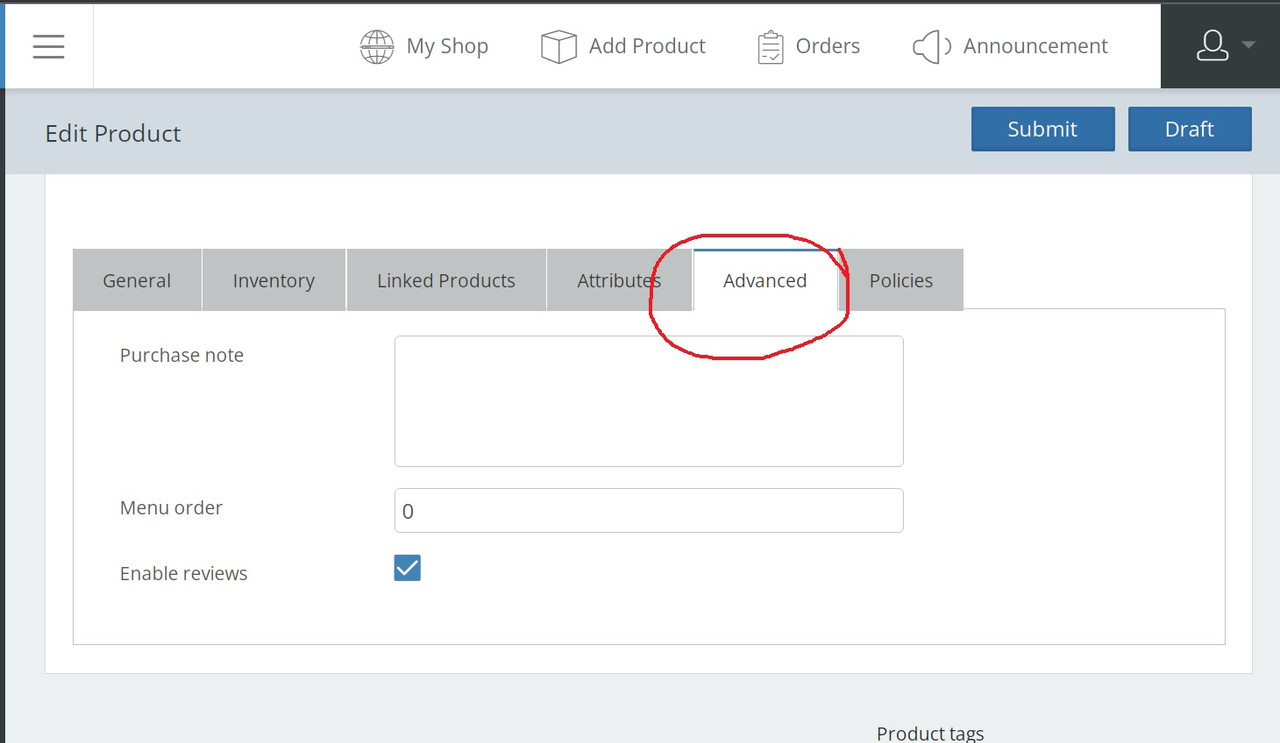
’’ – Remove Advanced product options for the vendor (Purchase note, Menu order, Enable reviews). These should be globally set by the admin ’’
>> Please do share a screenshot mentioning which part are you referring here. <<
** https://i.postimg.cc/c6yGgKKP/Advanced.jpg>>> Use this code :
function remove_linked_products($tabs)
{
unset($tabs['inventory']);
unset($tabs['advanced']);
return($tabs);
}
add_filter('wcmp_product_data_tabs', 'remove_linked_products', 10, 1);
To disable policies, goto WCMp >> Settings >> General and disable the “Policy”..
=======================================================================================
’’ – Download limit and download expiry should be globally and set by the admin ’’
>> For this override the edit product page and remove those. You can have reference here https://github.com/wcmarketplace/dc-woocommerce-multi-vendor/blob/master/templates/vendor-dashboard/product-manager/edit-product.php <<
** I don’t know PHP. All I can do is copy/paste snippets.
If I remove elements from a PHP file, they will be paced again, after a plugin update. **>>> If you override a template, then when you will update the plugin, it won’t affect the modifictaion.
This link might assist you better https://www.ibenic.com/include-or-override-wordpress-templates/
=======================================================================================
’’ I’m setting up a specific layout for the product page… ’’
>> You just need to check our codes on how we are displaying the fields and saving the same. <<
** I found the PHP files for Questions and Answers and for Vendor Info.
I was unable to find a code snippet example for calling the template from its URL.
I’m using the function wc_get_template but if only looks for files inside of WooCommerce.
Can you please tell me how to do it? **>>> Our team will get back to you on this.
p.s. you can track your enhancement request here: https://github.com/wcmarketplace/dc-woocommerce-multi-vendor/issues/1019
Just to keep you posted, we can’t share any ETA on this`Hi @sedawkgrep, thanks for the query.
Any user i.e. subscriber/vendor can also become a customer in woocommerce.
Therefore a vendor can also purchase from your site.Let us know if you have any further queries.
Hi @annampastore, it seems like there might be some issues with your site. Can you please contact our support team here so they can assist you better: https://wc-marketplace.com/contact-us/
@annampastore, you may use any video recorder extensions like Loom to share the videos.
@annampastore, can you please share a video of the whole flow so we can assist you accordingly.
Hi @bilion, thanks for the queries 🙂
Our replies are inline :
1) On the vendor store, tabs Products, Reviews and Policies are separate pages. Policies and Reviews are just text and do not need a full page reload. At least, load them with Ajax. But, it would be best to have just regular tabs and everything on the same page.
2) On the product page, the Vendor Info tab only has the Vendor Name and Store Description.
>> I would like to show a lot more, which I discuss in paragraph 3.
But, for a quick fix, you can update the plugin to display everything that is on the vendor store: Profile Image, Name, Rating, Country, Social, Follow and Store Description.
When adding this to the product page, please add tags and classes to these elements, so that they can be styled with CSS. Right now, the Vendor Description doesn’t have a tag or class. I assume that this should be set in the plugin’s php.
Also, the vendor store description doesn’t have the html and css markup that was added in the MCE editor. Please, fix this so that the text formatting and styling is preserved.
>> I have forwarded this to the Product enhancement team. Depending upon mass request and availability of resources, the team would be in a situation to proceed further.
However we can give a filter, using this you can add any number of tabs and corresponding content by doing custom code.3) On the vendor store and in a product page sidebar I would like to have all of this as Vendor Info:
– Logo (already exists) Should link to the vendor store
– Name (already exists) Should link to the vendor store
– Address (already exists) Would like to show only country
– Short biography (this is the store description) Enable the admin to change the label of this for the vendor dashboard and frontend
– Rating (already exists)
– Number of sales
– Date of registration
– Social profiles (already exists)
– Link to the seller’s website
>> You need to use this code :add_filter('is_vendor_add_external_url_field', '__return_true');– Contact vendor form – This should be a global on/off setting for the admin and an optional setting for the vendor
>> Can you please explain this4) We need better support for stores that sell only digital products. Add options for the admin to add global rules and remove options for the seller.
– Every product should be by default Digital and Variable. Remove this option for the vendor.
>> Use this codeadd_filter( 'wcmp_product_type_options', 'autocheck_vd'); function autocheck_vd( $arr ){ $arr['virtual']['default'] = "yes"; $arr['downloadable']['default'] = "yes"; return $arr; }Now only keep Variable product enabled via WCMp >> Settings >> Capability.
– No shipping or return options for vendor
>> Disable the “shipping” option via WCMp >> Settings >> General.
– No Advanced product options for the vendor (Purchase note, Menu order, Enable reviews). These should be globally set by the admin
>> Please do share a screenshot mentioning which part are you referring here.– A refund policy should be global and set by the admin, not by the vendor
>> Admin can use WooCommerce’s flow of refunds here.– No store location, only country. No map option
>> For this, don’t enable the map option via WCMp >> settings >> Vendor– No inventory, SKU
– No Shipping policy
– Download limit and download expiry should be global and set by the admin
>> For this override the edit product page and remove those. You can have reference here https://github.com/wcmarketplace/dc-woocommerce-multi-vendor/blob/master/templates/vendor-dashboard/product-manager/edit-product.php
– The Store setup wizard is asking for an address of the store. We don’t need that with digital downloads
– Coupons and sales should be set globally, not by the vendor. The vendor can only choose which products to include in the sale
>> Just remove the add coupon option via WCMp >> Settings >> Capability.– Orders have options, such as: processing, on hold, completed, shipped.
We don’t need any of those options, because the file is either paid for and downloaded or the payment or download failed.
The options for payment should remain: request refund, refunded, pending, failed, completed.
>> Our plugin by default supports WooCommerce supported status. So in order to add this you need to do custom code.5) A question doesn’t appear on the product page, even after being approved.
The Questions and Answers section is there, but it doesn’t display the questions.
>> We have checked this on our end, as you can see this is working fine : https://watch.screencastify.com/v/RzGuDsqrhMIoBvrzrj5D6) In addition to the Questions and Answers, each store should have a support forum that is only for verified customers or has a charge for each support ticket.
>> We have a widget called WCMp: Vendor’s Quick Info, this lets customer contact the vendor. For further information please check this doc : https://wc-marketplace.com/knowledgebase/setting-wcmp-widgets/#nav-57) I’m setting up a specific layout for the product page, by hooking and unhooking elements. So, I need shortcodes of the elements that your plugin adds to the product page:
– Report Abuse
– Vendor Info
– Sold by
– Questions and Answers
– Related products
Please, include anything that I didn’t see.>> These are not shortcodes. You just need to check our codes on how we are displaying the fields and saving the same.
8) We need to be able to edit the product page and the vendor dashboard. Please, create on your website a:
– Visual guide of hooks on the dashboard
– Shortcode snippet repository>> You can check our hooks here : https://github.com/wcmarketplace/dc-woocommerce-multi-vendor/blob/master/classes/class-wcmp-vendor-hooks.php
For the rest of the guidance you can also check our GitHub. for any specific help, please do let us know so our dev team can help you accordingly.`
Hi @marat0998, sorry for the delayed response.
As per our default flow, WC Marketplace only handles the payment from the admin to the vendor. Now the admin of the site will get full payment of the order, becasue the customer uses the payment mode enabled via WooCommerce >> Settings >> Payment. (see this scrrenshot – https://prnt.sc/lxbdew)
Now as per WCMp Schedule and payment mode (see this screenshot – https://prnt.sc/m7tciu), the vendor will get their part of the commission.
So as you can see, this is not dependent on whether the order was delivered. However, you can tweak our code and change the flow, where WCMp will only [ay the vendor if the order status is completed. This way admin can mark the vendor’s order as completed.
Hi @mikeloucas, can you please let us know where do you want to display the fields, so we can help you out.
I am afraid @annampastore, we haven’t tested the compatibility of any such plugin on our end.
Hi @annampastore, thanks for the update.
if our withdrawal settings in not applicable on Terrawallet, then you need to contact their plugin author. They need to add this code, as they claims to be compatible with us.
Hi @annampastore, are you using any wallet plugin for this, if yes can you share the plugin link so we can check and help you out.
Hi @annampastore, please make sure you are following this flow to assign vendors with a product https://watch.screencastify.com/v/9M019wjan9vTUNdOeWGp
Hi @annampastore, thanks for getting in touch with us.
As your are adding an existing customer as a vendor, then goto Users >> Customer and edit the user. Then change the role to “vendor” from “customer”.