Trippetchz

Forum Replies Created
-
Forum: Plugins
In reply to: [Participants Database] Bug with dates/timesFair enough.
But the problem outlined above is: since you say you’re using
now()to write the times instead of something that goes through WordPress’s settings (likewp_date()for example) this bug will persist in setups like mine (and many other shared hosts) where the date settings vary between the webserver, mysql sever, and the default PHP settings—and these cannot be easily changed (if at all) on shared hosts (which is why I tested three different servers with different hosting companies and could replicate the result on each).This is why I suggest using the settings that WordPress applies to PHP (i.e. the WordPress timezone setting) and a function like
wp_date()to do writes that captures this setting. I can foresee this would solve the problem of mysql writing itsnow()time which may be different to the PHP timezone (as illustrated above), and may also solve any time shifting issues you may have had in the past with other setups also diverging from UTC—because the times PD will *always* be writing a time that is in sync with the WordPress timezone setting. This solves the problem of having to rely on the system defaults (which, as above, can vary wildly and have nothing to do with the WordPress settings).Judging by your post mentioned in the OP, and the comments on that page, it seems like you’ve had a few other people mentioning timezone quirks in the past, so I think I’m surely not the only one. Perhaps the difference here is that I’ve provided a more comprehensive bug report than simply “it doesn’t work.”
Anyway, long story short, I hope you’d consider at least experimenting with a change, otherwise we might have to resort to getting the plugin hacked to fix this bug, which is unwanted cos it will wipe us out on every update…
I think this is a great plugin and want to help it succeed!
So, to help convince you, and allay your concern, I imagine the change would be transparent for those *not* facing issues with
now()because the timezone setting would be unchanged in that use-case, and I also don’t think it’s a dangerous change to move fromnow()to something likewp_date()in any event—the WordPress time/date functions are well documented and something likewp_date()was specifically designed and deployed in 5.3 to solve many of the legacy issues with locale quirks like this.TLDR; I hope you consider at least testing some changes!
If I can be of any help, please let me know. We’d love to use this plugin in our grassroots community group, but the record dates need to be correct for us for book keeping reasons.
Thanks!
- This reply was modified 4 years, 6 months ago by Trippetchz.
Forum: Plugins
In reply to: [Participants Database] Bug with dates/times… or wp_date();
Forum: Plugins
In reply to: [Participants Database] Bug with dates/timesThanks for getting back.
OK, I see that the plugin is inconsistent about how it applies the timezone.
Great, thanks.
If the db server timezone is not UTC, that might throw things off…I have never tested a setup like that.
Okay, to assist then, here is a rundown on the setups for the three different servers/hosting accounts I tested and had the inconsistencies:
First server, European host, web server timezone is IST, mysql database (mariaDB) using “SYSTEM” timezone and
now();matches; the default system/account setting for PHP appears to use UTC:
Second server, host was Greengeeks in United States, server in Amsterdam, web server timezone is CET, mariaDB using “SYSTEM”, host allowed changing PHP.ini setting to Melbourne:

Third server, host and datacentre is in our country (still cPanel shared host though), timezone AEDT, database also same, but host does not allow PHP.ini so PHP defaults to UTC:

So, how can we tackle this on shared hosts? The webserver timezone setting cannot be changed, maybe DB timezone could be (but I’m not sure, and would probably also vary host to host) and the PHP.ini settings sometimes can or cannot be changed for the whole account, also depending on the host.
I’m not a developer/not at all great at coding, but my first thought is, would it make more sense for Participants Database to use the WordPress current_datetime() (introduced in 5.3) instead of
now()to do all the database writes? That way you avoid the potential differences between webserver/mysql time and PHP time, AND also capture WordPress timezone setting?Forum: Plugins
In reply to: [Participants Database] Bug with dates/timesPlease check my submission materials carefully and actually watch the screen recordings.
You can see in the OP video that yes, I have toggled “Sync php Timezone” setting on and off and the behaviour persists regardless.
And in the supplementary video, I’ve made notes about how/where you can see the time changing between screens:
At ~0:05, note the local time is 11:22:56am. Timezone is set to Melbourne. Correct.
At ~0:26, when adding a participant, note the record time stamp on creation is 12:23am, which is incorrect.
At ~1:00, the record time on viewing a record (after it has been saved) has changed from above to 11:23am, and is correct.
At ~1:10, note the record time when viewing the list is 10:23pm which is incorrect.Forum: Plugins
In reply to: [Participants Database] Bug with dates/timesHi there,
Thanks for getting back.
Could you give some specifics about what I should check with the hosting providers? I’ve tested this on two other separate reputable hosts, and can replicate similar results, so I am wondering what may you think may be at odds. All three are mainstream cPanel hosts.
And as with OP, no other plugins or WordPress behaviour is affected, which is why I suspect PD may be doing something odd in isolation.
And yes, the Record Timestamps are what I’m talking about. Did you watch my video demonstrating the issue?
Here is another video from a second separate host, replicating as above: https://archive.org/download/2022-02-06-11-23-01/2022-02-06%2011-23-01.mp4
At ~0:05, note the local time is 11:22:56am. Timezone is set to Melbourne. Correct.
At ~0:26, when adding a participant, note the record time stamp on creation is 12:23am, which is incorrect.
At ~1:00, the record time on viewing a record (after it has been saved) has changed from above to 11:23am, and is correct.
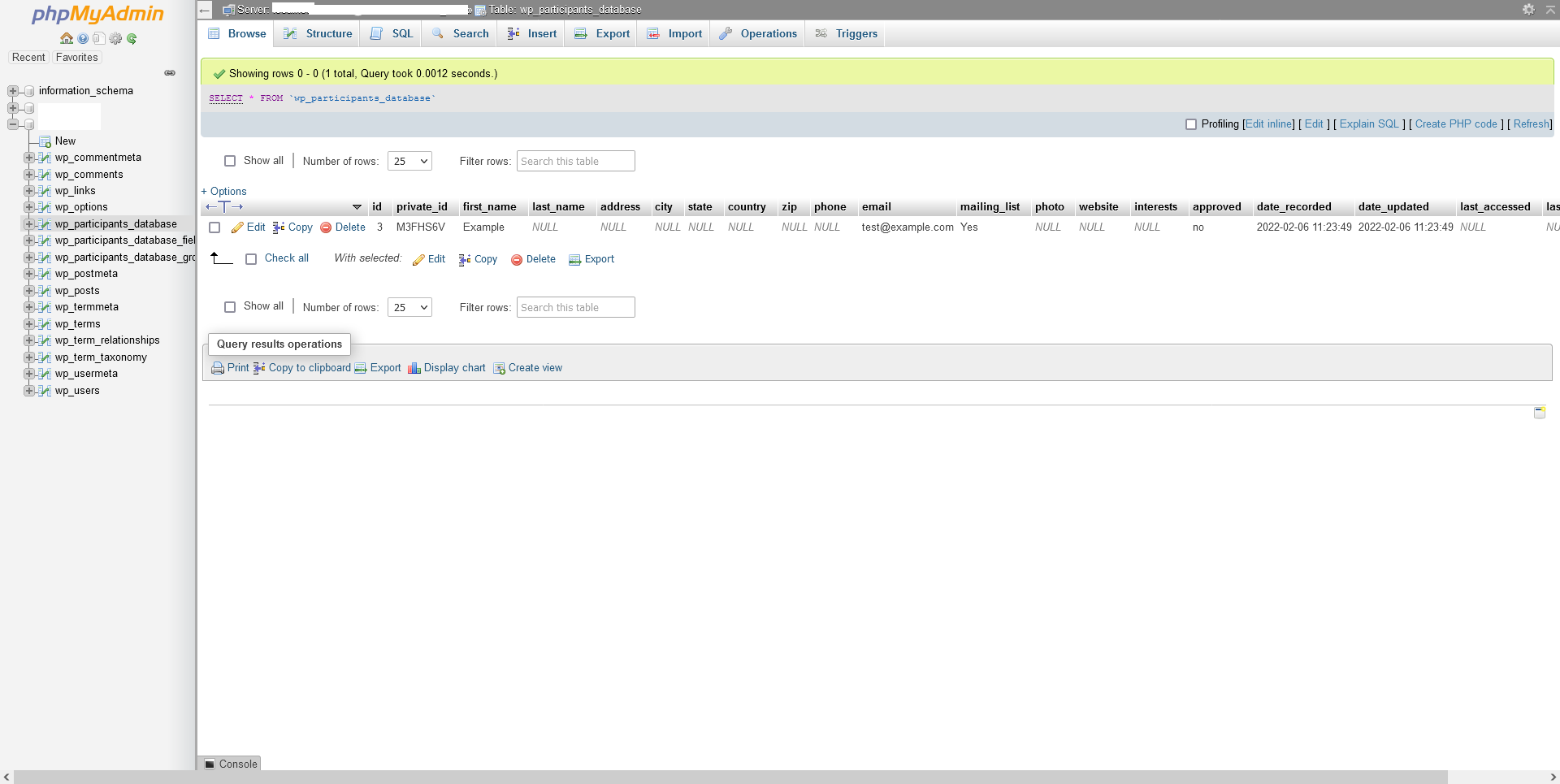
At ~1:10, note the record time when viewing the list is 10:23pm which is incorrect.Here’s also a screenshot of what timestamp Participants Database has written into its table. The values look correct there:
https://i.postimg.cc/gYqZ2222/Screenshot-2022-02-06-at-11-29-22.png
With respect, by process of elimination, something in Participants Database seems broken to me.
Forum: Plugins
In reply to: [Participants Database] Works with Akismet?Hi there, thanks for getting back.
Okay great, glad to hear there might be integration with Akismet coming down the line sometime. That’d be great.
Forum: Plugins
In reply to: [Participants Database] Hiding menu itemsHi there,
Thanks for getting back.
Yes, I’d prefer the latter as I’d like to check using an array of WordPress User IDs as opposed to custom roles, etc.
Which filters can I use, since the common method above isn’t working?
Thanks,
TForum: Plugins
In reply to: [Participants Database] Default Signup Form without using TablesNevermind! We found this in your documentation. Apologies!
Forum: Plugins
In reply to: [Participants Database] Default Signup Form without using TablesSomething like this would be desirable for us:
<div class="participants-database-signup">
	<div class="row">
		<div class="form-group col-sm-12 col-md-6"> <label class="label-control mb-10" for="pdb-first_name-2">First Name</label> <input name="first_name" id="pdb-first_name-2" class="required-field regular-text" type="text" value=""></div>
		<div class="form-group col-sm-12 col-md-6"> <label class="label-control mb-10" for="pdb-last_name-2">Last Name</label> <input name="last_name" id="pdb-last_name-2" class="required-field regular-text" type="text" value=""></div>
	</div>
	<div class="row">
		<div class="form-group col-sm-12 col-md-6"> <label class="label-control mb-10" for="pdb-phone-2">Phone Number</label> <input name="phone" id="pdb-phone-2" class="required-field regular-text" type="text" value=""></div>
		<div class="form-group col-sm-12 col-md-6"> <label class="label-control mb-10" for="pdb-email-2">Email Address</label> <input name="email" id="pdb-email-2" class="required-field regular-text" type="text" value=""></div>
	</div>
	<!-- and so on -->
</div>
Forum: Plugins
In reply to: [Participants Database] Participants Database and CardDAVOkay thanks. I understand this will require custom coding. Do you have any suggestions for which hooks/filters might do the job though?
Forum: Plugins
In reply to: [Participants Database] Custom code after a participant is approvedHi there,
Thanks for getting back and for the suggestions.
If I get anything working, I’ll share it here. 😉
Thanks,
trForum: Plugins
In reply to: [Hyper Cache] x-hyper-cache: “continue – no file”Here are screenshots of current settings:
https://postimg.cc/0680Q1X1
https://postimg.cc/Cz8jFxNQ- This reply was modified 6 years, 3 months ago by Trippetchz.
Forum: Plugins
In reply to: [Hyper Cache] x-hyper-cache: “continue – no file”Actually, sorry, after saving changes to
advanced-cache.phpjust to be sure, now there are no files in/var/www/DOMAIN.COM/cache/at all, and they don’t seem to be generating anymore either on fresh website hits. It’s still returningx-hyper-cache: "continue - no file"seemingly no matter what I do…Forum: Plugins
In reply to: [Hyper Cache] x-hyper-cache: “continue – no file”Thank you for your reply! 🙂
Yes, the path looks correct, it matches the one set in
wp-config.php(where DOMAIN.COM is the sitename):define( 'HYPER_CACHE_FOLDER', '/var/www/DOMAIN.COM/cache');And so if I look in
/var/www/DOMAIN.COM/cache/there are files such as/var/www/DOMAIN/cache/DOMAIN/index-https.htmletc.It’s very strange that is reporting “no file.”
I wonder if you have any other ideas?
Thank you!
Forum: Plugins
In reply to: [Lightbox with PhotoSwipe] Gutenberg Gallery Block Captions not showingFantastic. Thanks for your work!!!