Themonic

Forum Replies Created
-
Forum: Themes and Templates
In reply to: [Iconic One] Disable Responsive NatureRemove all your customizations and check again for the display menu problem.
Forum: Themes and Templates
In reply to: [Iconic One] Full-width logo😀
Forum: Themes and Templates
In reply to: [Iconic One] Full-width logoFor full width/large images. Paste this in custom.css
.themonic-logo img {
    width: 100%;
}
Forum: Themes and Templates
In reply to: [Iconic One] Please add InfiniteScroll support!Hi Geoffrey,
Thank you for this, we will surely direct anyone requesting infinite scroll to this post of yours.
Unfortunately, we won’t be adding support for infinite scroll to our theme unless we receive many such requests.
———–
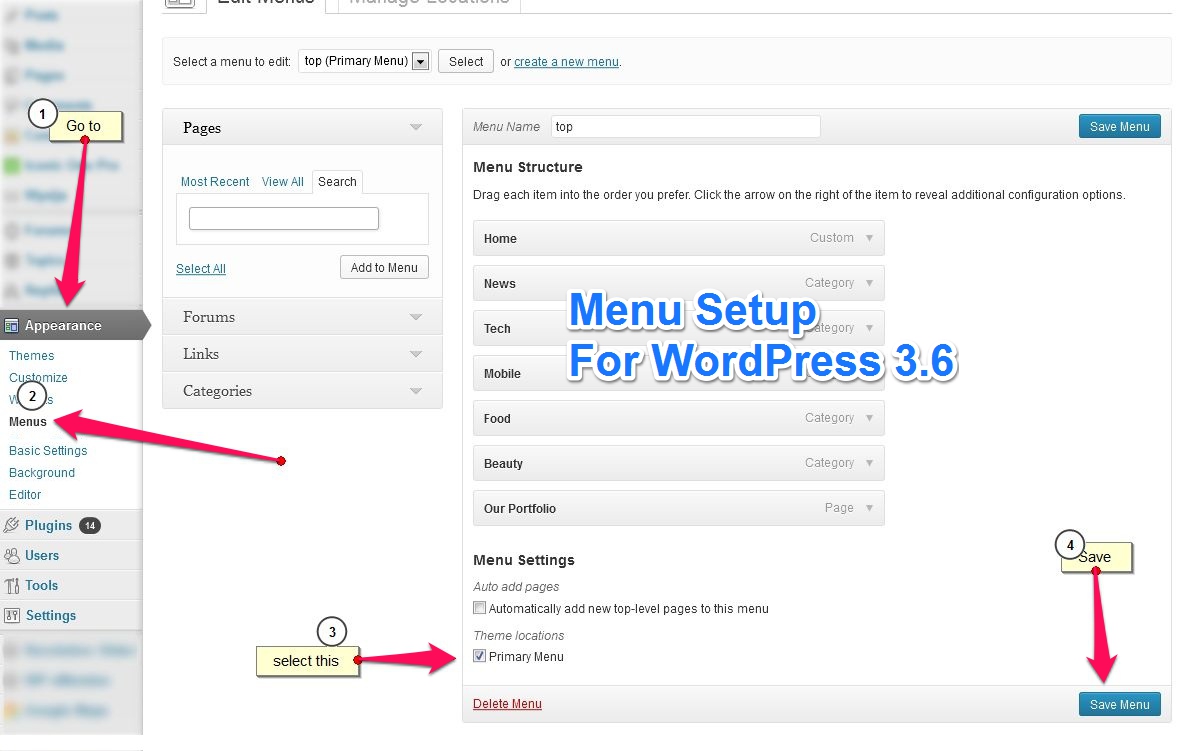
Was checking your website and found that the Iconic One menu is disappearing in mobile view, refer this image for WP menu setup http://themonic.com/wp-content/uploads/2013/07/menu-setup-wp-latest-2013.jpgForum: Themes and Templates
In reply to: [Iconic One] Top Menu spacing after link items in IE8Hi Al,
We have noted the issue and will push an update this month asap.
Thank you.
Forum: Themes and Templates
In reply to: [Iconic One] Logo and nav barHi Daniel,
Kindly ask the Pro version questions in the Pro users forum here
http://themonic.com/forums/members/iconic-one-pro-support/Small customization like the color changes can be easily done using copy pasting small code in custom.css. Ask the same in the Pro user forum so that we can provide readymade CSS code. Do provide your site URL too. Have you already tried the color settings? http://themonic.com/online-documentation-usage-guide-for-iconic-one-pro/#color
About the other request:
You had a pretty specific request for Logo inline with nav bar that requires code changes and possibly to and fro communication that takes support staff time, custom work of that kind is outside the scope of our theme support that we provide for free.Forum: Themes and Templates
In reply to: [Iconic One] Editing Sidebar menuWe provide theme support as per the demo. If you want custom work of this kind, use the support packages available in the theme options page.
Forum: Themes and Templates
In reply to: [Iconic One] need Featured Image & Post title in a lineWe provide theme support as per the demo. If you want to do customization or custom work of this kind, use the support packages available in the theme options page.
Font size question has been answered already, kindly browse the resolved topics.
Forum: Themes and Templates
In reply to: [Iconic One] Top Menu spacing after link items in IE8Hi Al,
What is your site URL? Which version no. of theme are you using?
Forum: Themes and Templates
In reply to: [Iconic One] How to add new left sidebar ?I am sorry but this theme doesn’t support two sidebars and nor do we provide support for adding an extra sidebar. There must be other themes that could suit your purpose.
Forum: Themes and Templates
In reply to: [Iconic One] Comment section shows blackCan you check by reverting to default 2013 theme to see if it is even a theme problem?
Forum: Themes and Templates
In reply to: [Iconic One] Social icons not available on mobile or IpadCurrent version hides the social icons in mobile view. We have received a few requests for this and might include them in the future version of theme.
I am sorry but we do not provide support for customized websites, we provide support only as per the demo. Because, if you break something how will we know?
If you see the same problem in the demo, let me know.
Forum: Themes and Templates
In reply to: [Iconic One] Iconic One Template Display on iPad & iPhoneThe code I have given above is the only code you need for header responsiveness if you are using a big header image.
— please do not add php tags to the css code, it doesn’t work that way —
Why your site is not looking good on ipad/mobile?
This might be because how you are using a static home page.
We do not provide support for customized websites, we provide support as per the demo. Because, if you break something how will we know?
For Pro users we do provide proper guidance on such issues.
Forum: Themes and Templates
In reply to: [Iconic One] Iconic One Template Display on iPad & iPhoneYou are using small logo uploader as a banner/background image uploader and expecting it to work out of the box?
In your specific case with full width logo image, paste this in custom.css
.themonic-logo img {
    width: 100%;
}
—- This also applies to users using fullwidth/large logo images —-