Santiago

Forum Replies Created
-
Forum: Fixing WordPress
In reply to: Category / MenuI’d suggest you to reach the person that was paid to biuld the site. This is expected to work, so this is a bug that they should fix. 🙂
Take care!
Forum: Fixing WordPress
In reply to: CookiesHi Chaz,
If you refer to session cookies, the answer is no. WordPress won’t set any authentication or session cookie for logged out visitors.
But, keep in mind that session cookies are not the only cookies used and that WordPress core is not the only one setting cookies for your domain: in a normal site you have several plugins, themes, and third party libraries storing cookies on visitors browsers to provide a variety of features.
A great tool to see this is the browser dev tools (F12 in chrome).
See this capture for wordpress.org landing page https://ibb.co/gZ9R4U
As you can see, I’m not logged in but I still get some cookies stored. In this case most of them are used for Analytics purposes and set by Google Analytics JS library (you can’t avoid it, except you get rid of the library completely).Hope this shed some light.
Take care!Forum: Fixing WordPress
In reply to: Category / MenuHi James,
Hope you are doing well.The approach that you described is correct and the expected bahavior would be to see a list of the posts on that category only.
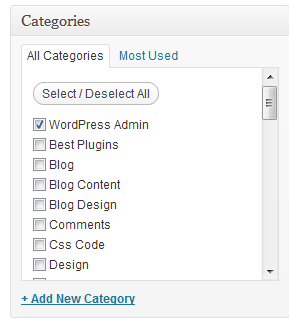
Just to be totally sure, can you confirm from the post edit screen in the right sidebar that only the right category/categories are checked for the post?
http://wpsites.net/wp-content/uploads/2012/09/Category-Module.pngIf that is correctly set, then you may have some plugin or custom code messing with the main WP query.
I’d recommend disabling all the plugins and switching to a default WP theme.
If this solves the problem, then you can switch back to your theme and enable plugins one by one while testing until you spot the offending plugin.Please let me know if that works for you.
Cheers!Forum: Developing with WordPress
In reply to: cURL vs wp_remote_XHey Jan,
Hope you are doing well.
Your code looks good.
I just run a quick test on my end against a public json api and it workedd just fine.$url = 'https://jsonplaceholder.typicode.com/todos/1'; $apikey = 'foo'; $response = wp_remote_get($url, array( 'sslverify' => false, 'headers' => array('Authorization: '. $apikey,'Accept: application/vnd.api+json') ) ); $result = wp_remote_retrieve_body( $response ); var_dump($result); die();Of course, this example is not actually using the auth header, but that doesn’t seems to be related to the issue you are experiencing.
Maybe you are passing some extra parameters to the request payload? That could make the request to force a different content-type header.Hope this helps. Take care and let me know if I can be of any help.
Cheers!Forum: Fixing WordPress
In reply to: Pinning stopped workingTry this url https://developers.pinterest.com/tools/url-debugger/ and then add the url in the input field.
Keep me posted on what your hosting says. Make sure you send them that validator link to them.
Forum: Fixing WordPress
In reply to: Edit the plugin can getshellThat’s the expected behaviour. You can edit plugin core files without restriction.
Nevertheless, editing files through the dashboard is not recommended. You can easily introduce an error and lock yourself out of your dashboard.I recommend editing the file in a code editor, keep a copy of the original and push it via a file administrator or FTP.
Hope this answer your question.
Have a great day 🙂
Forum: Fixing WordPress
In reply to: Pinning stopped workingHi there @ob1knorrb,
You can use the url debugger provided by pinterest to get some more information:
https://developers.pinterest.com/tools/url-debugger/?link=http%3A%2F%2Fwww.ob1knorrb.com%2Fcloaked-romulans%2FAs you can see, your server is returning a 403 status code (forbiden access).
You should check if you have any secuirty plugin blocking IPs.
Check your .htaccess and last contact your hosting support.Hope this helps.
Cheers!
Forum: Fixing WordPress
In reply to: Edit the plugin can getshellHey @bug1312,
Hope you are doing well,
Could you please elaborate more on the issue? It is not clear.Also, the link that you shared is pointing to localhost. It will work only for you.
Cheers
Forum: Developing with WordPress
In reply to: Hooks for add new tab in media frameHi @ashujangra,
The media tabs are created using JS.
This should put you in the right path https://www.ibenic.com/extending-wordpress-media-uploader-custom-tab/Cheers!
Forum: Networking WordPress
In reply to: Nested sitemap.xml files for Multisite subfolder installHi @sitecreations,
I believe that the best approach would be to use the robots.txt and apply the changes to it automatically.
Here is an example using Yoast plugin and a small script into an mu-plugin https://wphelper.site/robots-txt-yoast-sitemap-multisite/
Maybe not exactly what you need, but can be an inspiration.
If you are not using Yoast plugin, and since I understand that your concern is to manually add new subsite sitemaps to robots.txt, you can use a similar code snippet that will hook into wpmu_new_blog action.
Hope this helps. Take care!
Forum: Developing with WordPress
In reply to: Assistance Learning AJAXHi @gshell,
Hard to say what is wrong.
Please make sure g_name has a valid value.
Also, change this:
data : {
 'action': 'my-ajax-test',
 'ajax_guest_name' : g_name
},
into this:
data : {
 action: 'my-ajax-test',
 ajax_guest_name : g_name
},
In the browser dev tools, under the tab ‘Network’ you should be able to sniff the ajax request. There you can see if the parameters are being sent correctly.
BTW, if you visit localhost:81/wordpress/wp-admin/admin-ajax.php in your browser you will allways get a ‘0’ because you are not sending the ‘action’ parameter, therfore wordpress doesn’t find a handler for the request and returns 0 by default.
Try localhost:81/wordpress/wp-admin/admin-ajax.php?action=my-ajax-test and it should hit your handler.Cheers!
Forum: Developing with WordPress
In reply to: Assistance Learning AJAXGlad to hear it.
Keep me posted 🙂Forum: Developing with WordPress
In reply to: Automatically create posts with REST APIOh! You are consuming the REST API from JS. Didn’t get that part clear before.
In this case, it doesn’t make sense to use JS since it runs in the client side. You would need to hit and endpoint in site B to create the post, and you will need to deal with security.
Not practical.I recommend to connect to site A from within WordPress server, using PHP.
Here you will find a nice tutorial on how to do it.
https://pippinsplugins.com/using-wp_remote_get-to-parse-json-from-remote-apis/Sorry for the delay on my response. Let me know if you have further questions and I’ll try to address it as soon as I can.
Take care!
Forum: Developing with WordPress
In reply to: Automatically create posts with REST APIHi @portia79,
Hope you are doing well.
I’m a bit confused with the diferent pieces involved in your system.
I understand that you are already able to pull the data from WP site A into WP site B and that you are parsing it and rendering directly into the view. Is that correct?If that’s the case, and the challenge is to ‘migrate’ several posts from site A into site B but converting those to the cpt ‘Announcements’, I would suggest the following:
Create a plugin that will be installed in site B, there you will implement a REST call to site A to get the list of posts and then you will loop through the list.
In that loop, you will make use of the method wp_insert_post().
When defining the data array for wp_insert_post, you will set the post_type to ‘Announcements’.
You will also use the method wp_set_object_terms() to attach the corresponding custom taxonomy.Did I get the question right? I hope so 🙂
Have a great day
- This reply was modified 7 years, 11 months ago by Santiago.
Forum: Developing with WordPress
In reply to: Assistance Learning AJAXPleased to help 🙂
1- An AJAX call is basically an asynchronous request from JS to an URL. In this case, the target URL is your WordPress site. That line is telling AJAX what is the URL to use. And WP built in AJAX url is always http://your-site-url/wp-admin/admin-ajax.php
If you are curious, you can take a look at that file and you will see that it parses the ‘action’ parameter and based on it will call the corresponding registered handler.
Now, you could hardcode that URL like this:
url : 'http://your-site-url/wp-admin/admin-ajax.php',
but that would work only for that specific site.
So, the right way to do it is to dinamically define this URL as a JS variable that lives in the global scope.
In your example, it is asumed that you have something like this in your PHP code when you enqueue your script:wp_localize_script( 'my-script-handler', 'ajax_test', array( 'ajax_url' => admin_url( 'admin-ajax.php' ) ));This is defining an object called ‘ajax_test’ that contains the property ‘ajax_url’.
2- It looks correct, yes.
3- conole.log is a JS method to output data in the browser or JS interpreter console. Every browser has its own way to open the console. Here you have how to use the console in chrome https://developers.google.com/web/tools/chrome-devtools/console/
Along with the console, you have many other ‘dev tools’ available in the browser. One that is very useful when debugging AJAX, is the ‘Network’ panel. there you can see the request dispatched by JS and the responses. You also have a JS debuger. If you are familiar with debugging, there you can put a breakpoint in JS code and check what’s going on. That should help you to spot the missing details to get this working.Let me know if you need furhter assistance.
Have a great day!