saroverhees

Forum Replies Created
-
Forum: Fixing WordPress
In reply to: Theme FoldersOw sorry m8, thank you too ^^
Forum: Fixing WordPress
In reply to: Theme FoldersForum: Fixing WordPress
In reply to: Theme FoldersI FINALLY have my file shown up.
[Quote]If it says Could not retrieve directory listing you may need to change the Advanced setting for your connection in Site Manager, so that Passive transfer mode setting is set to Use passive mode.[Quote]
I had to put it on Active mode,
But i’m glad that it’s solved.
Thanks HomeyComb ang gangleri, for your willing to help.
Forum: Fixing WordPress
In reply to: Theme FoldersOw yea, and via my file manager does NOT work.
Forum: Fixing WordPress
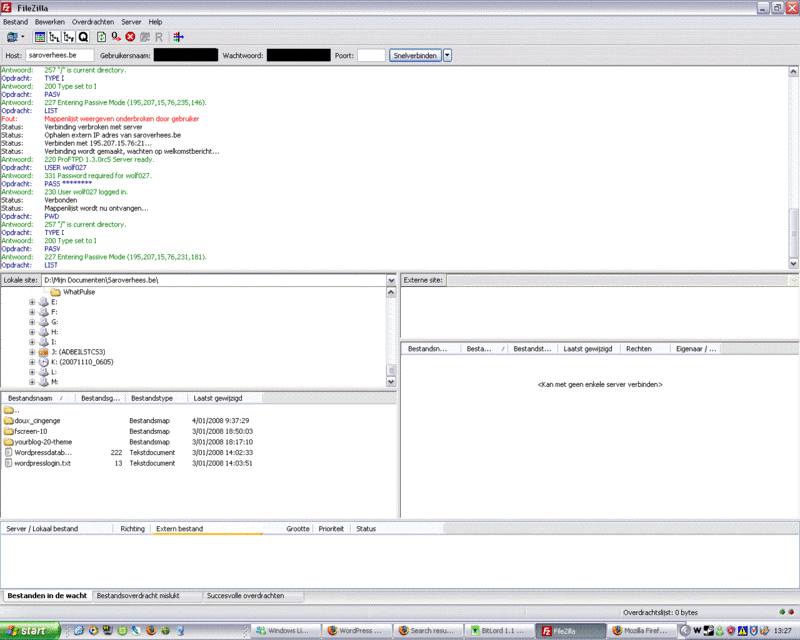
In reply to: Theme FoldersThe problem IS that my FTP does NOT work. I know i am having folders but when i connect they do NOT show up. I use the CORRECT password, host, port, username.
As you see on the screen. That’ss what i get. I contact my provider but he would not know what ever the problem would be.
Greetz.
Forum: Fixing WordPress
In reply to: Theme FoldersPlease understand. I’m very new to this and if i could i would give you the best. Don’t say i need to look what i do because i spend hours or rechearch.
Does this link works for you?
http://www.saroverhees.be/test/test.htmRegards
Forum: Fixing WordPress
In reply to: Theme FoldersWell, it works with me.
Forum: Fixing WordPress
In reply to: Theme Folders1 – I don’t, but thanks
2 – OK
3 – Yes
4 – LinkThanks for feedback.
Forum: Fixing WordPress
In reply to: Theme Folders*Bumb*
Forum: Fixing WordPress
In reply to: Theme FoldersDont forget me ^^
Forum: Fixing WordPress
In reply to: Theme FoldersThis is what i get. If you need any translation of somthing ask me. (i couldn’t get it in English)
Forum: Fixing WordPress
In reply to: Theme FoldersOn the other side, if you uploaded WP using your control panel, can’t you just go to the wp-content/themes folder and upload a new theme (unzipped of course) there? File by file if you’re not allowed to upload folders, but then again, if you uploaded WP you also uploaded folders).
_____________________________No. (read first post)
Forum: Fixing WordPress
In reply to: Theme FoldersWell, that problem seems to be with filezilla. So i’m going to download the ws_ftp client too.
Thanks for feedback.
Forum: Fixing WordPress
In reply to: Theme FoldersAfter a successful connection attempt, a list of files and folders appears on the right side of the main window.
Thats on the website of Filezilla, but thats not happening with me!
(connections do not fail.)
Greetz
Forum: Fixing WordPress
In reply to: Theme FoldersWell i finally get it. But filezilla doesn’t seem to let me in. I enter it all correct but i can’t see my file’s. Strange
because i’m pretty sure i’m not doing anything wrong.Regards