Robert Heller

Forum Replies Created
-
Forum: Plugins
In reply to: [WebLibrarian] Call NumberCall number is there, but it is probably not in the documentation, since it was added since the last time the documentation was updated.
Forum: Plugins
In reply to: [WebLibrarian] Collection Type PagesNot presently. I suppose I could add a filter feature.
Forum: Plugins
In reply to: [WebLibrarian] Show Thumbnail (or ThumbURL) on Admin Collection Page?It is possible. You would need to edit the code in includes/WEBLIB_Collection_Admin.php, specificly changing the function get_columns() in class WEBLIB_Collection_Admin (at line 187) to add the column. You would need to add a function column_thumbnail that echos or returns a suitable img tag. The column you want to add is ‘thumburl’. Its value would be a URL of an image (eg http://www.host.com/mumble.png) or empty (you can use WEBLIB_IMAGEURL . ‘/nothumb.png’ as the url to display a ‘no image available’ image).
Forum: Plugins
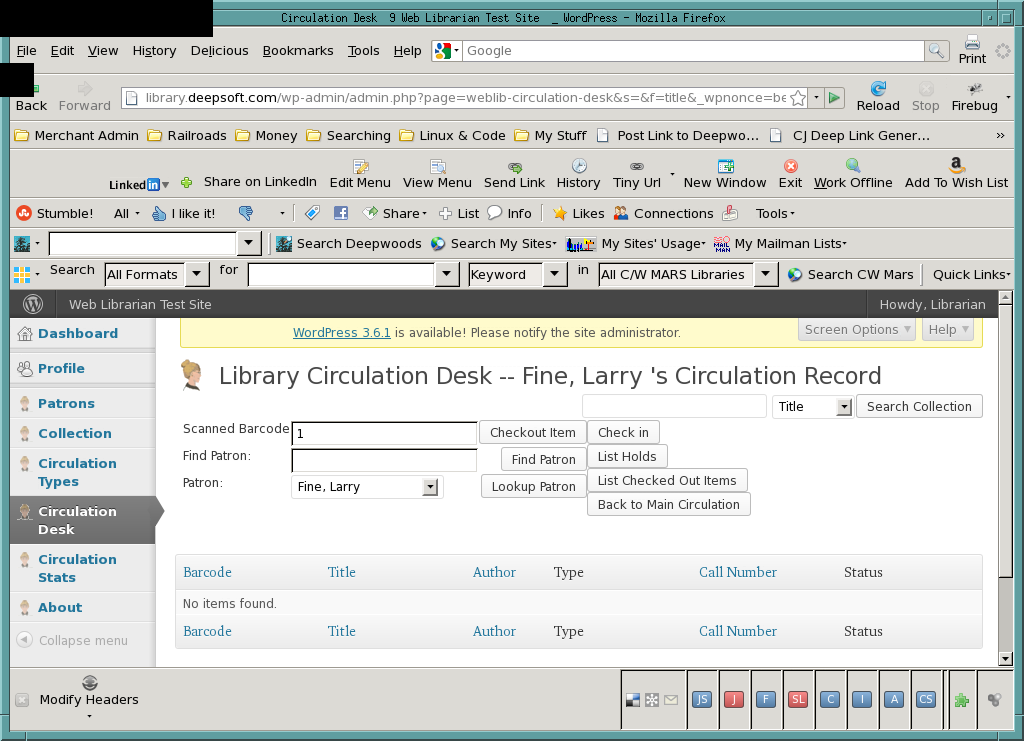
In reply to: [WebLibrarian] Check OutYou need to have the patron’s circulation record up. After *finding* the patron, you need to *lookup* the patron.
As shown here:
http://library.deepsoft.com/wp-content/uploads/2013/09/CheckoutShot.pngForum: Plugins
In reply to: [WebLibrarian] AWS Import ImageOk, I made a new release with the JavaScript updated. If you do a Lookup Item, all three image sizes, small, medium, and large (if available) are displayed and any of the three can be inserted as the thumbnail.
Forum: Plugins
In reply to: [WebLibrarian] AWS Import ImageOk, I’ve had a look. The ‘medium’ image is returned. The web librarian code is hard-coded to use the ‘small’ image for the thumbnail image. I suppose I can change the code to provide a choise of images to use.
Forum: Plugins
In reply to: [WebLibrarian] AWS Import ImageNot sure — I’d have to look at the product database API to see if there is a parameter controlling this.
Forum: Plugins
In reply to: [WebLibrarian] Check OutYou need to find and select a patron on the circulation page.
Forum: Plugins
In reply to: [WebLibrarian] CVS FileI imported the file into my test site without problem. You did select the “Use CSV Header” checkbox? Also: you should fix your file: the ISBN’s are formatted as floating point numbers (n.nnnnnE+12) — you need to set the data type of that column as “string” and not “number”. Also the file has 31 empty rows of commas, so 31 books are entered with generated barcodes with blank data fields.
Forum: Plugins
In reply to: [WebLibrarian] maximum of book itemI have updated the plugin to fix the AUTO-GENERATE barcode code to properly generate *new* barcodes and not recycle old ones.
Forum: Plugins
In reply to: [WebLibrarian] CSV import, sql db and general settingschoongwh:
It should be there in the latest version.And please *don’t* hijack threads! If you have a *new* question, open a *new* support thread.
Forum: Plugins
In reply to: [WebLibrarian] maximum of book itemI’ll have a look at the AUTO-GENERATE barcode code. There might be a problem there.
Forum: Plugins
In reply to: [WebLibrarian] maximum of book itemPlease double check this. There is nothing in the code that imposes any sort of item limit. I am not able to replicate this error. It seems like somehow your database systenm is fubar’ed. What operating system is your *server* running? What version of MySQL are you running?
Forum: Plugins
In reply to: [WebLibrarian] maximum of book itemThere isn’t any limit on the number of items in the database. Note that when you add an item the edit screen refreshes and becomes an update item page and a not a add new item page. You need to explicitly go to a fresh new item page to add an additional item. Are you sure you went to a new item page?
Forum: Plugins
In reply to: [WebLibrarian] CVS FileYes, mess-office seems to be a disaster when it comes to CSV files. M$ seems incapable of dealing inter-operatibly with standard formats.