Rich Tabor

Forum Replies Created
-
Forum: Reviews
In reply to: [Block Gallery - Photo Gallery Gutenberg Blocks] First Class Gallery PluginWow, thanks!
Hi @nikolajivancic,
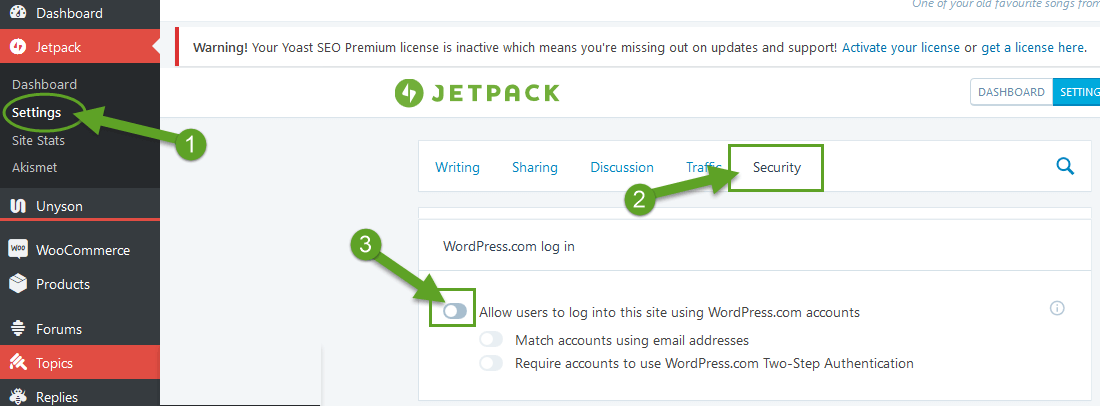
It looks like you may have JetPack installed – with the WordPress.com login activated. Here’s a quick tip on how to turn that off if you’d like to:
1. Login to your WordPress admin
2. Go to Jetpack > Settings
3. Navigate to the Security tab
4. Toggle off the “Allow users to log into this site using WordPress.com” setting
5. Click on Save ChangesHere’s a screenshot.
Let me know if that was the case or not. Cheers!
Hi again @nikolajivancic,
Again, that’s core WordPress behavior, and something that is filterable with a little PHP. I am considering building a UI around it within the plugin though.
In the meantime, there are alternative plugins that do just that (change the login and logout redirection URLs), like this one.
Forum: Reviews
In reply to: [Custom Login Page Customizer - Login Designer] Easy, simple, and it worksHey @mjtdi3, I’m curious about the image being skewed – that’s definitly not supposed to happen. Mind opening a support ticket with your URL so I can take a quick look?
Hi @kimhutchison2019, it looks like you may be using another login management plugin possibly? Perhaps that is interfering with Login Designer.
Are you able to open the Customizer > Login Designer view and change the background color only?
Wow, thanks @richardscharfenberg!
Forum: Reviews
In reply to: [Page Builder Gutenberg Blocks – CoBlocks] Nice plugin…Thanks @tgedge1! Columns are still a bit tricky, but we have some ideas on how to innovate columns even further than we’ve already pushed them.
Perhaps the easiest way is to use the “/” command in the column, which pulls up a block searcher.
Hey @florynx, that’s actually the intended placement of the third pricing table — but you gave me an idea. I bet we could work it out so that if the block is set to display at a wide, or full, width – then the third table shows up beside the other two. What do you think?
Glad you like it @ganeshjyo1!
We do have a Row block, which let’s you add columns to a page. You can actually add any block within the Row/Column blocks – including the Classic block. 👍
Forum: Plugins
In reply to: [Gutenberg] Background image?Hi @voodoopol,
It’s not currently possibly to change the background color/image of an entire page – though that is something we’re looking at including as part of the CoBlocks toolkit. We do have a Row block that lets you change the background color/image of a Row – but not the whole page.
Forum: Plugins
In reply to: [Gutenberg] Unable to create two column textHi there @aniceni,
Columns are still a bit tricky. It could be that your theme is overriding the styling of the core Columns block. I have built an additional Row block within my CoBlocks plugin – which lets folks create a number of column-based layouts pretty easily. Here’s a quick screen recording gif if you’d like see it in action. If you do check it out, let me know what you think. 👍
And for your second question, if you’re using WordPress 5.0+ — you won’t see “Edit with Gutenberg” anymore, as Gutenberg is the default editor. The exception would be if you have the Classic editor installed. If that’s the case, you may need to review the plugin settings to see if pages/posts have Gutenberg enabled.
Forum: Plugins
In reply to: [Gutenberg] Bootstrap like columns in Gutenberg?Hey @tgedge1,
Not within the core Gutenberg columns block, but I have built a Row block within my free CoBlocks plugin – which let’s folks do just that (and much more). Here’s a quick screen recording gif for you. Let me know what you think!
Forum: Fixing WordPress
In reply to: editor-font-sizes in functions not working (Gutenberg)Forum: Fixing WordPress
In reply to: How do you Center a Shortcode Widget with Gutenberg?Hey @wordpress555, there are two options that I can think of.
1. Use the Classic block and add a shortcode manually, then use the text alignment controls there to align the shortcode.
2. Use a one column Row block, like what I built in CoBlocks, and add the shortcode to it – then select the Column block and align it’s content to the middle. Here’s a screenshot.
Hope this helps!
Forum: Plugins
In reply to: [Page Builder Gutenberg Blocks – CoBlocks] Use in a SaaS settingHey @shoelaced, I don’t think there’s any issue using the plugin as such. We’re building CoBlocks to be a tool in folks’ toolbox. 💪