Randa

Forum Replies Created
-
Forum: Themes and Templates
In reply to: Customizing Bluebird 2.0 by Randa ClayYou’ll need to go into the theme editor under Appearance and click on the r_sidebar.php file in the list on the right. You’ll be able to see the About section in that file and can edit it. However, I always recommend that people use Widgets for their sidebars instead. That overwrites the default items I’ve placed in the sidebar and lets you customize easily.
http://codex.wordpress.org/Appearance_Widgets_SubPanelForum: Plugins
In reply to: DOMTab is acting weird!Thank you for posting this solution! Very helpful to me today.
Forum: Fixing WordPress
In reply to: BLUEBIRD THEME not loadingForum: Fixing WordPress
In reply to: Pages & Posts Suddenly Getting 404 PageThis has been resolved, though I’m still not sure of the cause. It may have happened because I erroneously tried to deleted the “uncategorized” category. Anyway, I did an export of the site, wiped out the installation of WP and started again after making sure the export file worked on my test site- no problem, all the posts and pages were editable and working. When I reinstalled WP and imported the XML file back in on the client site though, the problem persisted. So, we wiped it again and this time re-set up everything manually, rather than using the XML file, and it all works fine.
I’m puzzled as to why the export file worked fine on my test site (same version of WP, etc.), as it seems there was some “corruption” of the data, but I’m just happy the site is working again.
Forum: Fixing WordPress
In reply to: Pages & Posts Suddenly Getting 404 PageThanks, yes, I have one. It’s definitely something within the WordPress installation itself, rather than the design. The admin panel should show my published pages and posts and I can’t get to them.
Forum: Fixing WordPress
In reply to: Pages & Posts Suddenly Getting 404 PageI’m sorry – the links in the sidebar are just dummied up right now, they wouldn’t work anyway. It’s the nav below the search box at the top that is driven by wp_list_pages. You can see that I added a “Test Page” last night and it shows up in the nav. But if you click on any page in that nav, it just goes straight to the 404 page.
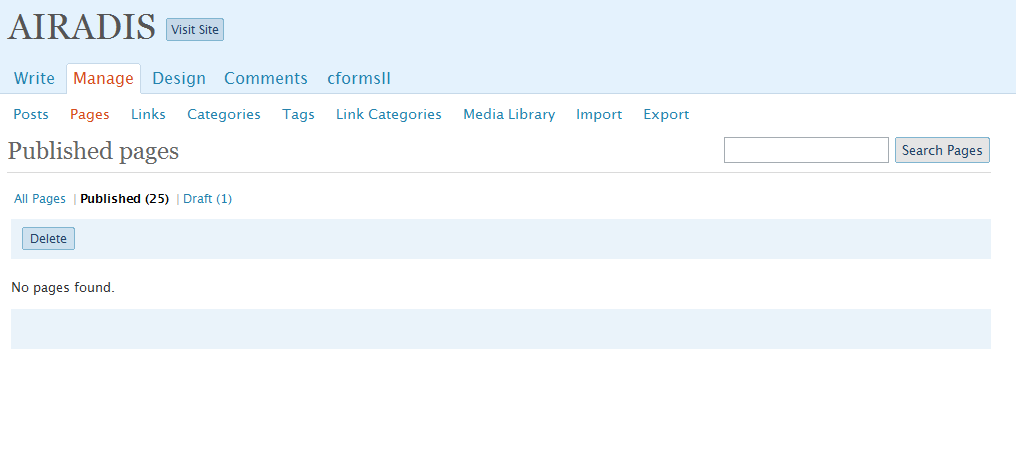
I can see that the posts and pages are published by the count listed, but they don’t show up in the list below and I can’t preview them- see screenshot: http://randaclay.com/screenshotair.png
Oddly, I can get the two test posts to show up by clicking on the category listed in the footer or on the 404 page, but the page layout for the blog page is goofed up.
Forum: Fixing WordPress
In reply to: Pages & Posts Suddenly Getting 404 PageSorry- should have included the URL: http://airadis.com
Forum: Fixing WordPress
In reply to: Permalinks suddenly stopped workingAnother update, I put in a manual, single post redirect into the htaccess, and it did work:
redirect 301 /archives/4-reasons-your-blog-needs-a-logo http://randaclay.com/blogging/4-reasons-your-blog-needs-a-logoMaybe instead of using a plugin, I need to just set up something similar in htaccess that would take care of all of them at once, but I don’t know what that code would look like…
Forum: Fixing WordPress
In reply to: Permalinks suddenly stopped workingUgh… I just tried the Permalink Migration plugin and that didn’t work either.
Forum: Fixing WordPress
In reply to: Permalinks suddenly stopped workingThanks for your response… no, I don’t.
Forum: Fixing WordPress
In reply to: Permalinks suddenly stopped workingBy the way- I’ve changed the permalink structure to one that works for now so people can at least comment.