ramonopoly

Forum Replies Created
-
Forum: Developing with WordPress
In reply to: Extending the @wordpress/create-block webpack.configHi there,
From what I can see
autoprefixeris enabled by default in the postcss plugins list used by the scripts package.I did a quick smoke test and got the following output:
.block-editor-block-list__layout{-webkit-user-select:none;-moz-user-select:none;user-select:none}From the following CSS:
.block-editor-block-list__layout{
    user-select:none;
}
Are you looking specifically to generate vendor prefixes for flexbox?
Maybe flexbox requires an extra option, but I’m not sure when reading the docs. They say it’s enabled by default.
Hi there!
Have you tried searching the plugin repository?
https://wordpress.org/plugins/search/popup/
I’ve used “popup” as a keyword but you might be able to find something better 🙂
Forum: Everything else WordPress
In reply to: Blog page and posts do not appearHi there!
I’m developing this locally so there’s no way to view it on the Original site
Are you building a block theme or building on top of an existing one?
Apologies in advance if you’ve already checked all this, but have you confirmed that the default template has a Query Loop block and Post Template block?
This article goes through some of the fundamentals: https://developer.wordpress.org/news/2023/03/block-theme-templates-the-easy-way-to-build-an-elegant-grid-of-posts/
Forum: Everything else WordPress
In reply to: Rows in Sections keep disappearingHi there!
Are you working with Row blocks in the block editor? I did a quick smoke tests and found that I could delete rows within another Group block, but I suspect your situation is unique?
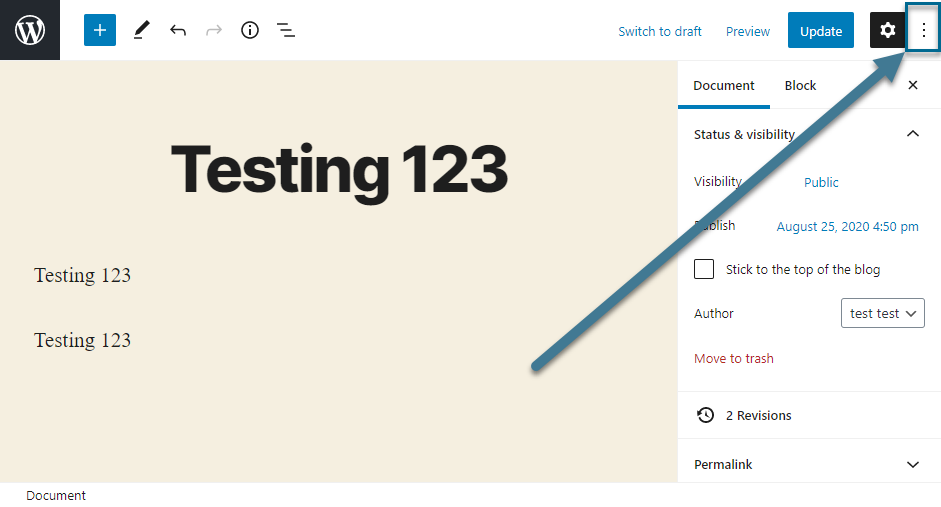
It might help to post an example of what you’re trying to delete, for example, a snippet of code from the editor. You can switch to code view in the block editor by clicking on the three dots to the right in the top navigation bar in the editor or with the following keyboard commands:
Mac: Command + Option + Shift + m
Windows: Ctrl + Shift + Alt + mForum: Fixing WordPress
In reply to: Making two Cover blocks to fit full widthHi there!
You’ve got the two Cover blocks in columns already which is what I’d have suggested, however from what I can see there’s a wrapper with the class name of
.guten-column-wrapperthat’s controlling the layout of its child elements.Adding
flex-direction: column;seems to achieve what you want, but I suspect it could be baked into the theme so it might not be achievable from the editor without a template modification.It might be worth asking over the Zeever forum. https://wordpress.org/support/theme/zeever/
Forum: Fixing WordPress
In reply to: My hamburger drop down header menu does not work on mobileSorry @angelmarfo I’m out of ideas, and without access to the site I’m not certain I can debug properly.
It might be worth dropping a question to the theme authors over at https://wpastra.com/contact/
Forum: Fixing WordPress
In reply to: Documentos en wordpressAh, perdón. Entonces, cuando subes documentos (PDFs, etc.), aparecen (normalmente de forma automática) en la página /documentos-categoría/transparencia-portal/? ¿Pero ya no lo hace?
¿Y no es posible editar la página a mano con el editor?
¿Puede ser que sabiote.com tenga un tema y/o un plugin que tenga esta funcionalidad? Puedes comprobar qué plugins tienes en la página /wp-admin/plugins.php
Sin un plugin/tema de terceros, o un cambio de código, no estoy seguro de que se pueda aplicar un adjunto/documento a una categoría en WordPress.
Forum: Fixing WordPress
In reply to: My hamburger drop down header menu does not work on mobileIs it possibl that missing element could be added to my site? Sorry I am not very good with code. I also have the free version
One thing you might like to try is creating another menu and assigning it as your Primary menu, just to rule out the possibility of problems with the menu itself. You don’t have to delete your current menu to do this.
Here some info on how to create new menus: https://codex.wordpress.org/WordPress_Menu_User_Guide
I’ve tried to build a header locally with a similar structure to your site, but still cannot pinpoint any issues.
I’d recommend also to check out any astra theme customizations you’ve made. For example in the Header Builder: /wp-admin/customize.php?autofocus%5Bpanel%5D=panel-header-builder-group
Try toggling some settings, or reducing the width of the submenus.
Sorry if that’s not very helpful so far, but ruling out things might uncover the culprit!
Forum: Alpha/Beta/RC
In reply to: 6.1 RC2 – WP-CLI error messageShould I be posting something in that thread?
I’d say it wouldn’t hurt. Maybe it will usher things along 🙂
Now I may abandon WP-CLI and just bite the bullet on a fresh installation from the zip file when the time comes. Do you have any recommendation?
Not really, sorry. I’m the type to nuke everything when I want a clean start, so maybe your idea is the cleanest.
Thanks for follow it up though!
Forum: Fixing WordPress
In reply to: Documentos en wordpressHola!
si he entendido bien, querrías que un enlace al documento aparezca dentro el menú? que tipo de documento? PDF?
hmmm, sería posible copiar la URL al adjunto (de la biblioteca de medios) y añadir un enlace personalizado al menu (Apariencia > Menús)?
https://codex.wordpress.org/WordPress_Menu_User_Guide#Adding_Items_to_a_Menu
Forum: Alpha/Beta/RC
In reply to: 6.1 RC2 – WP-CLI error messageIf I’m not mistaken this issue from 2019 (!) seems to be related: https://github.com/wp-cli/core-command/issues/141
So there’s an issue logged, but no fix yet.
Forum: Fixing WordPress
In reply to: How to add specific color to border around postIt looks great!
Forum: Fixing WordPress
In reply to: My hamburger drop down header menu does not work on mobileI had a quick look at the site and compared it to my version of astra, which is also 3.9.2 and it looks like something is up with the template.
I think this one: template-parts/header/builder/mobile-builder-layout.php
On my test site, the mobile navigation content sits in an HTML element
<div class="ast-mobile-header-content..., but on https://angelmarfo.com/, that element is empty:<div class="ast-mobile-header-content content-align-flex-start "</div>I’m not sure what’s going on here. It’s possible that a template file has changed, or there are some mobile settings I’m missing. I also have the free version, so if you have the paid upgrade there might be some more settings.
Forum: Fixing WordPress
In reply to: How to add specific color to border around postIt looks like that’s a block theme, so one way might be create a different template for every unique page.
Then edit the template’s background color, and apply it to the individual posts.
Here’s a pretty neat summary of how to create and edit a template: https://gutenberghub.com/templates-and-template-parts/
Forum: Fixing WordPress
In reply to: My hamburger drop down header menu does not work on mobileHi!
I’m seeing that the menu does not collapse in narrow widths.
Which theme are you using? Is it astra? Which version?
If so, here are some docs from https://wpastra.com/docs/ that might help with configuration:
https://wpastra.com/docs/mobile-header-with-astra/
https://wpastra.com/docs/create-mobile-header-with-header-builder/There’s also a dedicated forum for many themes where you could ask, e.g., https://wordpress.org/support/theme/astra/
I tried installing it locally but could not reproduce unfortunately.