pixel8er

Forum Replies Created
-
Forum: Plugins
In reply to: [Bitly's Wordpress Plugin] Didn't create shortlinkDoh…I was reading an old post about editing the wp-config.php
I checked the settings. The oauth field isn’t red and I have post and page selected.
Forum: Plugins
In reply to: [Bitly's Wordpress Plugin] Didn't create shortlinkMaybe I’ve misunderstood what I needed to do. I assumed I didn’t need to edit the wp-config.php file. But on further reading it seems I do need to do that.
I’ll give that a go and report back.
Thanks
PaulForum: Plugins
In reply to: Move MailChimp subscribe buttonOK I’ve been playing around and have got it a little bit closer to what I want. The code I’m using is:
<!-- Begin MailChimp Signup Form -->
<link href="//cdn-images.mailchimp.com/embedcode/slim-081711.css" rel="stylesheet" type="text/css">
<style type="text/css">
#mc_mv_EMAIL.mc_input {float:left;}
input.button{float: right;}
#mc_signup_submit.button {
background: #293f5e;
font-family: Helvetica,Arial,sans-serif;
font-size: 12px;
}
Anyone know how to get the subscribe button up next to the email field?
Thanks
PaulForum: Fixing WordPress
In reply to: Can anyone tell me if my RSS links are correct?Hi again
I’ve registered at feedburner and put the links on my blog page here
http://cadsmarter.com/blog/…when I click the link it takes me to an xml file. How can I check if it is the correct link I’ve put there?
Thanks
PaulForum: Fixing WordPress
In reply to: Site broken after editing addressHi all
Thanks everyone for their help and patience. Turns out I’d ticked a box during the install that set the home page as the blog page…doh! Apologies for wasting peoples time. The reinstall worked perfectly so I’m off to set it up
Thanks again
PaulForum: Fixing WordPress
In reply to: Site broken after editing addressActually after doing more reading I’m not going to do that.
I’m going to uninstall and reinstall. I assume that somewhere there is an option to set WordPress to have a static homepage so that you can have the blog as another page?
Forum: Fixing WordPress
In reply to: Site broken after editing addressCould I log into the hosting dashboard and do a redirect?
Forum: Fixing WordPress
In reply to: Site broken after editing addressHi Christiaan
Thanks for your reply.Yes I’m using WordPress in conjunction with the Genesis framework and Epik child theme.
1. Set your ‘siteurl’ and ‘home’ to your domain, as was listed here.
When I did point 1 above and saved it I was logged out. When I logged back in I get the Bluehost landing page.
Do I need to manually move the blog directory out directly under the parent directory?
Thanks
PaulForum: Fixing WordPress
In reply to: Site broken after editing addressHi WPyogi
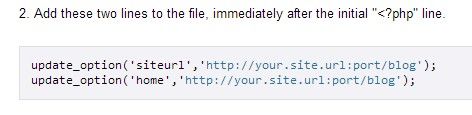
Thanks for your reply.Ok so I amended the functions.php file to include these 2 lines of code
update_option('siteurl','http://cadsmarter.com/blog');
update_option('home','http://cadsmarter.com/blog');
then via FTP I uploaded it. I had the blog directory in 2 places as I had already moved it out into the main parent directory – and this was the one I had been updating with the amended functions.php. I was scratching my head wondering why it wasn’t working. Then I uploaded the functions.php to the original blog subdirectory – and it worked!
So…my questions is now how do I change the main url to remove the ‘blog’ part?
I want my main url to be:
http://cadsmarter.comand I will have a separate page for the blog
Thanks again everyone for helping a newbie out
PaulForum: Fixing WordPress
In reply to: Site broken after editing addressIt may be that I’m interpreting the Codex website info incorrectly. I’m not sure what the ‘port’ or ‘blog’ part of the code is needed for.
If I want my website url for the main page to be
http://www.cadsmarter.comthen reading from the codex website instructions the code I need to enter is:
update_option('siteurl','http://www.cadsmarter.com:port/blog');
update_option('home','http://www.cadsmarter.com:port/blog');
Not sure if that’s correct…doesn’t look so with the ‘port’ and ‘blog’ in there
Forum: Fixing WordPress
In reply to: Site broken after editing addressThat’s what it says at this link
http://codex.wordpress.org/Changing_The_Site_URLSee this image for screenshot:
http://i1339.photobucket.com/albums/o719/pixel8er/Capture10-08-2013-33621AM_zps72858103.jpgForum: Fixing WordPress
In reply to: Site broken after editing addressI noticed that I had made an error in the 2 lines of code – I had a double http. Also I added www. So I corrected it as below:
update_option(‘siteurl’,’http://www.cadsmarter.com/blog:port/blog’);
update_option(‘home’,’http://www.cadsmarter.com/blog:port/blog’);But when I try the website I still get:
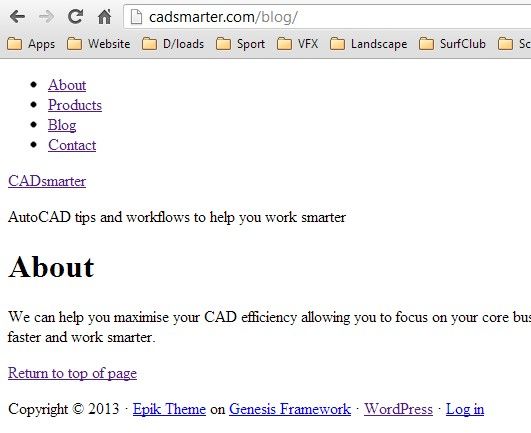
http://i1339.photobucket.com/albums/o719/pixel8er/Capture9-08-2013-105136PM_zps8c221b14.jpg
Am I doing the 2 lines of code wrong?
Forum: Fixing WordPress
In reply to: Site broken after editing addressHi Christaan
Thanks for the reply.
That might be beyond my skills – at the moment. I’ll see if I can find a clear tutorial
Thanks
PaulForum: Fixing WordPress
In reply to: Site broken after editing addressAs the original url was
http://www.cadsmarter.com/blogI edited the 2 lines of code to this
update_option('siteurl','http://http://www.cadsmarter.com/blog:port/blog');
update_option('home','http://http://www.cadsmarter.com/blog:port/blog');How long before it should work? Instantly? This is what I get
http://i1339.photobucket.com/albums/o719/pixel8er/Capture9-08-2013-105136PM_zps8c221b14.jpg
Forum: Fixing WordPress
In reply to: Site broken after editing addressHi esmi
Thanks for your reply.I found the info and I’ve been trying the method of editing the functions.php. Where it says to add the 2 lines of code am I adding the URL as it was before I broke it? Or as I want it to be? Either way neither is working.
My URL was previously:
http://www.cadsmarter.com/blogand I want it to be:
http://www.cadsmarter.comSo should the 2 lines look like this
update_option('siteurl','http://http://www.cadsmarter.com:port/blog');
update_option('home','http://http://www.cadsmarter.com:port/blog');or like this:
update_option('siteurl','http://http://www.cadsmarter.com/blog:port/blog');
update_option('home','http://http://www.cadsmarter.com/blog:port/blog');Thanks
Paul