Nimble3

Forum Replies Created
-
Forum: Plugins
In reply to: [Wordpress Picture / Portfolio / Media Gallery] Incorrect menu structureFirst, the portfolio you are using is not ours, its the theme’s own function.
Second a portfolio item just works as a post, when you open a post page WP assumes it a blog post.
send wp-admin and ftp access to wp@nimble3.com we will see what we can do for you.
in template.php line#1 please check the path to CSS file, you need to modify the path as well when making a copy of template.
Forum: Plugins
In reply to: [Wordpress Picture / Portfolio / Media Gallery] comment supportyou need to add the comments_template(); in theme file, recommended way is to use single-portfolio.php which would be basically a copy of single.php and then you can modify it according to your need.
Forum: Plugins
In reply to: [Wordpress Picture / Portfolio / Media Gallery] Other Video SupportIts working on our side, lets have a discussion on Skype or GTalk, please send your id for any messenger at wp@nimble3.com
send your wp-admin and ftp access to wp@nimble3.com, it seems theme’s issue but we want to investigate it for our plugin.
Forum: Plugins
In reply to: [Wordpress Picture / Portfolio / Media Gallery] Other Video SupportPlease replace your includes/prettyphoto/jquery.prettyPhoto.js content with http://pastebin.com/0ZWdTFL2
Forum: Plugins
In reply to: [Wordpress Picture / Portfolio / Media Gallery] Other Video SupportPlease mention the URL you are using for Image/Video URL here
your theme’s CSS is making conflict and taking priority.
Please mention your live URL, and we will exactly tell you what to change to remove the bullets.
Premium version users please email your problems at wp@nimble3.com
Forum: Plugins
In reply to: [Wordpress Picture / Portfolio / Media Gallery] Change Default URLWhen registering ‘portfolio’ post type, please replace
'rewrite' => truewith'rewrite' => array( 'slug' => 'something-custom' )Forum: Plugins
In reply to: [Wordpress Picture / Portfolio / Media Gallery] Other Video SupportTry adding
iframe=truequery string parameter after Image/Video URLSolution at #post-3815511 is for FREE version.
For PREMIUM version, please add
deeplinking: falseto Nimble Portfolio -> Settings -> PrettyPhoto ConfigurationForum: Plugins
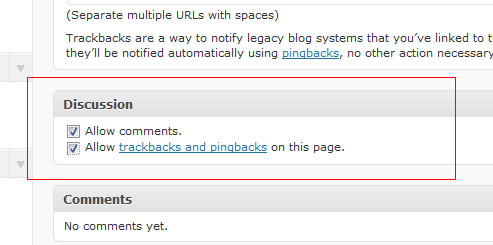
In reply to: [Wordpress Picture / Portfolio / Media Gallery] comment supportI believe you need to check
Allow comments.checkbox under Discussion panel.look at this screenshot http://learnwebtutorials.com/wp-content/uploads/2011/03/wordpress-allow-discussion.jpg
I am getting “500 Internal Server Error” when accessing http://jonathanstephanoff.com/pilotingpaperairplanes/ldstephanoff/home/design/
Duplicate of http://wordpress.org/support/topic/sort-issue-double-portfolio-items-remove-read-moreview-project-1?replies=2
Marking resolved.