newuser2

Forum Replies Created
-
Forum: Plugins
In reply to: [Subscribe2 - Form, Email Subscribers & Newsletters] HTML email format issueAre tables allowed? The following has no line breaks but still shows with gaps:
<div style="width: 550px; margin-left: auto; margin-right: auto; margin-top: 10px"> <table width="100%" border="0" cellspacing="0" cellpadding="0"> <tr> <td height="20" align="right" valign="middle" bgcolor="#393"><table width="100%" border="0" cellspacing="0" cellpadding="0"> <tr> <td height="13" align="left" valign="middle"></td> </tr> </table> <table width="97%" border="0" cellspacing="0" cellpadding="0"> <tr> <td height="13" align="left" valign="middle"><img name="" src="http://i1225.photobucket.com/albums/ee398/76uk/mailhacker-white.png" alt="" /></td> </tr> </table> <table width="100%" border="0" cellspacing="0" cellpadding="0"> <tr> <td height="12" align="left" valign="middle"></td> </tr> </table></td> </tr> </table> <table width="100%" border="0" cellspacing="0" cellpadding="0"> <tr> <td height="20" align="left" valign="middle"></td> </tr> </table> <table width="100%" border="0" cellspacing="0" cellpadding="0"> <tr> <td align="left"> <h1>{TITLE}</h1> </td> </tr> </table> <table width="100%" border="0" cellspacing="0" cellpadding="0"> <tr> <td height="20" align="left" valign="middle"></td> </tr> </table> <table width="100%" border="0" cellspacing="0" cellpadding="0"> <tr> <td height="20" align="left" valign="middle"> <h5>{POST}</h5> <p> </p> <h5>Click to continue reading... {PERMALINK}</h5> </td> </tr> </table> <table width="100%" border="0" cellspacing="0" cellpadding="0"> <tr> <td height="30" align="left" valign="middle"></td> </tr> </table> <table width="100%" border="0" cellspacing="0" cellpadding="0"> <tr> <td align="left"> <h2>97% of people think we rock.</h2> </td> <td align="right"> <a href="#" class="four">Find out why →</a> </td> </tr> </table> <table width="100%" border="0" cellspacing="0" cellpadding="0"> <tr> <td height="30" align="left" valign="middle"></td> </tr> </table> <table width="100%" border="0" cellspacing="0" cellpadding="0"> <tr> <td align="left"> <h7>Need help? Have suggestions? Want to vent? We want to hear from you, <a href="mailto:hackers@mailninja.co.uk" class="four">drop us an email</a></h7>.</td> </tr> </table> </div>Forum: Plugins
In reply to: [Subscribe2 - Form, Email Subscribers & Newsletters] HTML email format issueI recognise the following as HTML, but the rest isn’t is it?
<head>
<link rel=StyleSheet href="http:www.myurl.com/style.css" type="text/css" media=screen>
Forum: Plugins
In reply to: [Subscribe2 - Form, Email Subscribers & Newsletters] HTML email format issueHere you go:
<!DOCTYPE html PUBLIC "-//W3C//DTD XHTML 1.0 Transitional//EN" "http://www.w3.org/TR/xhtml1/DTD/xhtml1-transitional.dtd">
<html xmlns="http://www.w3.org/1999/xhtml">
<head>
<meta http-equiv="Content-Type" content="text/html; charset=UTF-8" />
<link rel="stylesheet" type="text/css" href="http://joinalpha.com/blog/css.css">
</head>
<body>
<div style="width: 550px; margin-left: auto; margin-right: auto; margin-top: 10px">
<div style="font-family: helvetica; color: #898989; background-color: #393; padding: 5px 0px 5px 20px" >
<p><img name="" src="http://i1225.photobucket.com/albums/ee398/76uk/mailhacker-white.png" alt="" />
</p>
</div>
<div style="font-family: helvetica; color: #898989; background-color: #ffffff"> </div>
<div style="font-family: helvetica; color: #898989; background-color: #ffffff"><font size="3">Here's the latest MailHacker blog post. Let us know what you think.. </font></div>
<div style="font-family: helvetica; color: #898989; background-color: #ffffff"> </div>
<div style="font-family: helvetica; color: #898989; background-color: #e6f2f5; font-size: 120%; border-width: 1px; border-color: #d0e6ec; border-style: solid; padding: 10px 5px 0px 10px">MailNinja has posted a new item:
<p>'{TITLE}'</p>
<p>{POST} Click to continue reading... {PERMALINK}</p>
</div>
<p style="font-family: helvetica; color: #898989; background-color: #ffffff; margin-bottom: 2px"><span style="color: #666666">The MailNinja team</span></p>
<div style="font-family: helvetica; color: #898989; background-color: #ffffff; margin-bottom: 2px"><span style="color: #666666; font-size: 95%"> </span></div>
<div style="color: #898989; margin-bottom: 2px">
<div align="center" style="color: #999999; font-size: 14px">
<div align="center"><font color="#666666"><span style="background-color: #FFFF00"><font face="Verdana">Grow your business with MailNinja. <a title="" href="#">Click here to learn more</a></font></span></font></div>
</div>
<font color="#666666"><span style="color: #898989"><div style="font-family: helvetica; background-color: #ffffff"> </div></span></font></div>
<div style="font-family: helvetica; color: #898989; background-color: #ffffff; margin-bottom: 2px"></div>
<div style="font-family: helvetica; background-color: #ffffff; color: #999999; font-size: 95%" align="center">
Need help? Have suggestions? Want to vent? We want to hear from you </div>
<div style="font-family: helvetica; background-color: #ffffff; color: #999999; font-size: 95%" align="center"> <a title="" href="mailto:hackers@mailninja.co.uk">Send us an email any time!</a></div>
<div style="font-family: helvetica; background-color: #ffffff; color: #999999; font-size: 95%"> </div>
<div style="font-family: helvetica; background-color: #ffffff; color: #999999; font-size: 95%"></div></div>
</body>
</html>
[Please use the code buttons when posting code here]
Forum: Plugins
In reply to: [Subscribe2 - Form, Email Subscribers & Newsletters] HTML email format issueOn sending the email the plugin is adding a bunch of para and line breaks to the end of every line, even the head and body tags…
Forum: Plugins
In reply to: [Subscribe2 - Form, Email Subscribers & Newsletters] HTML email format issueI’ve previewed the email in Dreamweaver and various online tools and it appears fine. I don’t understand why its formatting different to the other email…
Forum: Plugins
In reply to: [Subscribe2 - Form, Email Subscribers & Newsletters] HTML email format issueBTW i disabled the ‘Include theme CSS stylesheet in HTML notifications’ option
Forum: Plugins
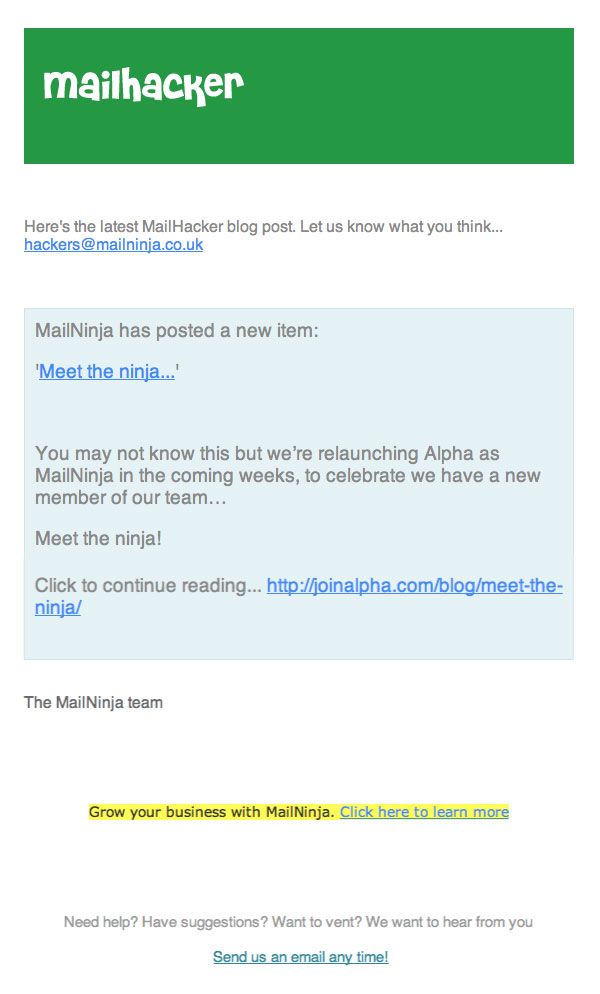
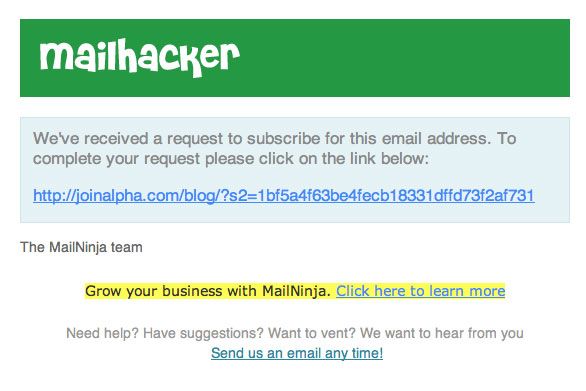
In reply to: [Subscribe2 - Form, Email Subscribers & Newsletters] HTML email format issueSeems the Subscribe / Unsubscribe confirmation email is ok, but the New Post email is gappy!
See this example email to see.
This one is ok… see here.
Forum: Plugins
In reply to: [Subscribe2 - Form, Email Subscribers & Newsletters] HTML email format issueSo the style.css of the blog is affecting the emails?
I cant find that line in that file…
Can you give us some code to embed the subscribe2 subscription form on a HTML web page?
Or give us a heads up how to achieve this?
Thanks again…
So whats the database field full string for the email address?
Once someone enters and email in the subscribe2 form, are they added to the blog user database?
I may be able to sync databases up…?
Once someone enters and email in the subscribe2 form, are they added to the blog user database?
I may be able to sync databases up…?
Is there a workaround so that on entry of an email, a user is subscribed to our newsletter list AND subscribe2 list?
I must be able to feed subscribers to our wordpress DB or subscribe2 list somehow?
My idea was to merge 2 subscription forms into one so i can pipe the email to 2 sources.
This seems a simple and logical requirement and must be able to be achieved…
Thanks in advance.
In fact I have 2 questions in total:
- Is there a way to source the HTML code for the subscription form so we can embed it into our main website?
- Can i customise the HTML emails that go out?
Thanks