methnen

Forum Replies Created
-
Forum: Plugins
In reply to: [M Chart] Percentage symbol in x-axis not showingYes this is basically a current limitation. Having non numeric strings show up properly in Chart.js requires some extra work.
The next version of M Chart (still working on it) includes some changes to try and deal with this.
I’m not sure if it’ll solve the issue you’re having in particular but it might. I’d need to see your chart data and setup to know for sure.
What I’d suggest in the meantime is to label the axis as being a percentage so the viewer knows that the value is a percent.
OK, I see it only shows up when you have the older version of GigaOm Analytics active.
I’m assuming that is intentional?
If that’s the case shouldn’t the note about it not be visible too?
OK, I’ve gotten the filters to work. Appears to have been a caching problem on my end.
However, I still can’t see that Exclude from Analytics setting.
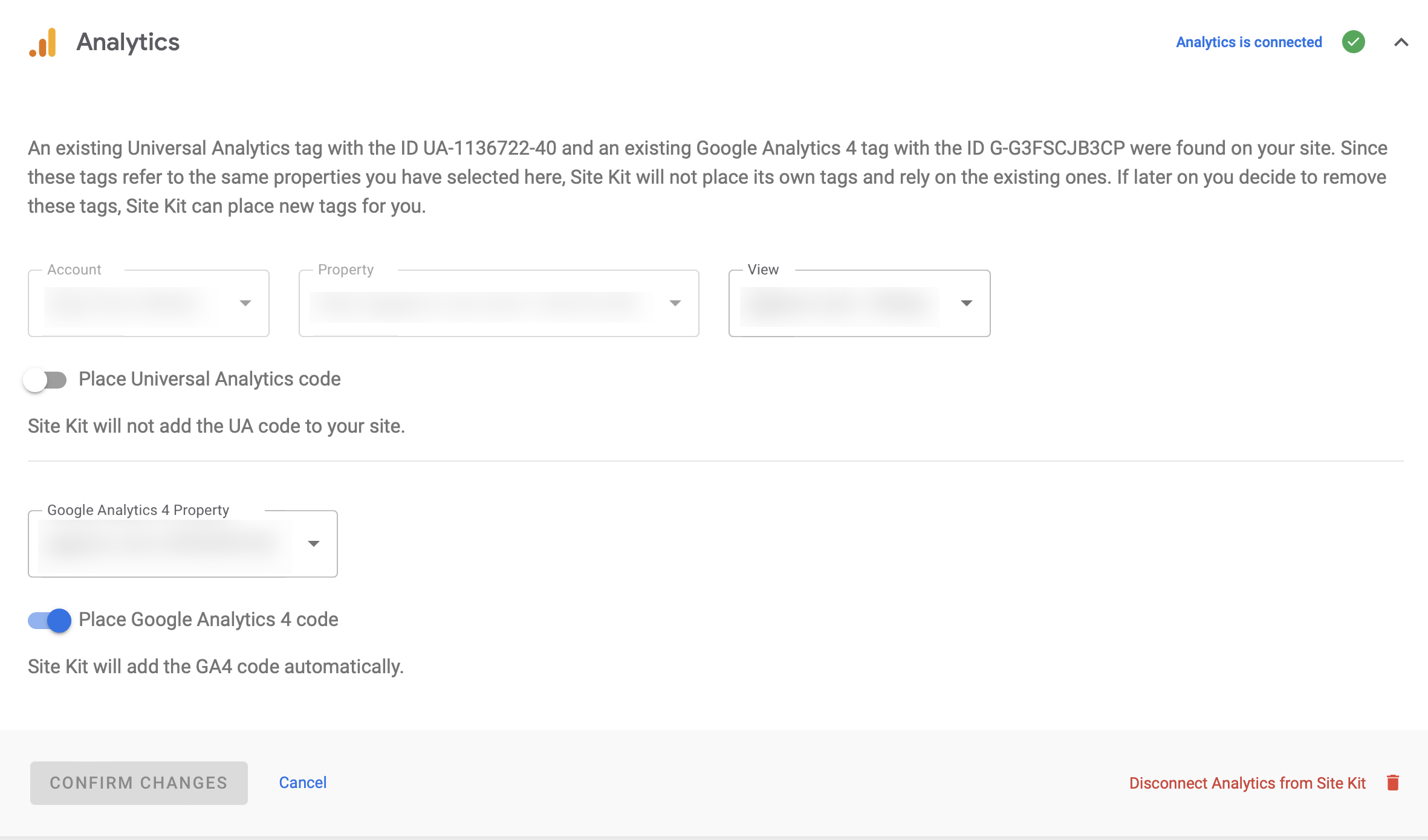
If I go to the settings panel I see this:
https://methnen-dropshare.s3.amazonaws.com/pb-WCMW5PdrfI.png
Note that there’s no way to toggle anything about the Exclude from Analytics behavior…
Thanks for the replies. I’m gonna have to experiment with the googlesitekit_analytics-4_tag_blocked filter because it wasn’t working as I expected it to.
As for the Exclude from Analytics stuff I can’t seem to find where in Google Analytics that’s found. Any chance you can give me a rundown of where I go to find that?
Forum: Plugins
In reply to: [M Chart] Chart not working in Safari BrowserWe spent some time investigating this via email. It appears to be somewhat specific to this user’s system. I was unable to duplicate the problem on my end and haven’t heard back from them for awhile.
Will update this again if I do and/or we figure out what was going on.
OK chased this one down and it will be fixed in the next version as well.
Forum: Plugins
In reply to: [M Chart] Change default Slug “chart”There’s a few ways to do this that don’t actually require any changes to the plugin.
Basically you just need to change it before it gets created in WP.
Something like this added to your functions.php file should work:
<?php

add_filter( 'm-chart_post_type_args', 'm_chart_post_type_args' );

function m_chart_post_type_args( $args ) {
    $args['rewrite']['slug'] = 'your-new-slug-here';

    return $args;
}
Forum: Plugins
In reply to: [M Chart] PHP 8.0.13 Warning: Undefined variable $disabledOK, I’ve found that one and fixed it and fixed another warning I found in the process. That fix will go up in the next version which has been close to being ready for some time, just need to find a few more chunks in a day free. 🙂
Forum: Plugins
In reply to: [M Chart] PHP 8.0.13 Warning: Undefined variable $disabledTaking a look at this and the CSV import/export issues today. I’ll let you know how that goes.
Forum: Plugins
In reply to: [M Chart] I’d like to buy you a beer, a coffee, a pizza :)I genuinely appreciate the offer.
However, I’d rather you make a donation of your choosing to my charity of choice:
Forum: Plugins
In reply to: [M Chart] Use “Custom Taxonomy” for Chart “Custom Post Type”Inheriting the Category taxonomy from the Post type was intentional and not something I will be changing.
However, unregistering that Taxonomy and adding your own from the functions.php file of your theme should be relatively straightforward.
There’s nothing happening in how the plugin handles both items that isn’t pure WP.
Gonna need to take a look at this and get back to you. Not immediately sure what’s going on but I’ll see if I can reproduce the issue. Can you throw me the CSV file you’re playing with to: jamie AT methnen.com
Forum: Plugins
In reply to: [M Chart] Hide Chart TitleIf you’re comfortable playing with WP hooks yes.
This is the one you’d want:
https://github.com/methnen/m-chart/wiki/Action-and-filter-hooks#m_chart_chart_args
It lets you play with everything the charting library will receive RIGHT before it gets printed out to the Javascript.
Note that it’s in the form of a PHP Array which then get’s written out as a JSON object for the JS charting library to use.
Forum: Plugins
In reply to: [M Chart] Chart not working in Safari BrowserHappy to take a look. Is there some place I can see the issue in action?
Feel free to email any additional info you might want to more privately share to:
jamie AT methnen.com
Never mind, I’ve realized it’s in the Network Admin settings. 🙂