ka2

Forum Replies Created
-
Forum: Plugins
In reply to: [Custom DataBase Tables] Failed to Create TableThank you for your inquiry.
By column definition, the varchar type of column need the length of the string. So, varchar() instead, please put the number of the string length, such as varchar(255). Then, you are able to be table creation.
Please try it.
Forum: Plugins
In reply to: [Custom DataBase Tables] Failed to Create TableSorry for my late reply.
Sorry to trouble you, please tell me the full statements of SQL which is displayed in a modal dialog for confirmation of when you will be creating a table.
Thank you,
Forum: Plugins
In reply to: [Custom DataBase Tables] table within a each cell of a particular columnThank you,
Well, I could understand what you want.We can not be realized by shortcode, so we should be addressed by script of php.
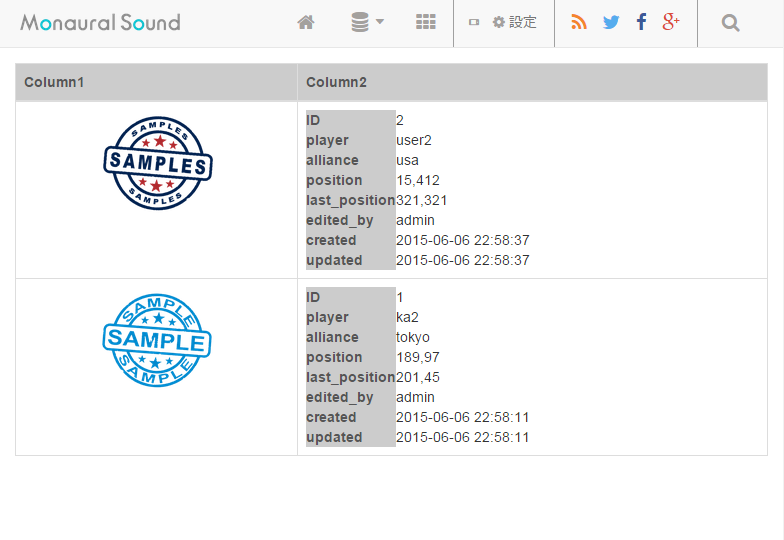
For example is as follows:global $cdbt; $images = $cdbt->get_data( 'my_images_table', 'ID,image_url' ); $data = $cdbt->get_data( 'my_properties_table', '*' ); $outer_table = '<table class="table table-bordered"><thead><tr><th>Column1</th><th>Column2</th></tr></thead><tbody>'; foreach ($images as $value) { $outer_table .= sprintf('<tr><td><img src="%s" width="128"></td>', $value->image_url); foreach ($data as $datum) { if ($datum->ID === $value->ID) { $inner_table = '<table>'; foreach ($datum as $k => $v) { $inner_table .= sprintf( '<tr><th>%s</th><td class="text-left">%s</td></tr>', $k, $v ); } $inner_table .= '</table>'; break; } } $outer_table .= isset($inner_table) ? sprintf('<td>%s</td></tr>', $inner_table) : '<td>no data</td></tr>'; unset($inner_table); } $outer_table .= '</tbody></table>'; echo $outer_table;Screenshot image of the result that has run the above code is here.
http://ka2.org/assets/2015/06/example_image.png
How about this?
Forum: Plugins
In reply to: [Custom DataBase Tables] table within a each cell of a particular columnHi there,
Thank you for your inquiry.That is, do you want to output the only values of the “properties” column into the horizontal row?
So, it is feasible if you use a PHP script.
For example is as follow:global $cdbt; $data = $cdbt->get_data( 'your_table_name', 'properties' ); $html = '<table class="table table-bordered"><tr>'; foreach ($data as $value) { $html .= sprintf('<td>%s</td>', $value->properties); } $html .= '</tr></table>'; echo $html;Do you have become the answer you desire?
Forum: Plugins
In reply to: [Custom DataBase Tables] Selection of Date using PickerThank you for your inquiry.
Sorry, currently plugin has a poor interface to entry of date type fields.
I’m going to implement the date picker like calendar format at next version 2.
I’m during intensively developed a plugin version2. In my plan, I would like to release the version2 on June.Thanks,
Forum: Plugins
In reply to: [Custom DataBase Tables] Hyperlink?Thank you for your inquiry.
Currently,there are many desire to decorate the some specific columns of data listed in the same as you want. It is difficult in the specification of the current plugin, but you can respond by modifying the source of the plugin as described below.
As an example, we will introduce the case of short codes [cdbt-view].Firstly, please open the file of
wp-content/plugins/custom-database-tables/templates/cdbt-public-list.phpby using text editor.Please add the following one line to the 189 line.
$val = apply_filters( 'cdbt_view_cell', $val, $data_id, $key, $table_name );After adding the above line, source looks like follow:
if (!empty($exclude_cols) && in_array($key, $exclude_cols)) {
  continue;
} else {
  $val = apply_filters( 'cdbt_view_cell', $val, $data_id, $key, $table_name );
  $list_rows .= '<td>'. $val .'</td>';
}
Next, open the function.php of your theme (wp-content/themes/*****/functions.php), you can add as follows:
function my_decorate_cell( $cell_value, $data_id, $column_name, $table_name ) {
  if ( $table_name == 'your_table_name' && $column_name == 'target_column_name' ) {
    if ( !empty($cell_value) ) {
      $cell_value = sprintf('<a href="%s">%s</a>', $cell_value, $cell_value);
    }
  }

  return $cell_value;
}
add_filter( 'cdbt_view_cell', 'my_decorate_cell', 10, 4 );
In the above example, There will be enclosed the value of the “your_column_name” column of “your_table_name” table at
<a>tag.Also, the same demand with you wants is quite large.
So in the next version, I’m going to add this filter hook to the cell output of all short code.Thank you,
Forum: Plugins
In reply to: [Custom DataBase Tables] Screen DisplayThank you for your inquiry.
> http://www.macase.net/testing-resultats/?preview=true&preview_id=13317&preview_nonce=656d8fed9c
Unfortunately, I could not see your url of above, because I don’t have permission to see your preview page.
However, I have guessed that you want to do you. Do you want to avoid from outputting as an empty record is a blank rows in the list when is displayed by the shortcode of [cdbt-view]?If so, you will check the elements of a cell in a table by using JavaScript (or jQuery etc.), and be able to hide the blank rows.
Sorry, it’s impossible in the currently plugin side.If I can see your page displayed table by the shortcode of [cdbt-view], I will perhaps be able to provide a sample code of JavaScript to you.
Thank you for taking care of it.
Forum: Plugins
In reply to: [Custom DataBase Tables] Modal in footerThank you very much for reporting.
And, I’m so sorry for not replying sooner.Unfortunately, it’s a bug. I’m sorry. When you used the attribute of “bootstrap_style=false” in shortcodes, There should be not render a modal block.
Please wait a while until this plugin is released the next version, I will fixed a bug.
Forum: Plugins
In reply to: [Custom DataBase Tables] Can i add custom button to ALL rows?And, This is reply to one more question.
How to show table with mysql WHERE clause?
If you want to narrow the record that you want to display in the Where clause, please use the short code of [cdbt-extract].
Thank you,
Forum: Plugins
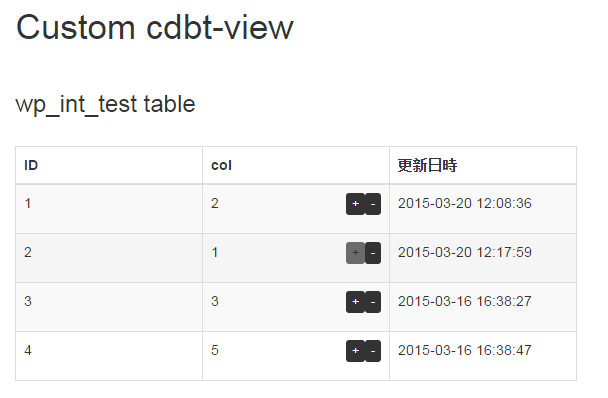
In reply to: [Custom DataBase Tables] Can i add custom button to ALL rows?I try to include my original button to rendered page by a shortcode of [cdbt-view].
For example if table is as follows:
CREATE TABLE wp_int_test (
  ID int(11) unsigned NOT NULL AUTO_INCREMENT COMMENT 'ID',
  col int(11) NOT NULL,
  created datetime NOT NULL DEFAULT '0000-00-00 00:00:00' COMMENT 'created datetime',
  updated timestamp NOT NULL DEFAULT CURRENT_TIMESTAMP ON UPDATE CURRENT_TIMESTAMP COMMENT 'updated datetime',
  PRIMARY KEY (ID)
) ENGINE=InnoDB AUTO_INCREMENT=1 DEFAULT CHARSET=utf8
The html contents in body of post is follows:
[cdbt-view table="wp_int_test" display_search="false" display_list_num="false" enable_sort="false" exclude_cols="created"]

<script>
function refresh_page() {
  location.reload();
}
</script>
In the “templates/cdbt-public-list.php” on the directory of cdbt plugin, I have customized as follows:
# 189 to 190 lines
  $output = apply_filters('cdbt_view_column_value', $val, $table_name, $key);
  $list_rows .= '<td>'. $output .'</td>';
Then, In the “functions.php” of using theme, I have added as follows:
add_filter('cdbt_view_column_value', 'add_my_button', 10, 4);
function add_my_button($val, $table_name, $column_name, $id) {
  if ($table_name == 'wp_int_test' && $column_name == 'col') {
    $increase_query = sprintf('UPDATE %s SET %s = %d WHERE ID = %d', $table_name, $column_name, intval($val)+1, intval($id));
    $increase_button = do_shortcode(sprintf('[cdbt-submit table="%s" label="%s" query="%s" final="refresh_page" add_class="%s"]', $table_name, '+', $increase_query, 'default btn-xs'));

    $decrease_query = sprintf('UPDATE %s SET %s = %d WHERE ID = %d', $table_name, $column_name, intval($val)-1, intval($id));
    $decrease_button = do_shortcode(sprintf('[cdbt-submit table="%s" label="%s" query="%s" final="refresh_page" add_class="%s"]', $table_name, '-', $decrease_query, 'default btn-xs align-left'));

    $val = sprintf('%s <p class="pull-right">%s%s</p>', $val, $increase_button, $decrease_button);
  }
  return $val;
}
By the above as, you can make a list of pages that you can change the value by added buttons of “+” or “-” to the particular column.
Forum: Reviews
In reply to: [Custom DataBase Tables] Seems nice, doesn't workIt’s very good idea!
Certainly as you said, we may be so happy if you be able to use “table creator” interface when you will alter table.
Thank you very much.
Forum: Plugins
In reply to: [Custom DataBase Tables] Can i add custom button to ALL rows?Hmmm,
If you can hardcoded into the sources of the plugin, you may try to embed directly button into the file of the following.
– This contents is rendered by shortcode
templates/cdbt-public-edit.php : 269 to 273 lines– This contents is rendered on admin panel
templates/cdbt-edit.php : 216 to 220 linesThe event of clicking on the button add as JavaScript in the “lib/cdbt.scripts.php”. In this way, you can add the processing and yourself button that you want.
Forum: Plugins
In reply to: [Custom DataBase Tables] ask about use api to insert_dataHi there,
Thank you for your inquiry.The example of when want to insert from as “functions.php” of your theme are as follows:
<?php
global $cdbt;
$table_name = "my_table";
$insert_id = $cdbt->insert_data($table_name, array('column1' => 'value1', 'column2' => 'value2'));
echo $insert_id;
The example of when want to insert using a Web-api are as follows:
<?php
$url = 'http://your.web.site/?cdbt_api_key=<API key>&cdbt_table=my_table&cdbt_api_request=insert_data&data={column1:value1,column2:value2}';
$response = file_get_contents($url);
var_dump($response);
Please try an above.
Forum: Plugins
In reply to: [Custom DataBase Tables] Can i add custom button to ALL rows?Hi there, thank you for your inquiry.
It’s really too bad, but your both hopes is not possible in the current plugin.
However, I also would like to support advanced data retrieval as query of “JOIN” in the future. I was surprised to your fantastic idea of including the custom button to the data rows. Its your idea will be stock for additional future functionality.
Thank you,
Forum: Plugins
In reply to: [Custom DataBase Tables] Missing EDIT buttonThank you for your inquiry.
In order to enable the editing button at shortcodes of [cdbt-edit], there must be another page that is embedded a shortcode of [cdbt-entry].
Then, an “entry_page” attribute in the shortcode of [cdbt-edit] must have post_id or post_name of its page (was embedded a shortcode of [cdbt-entry]). Yet an “entry_page” attribute is optional from plugin version 1.1.14. So that attribute does not have to specified.Please ie try the following responses:
- You create a post that
[cdbt-entry table="zzdb_table_namezz"]is described in the post body. - You change the current shortcode to
[cdbt-edit table="zzdb_table_namezz" exclude_cols="ID,created,updated"]
Please try as above.
- You create a post that