irri

Forum Replies Created
-
Hello, I seem to have the very same problem with my website too.
The x is not visible, making it hard to get away from the slide-in when people don’t want to opt-in.
But the CSS code above didn’t help me (which I think is obvious because my website probably works differently, haha).
Could you perhaps help me with this too? Thanks so much in advance.
I love this plugin.
http://www.miriambos.comHi there.
Same trouble here. Can’t upload new images.But even after reinstalling the latest version of the plugin of Contact form 7 I keep getting the same error.
I used the latest version from June 2.
It’s conflicting my nextgen gallery plugin and I can’t upload new images. I am quite relieved that the gallery itself is still working though.I don’t understand why the latest plugin worked for others.
Any ideas? :SThe error:
http://i27.photobucket.com/albums/c191/irrimiriam/ScreenShot2012-06-12at091835.pngKind Regards
Forum: Installing WordPress
In reply to: After update, rich editor of post area not workingResolved quite quickly:
someone just told me that I had to uncheck the ‘Disable the visual editor when writing’ in my profile (under ‘users’). I have no idea why it was checked, but here you go. It solved the mysterie 😀
Forum: Themes and Templates
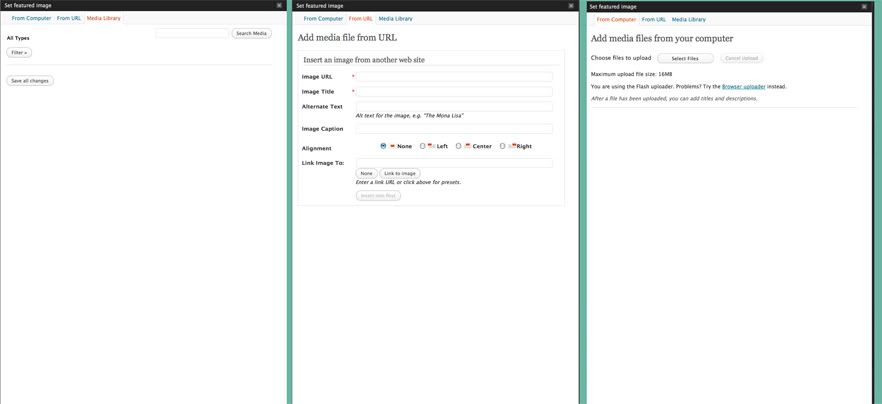
In reply to: 'Featured image option' doesn't show 'set as featured image'Thanks for your reaction.
I know that. I’ve read it in more fora. But that isn’t the problem
As explained in my post you can’t choose the ‘set as featured image’
It doesn’t matter if I check the ‘media library’ or the ‘url’. It just doesn’t show 🙂example of the three options. It doesn\t show set as featured image
http://i27.photobucket.com/albums/c191/irrimiriam/screenshot.jpg