geraintp

Forum Replies Created
-
Forum: Fixing WordPress
In reply to: DIV ErrorsShort of rewriting you theme probably not.
What are you using to validate your html?
<div out="fadeOut" in="fadeIn" style="height: 259.767px; width: 479.767px; top: 0px; background: url("http://xn--canyoningallgu-iib.de/wp-content/uploads/2014/11/Canyoning-Allgaeu-Gunzesried-Familie.jpg") no-repeat scroll left top / 100% auto transparent; margin-left: 0px; right: 0px; transform: rotate(0deg);" entrance="effect" id="square-lit" class="squareLitDemo shape animated fadeOut">‘out’, ‘in’ and ‘entrance’ are not valid attributes in html mark up. their there to communicate with the javascript (probably a plugin) used by the theme developer on how to animate the div’s. the correct way to do this would have been using data-* i.e. ‘data-in’, ‘data-out’, ‘data-entrance’ which is valid html5 however changing them will more than likely break the javascript plugin doing the animating as it will also need to be changed to look for correctly named attributes.
Their not the end of the world as any browser that doesn’t know what to do with them will ignore them, it’s not neat or efficient but it shouldn’t break anything which is probably why the plugin/theme developer(s) haven’t noticed/fixed the issue.
If you bought the theme maybe raise a support tick if you can, pointing out that the theme doesn’t validate and uses non standard attributes. But the response will probably be its the javascript plugins fault
Forum: Fixing WordPress
In reply to: Facebook share showing wrong informationFacebook used OpenGraph meta data from the page to determine what to show, here’s the current data from your site.
<!-- This site is optimized with the Yoast WordPress SEO plugin v1.7 - https://yoast.com/wordpress/plugins/seo/ -->
<link rel="canonical" href="http://puresir.com/wordpress/free-e-book/" />
<meta property="og:locale" content="en_US" />
<meta property="og:type" content="article" />
<meta property="og:title" content="FREE E-book - Pure Sir" />
<meta property="og:url" content="http://puresir.com/wordpress/free-e-book/" />
<meta property="og:site_name" content="Pure Sir" />
<!-- / Yoast WordPress SEO plugin. -->
Your not specifying an image or a description so facebook is trying to generate that automatically by looking at the content of the page, hence the unpredictable results your seeing.
you need to set a
<meta property"og:image" .... />Square images work best,see this article
Forum: Installing WordPress
In reply to: How to migrate from an english version to a french versioHi
Translation of WordPress are just that, you just need to install the necessary language files. In fact the next version of WP 4.1 currently (beta) will let you install languages from the dashboard.
If you don’t want to wait.
Go to your wp-config.php file, near the bottom you should find lines that looks like:
/**
 * WordPress Localized Language, defaults to English.
 *
 * Change this to localize WordPress.  A corresponding MO file for the chosen
 * language must be installed to wp-content/languages. For example, install
 * de.mo to wp-content/languages and set WPLANG to 'de' to enable German
 * language support.
 */
define ('WPLANG', '');
modify this to :
define('WPLANG', 'fr_FR');then go to the dashboard > updates and hit check again,
You should then have the option to reinstall wordpress 4.0 fr_FR
NB. However this will only translate the UI of wordpress’ dashboard, your menus, tags, categories, and content will all still be in the language it was entered into the site.
If you want to translate that you’ll have to do it manually, there are plugins like WPML that support inline translation of content and multi lingual content.
Also you need to check that your theme actually supports translation, if it does you may have to create language files for it if french versions don’t exist.
Forum: Fixing WordPress
In reply to: How to access a non-widget on home pageHi
It looks like it been added directly to the theme/template directly. when you view the source there are even several other buttons that have been commented out.
<a class="stateBtn" href="http://socspa.com/types-of-claims/georgia-public-adjuster/">Georgia</a>
   <!-- <a class="stateBtn" href="http://socspa.com/types-of-claims/florida-public-adjuster/">Florida</a>
    <a class="stateBtn" href="http://socspa.com/types-of-claims/texas-public-adjuster/">Texas</a>
    <a class="stateBtn" href="http://socspa.com/types-of-claims/arizona-public-adjuster/">Arizona</a>
    <a class="stateBtn" href="http://socspa.com/types-of-claims/north-carolina-public-adjuster/">North Carolina</a>
    <a class="stateBtn" href="http://socspa.com/types-of-claims/south-carolina-public-adjuster/">South Carolina</a>
    <a class="stateBtn" href="http://socspa.com/types-of-claims/new-jersey-public-adjuster/">New Jersey</a>
    <a class="stateBtn" href="http://socspa.com/types-of-claims/oklahoma-public-adjuster/">Oklahoma</a>
    <a class="stateBtn" href="http://socspa.com/types-of-claims/pennsylvania-public-adjuster/">Pennsylvania</a>
    <a class="stateBtn" href="http://socspa.com/types-of-claims/michigan-public-adjuster/">Michigan</a> -->
which template file your looking for depends on how you theme was build and how your site is configured. I’m guessing that its probably a custom page template.
best way to check that is if you go to edit the home page whether in the Page Attributes box the template is set to something other that Default.
Custom Page TemplatesIf thats the case you need to find the template file in your theme that start …
<?php
/*
Template Name: My Custom Page
*/
with the matching name.
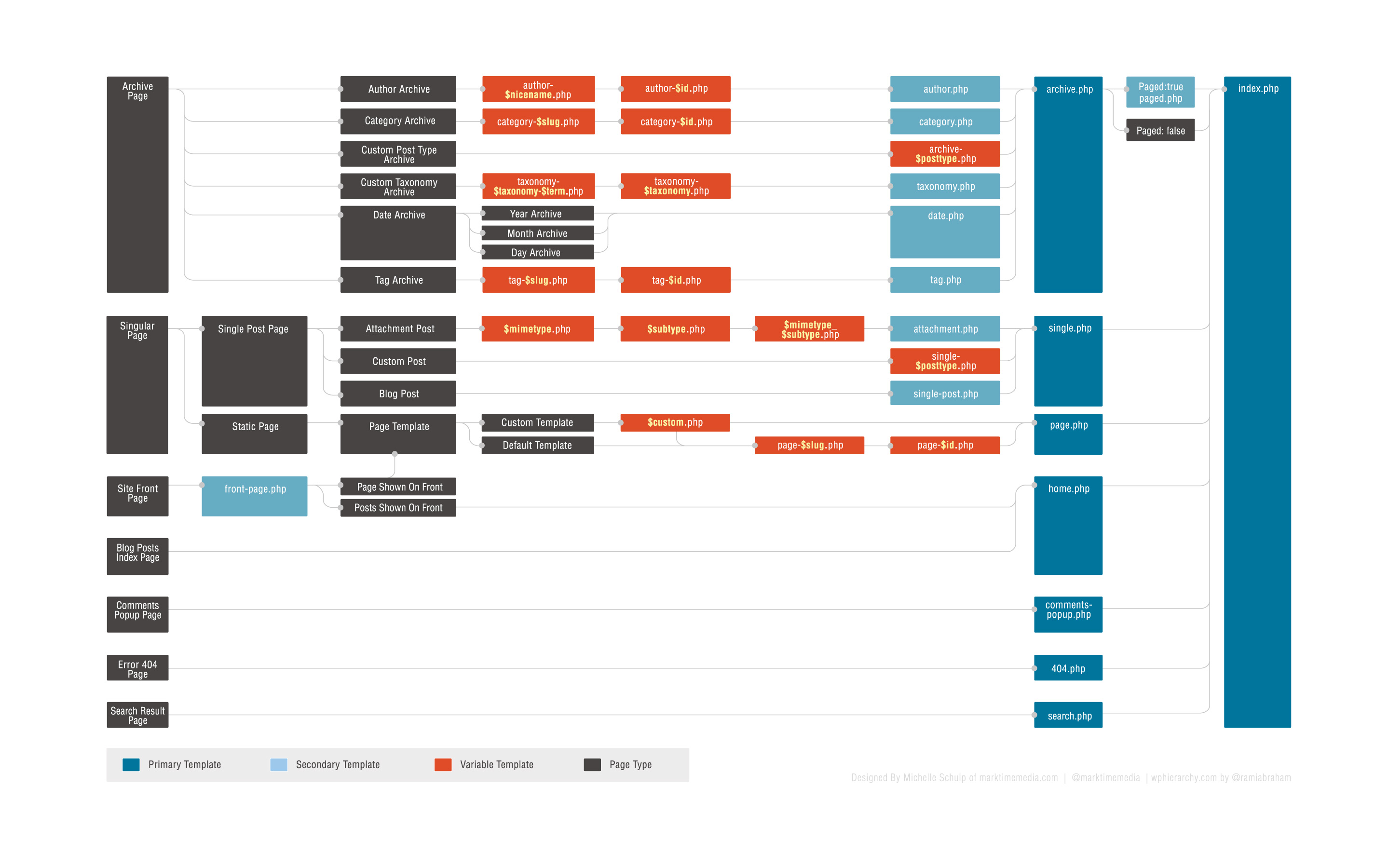
If the home page is not a page in the admin area, that content block could be in
- front-page.php
- home.php
- index.php
see
Template Hierarchy
template hierarchy DiagramHope that helps.
GForum: Fixing WordPress
In reply to: How to get rid of category and description on top of post pageHi,
Theres a couple of ways to go about it depending on your skill level and how confident you are at editing your theme.
Option 1. – uses CSS to hide them.
Option 2. – edit the relevant template files in the theme to remove or change the parts you want to update.so Option 1 – without editing your theme
- Install the WordPress Jetpack plugin.
- activate – custom CSS (should default to on, i think) – this will add a custom CSS menu item under Appearance in the admin area.
- add the css below
body.category article.breadcrumbs {
    display: none;
}
NB this only hides the panel on category-archive pages.
body.single-post article.art-post.art-article:first-child {
    display:none;
}
this second block removed the nav block on single posts templates, however this second block is CSS3 which only work in modern browsers i.e. ie7+
see browser supportif you don’t want to install jetpack you can add the css to the very bottom of the style.css in your folder theme.
Option 2.
Is more complicated as you need to figure out where in the theme those blocks are coming from and edit them to change what they output.So for categories template order
- category-slug.php
- category-ID.php
- category.php
- archive.php
- index.php
one of the follow temples is generating that content, probably not the first two, 3 and four are most likely, if 3 doesnt exist then its 4 ‘archives.php’
Once you figured out which template is being used you need to find some code that looks like:
<article class="art-post art-article  breadcrumbs" style="">
         ......
</article>
and delete it or comment it out. trouble is it maybe wrapped in/contain various
<?php .. ?>code sections which may make it harder to spot.and rise and repeat for the second one, this time you need to edit ‘single.php’ and find and delete something that looks like.
<article class="art-post art-article " style="">
     <div class="art-postcontent clearfix">
     <div class="navigation">
     <?php posts_nav_link(); ?>
     </div></div>
</article>
Without seeing the actual templates files its hard to explain exactly what to delete.
Hope that helps.
Forum: Localhost Installs
In reply to: Moved multisite to localhost – stylesheets and url issuesHay,
By the sounds of it you’ve set the domain to a relative url, even tho its a local ie. localhost you still need http:// (the protocol) otherwise any link in html is considered to be relative to the current page address.. so http://localhost etc…
as for multi site there are a few tables in the db that contain the site domain this is a good tutorial on all the places you need to update.
- wp_options: options named “siteurl” and “home”
- wp_site
- wp_sitemeta: the option named “siteurl”
- wp_blogs: any entries in the “domains” column that have the old domain name
- wp_#_options: Each sub-site will have sets of tables that correspond to the blog_id in the wp_blogs table. You need to go to the wp_#_options table, where # corresponds to the blog_id, and update the “siteurl” and “home” settings in that table.
so for starters you need to make sure that you changed
http://www.mysite.com with http://mysite.locand
mysite.com with mysite.loc
as in the db its stored with and without the http://
for example in wp_sites and wp_blogs table its stored without the http:// and in the wp_options, wp_#_options and wp_sitemeta its stored with http://
Not sure what you meant by
I am now in a subdirectory install, but I assume this would not be an issue because my virtualhost points to the subdirectory. (ie. mysite.loc points to ‘localhost/mysite.loc/’).
in particular (ie. mysite.loc points to ‘localhost/mysite.loc/’). if you mean its set as a virtual host
so that you get the same page whether your at
http://localhost/mysite.loc
or
http://mysite.locYes that should not matter.
Hope that helps.