Frumph

Forum Replies Created
-
Forum: Plugins
In reply to: [Comic Easel] Can't edit permalinkCreate a new thread, please don’t hijack someone elses.
Forum: Themes and Templates
In reply to: [ComicPress] Remove thumbnail at bottom of comiclooks like you just added it to the post area, .. where you type blog post type stuff .. just remove it.
Forum: Themes and Templates
In reply to: [ComicPress] Hyperlinks / image maps1.8.3 of Comic Easel will have a new option in the panel on the right hand side, it’ says “comic has map?” you would checkmark this box.
Then you add the map code to the under comic html section
the name of the map is #comicmap
like this:
<map name="comicmap"^ that will make the maps work for you again, I added better support for them
Forum: Plugins
In reply to: [Comic Easel] Can't edit permalinkOkay this was fixed in the next release.
Turned out the method I was using to use chapters in the url line caused this to happen.
Rewrote it.
Forum: Plugins
In reply to: [Comic Easel] Related comic thumbnail with Comic EaselI don’t have a solution that would be as easily as possible.
What “I” would do is take one of those related posts plugins that you said you liked and made it work for the comic post type.
Forum: Themes and Templates
In reply to: [ComicPress] Hyperlinks / image mapsput the map and area cords line in the top one and the </map> in the bottom one
Forum: Plugins
In reply to: [Comic Easel] Can't edit permalinkI have no idea what RDP \ webex \ team viewer is ;/ but loading skype now.
Forum: Plugins
In reply to: [Comic Easel] Can't edit permalinkThat tinymce complaint is probably what’s doing it ;/ do you get that same complaint on the regular post pages?
Forum: Plugins
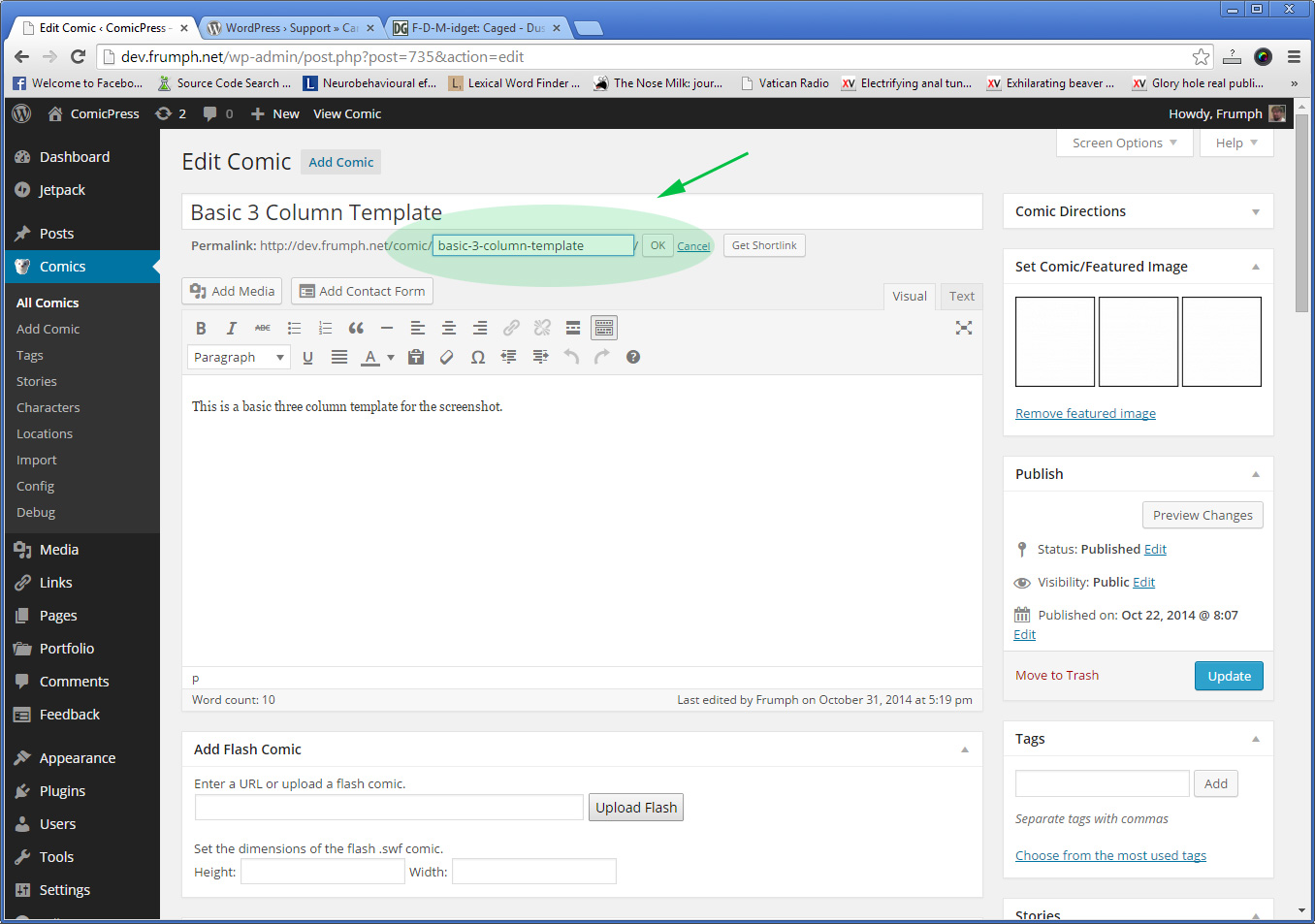
In reply to: [Comic Easel] Can't edit permalinkJust to be clear, we’re talking about this:
http://frumph.net/downloads/edit-slug-box-in-editor.jpg
—–
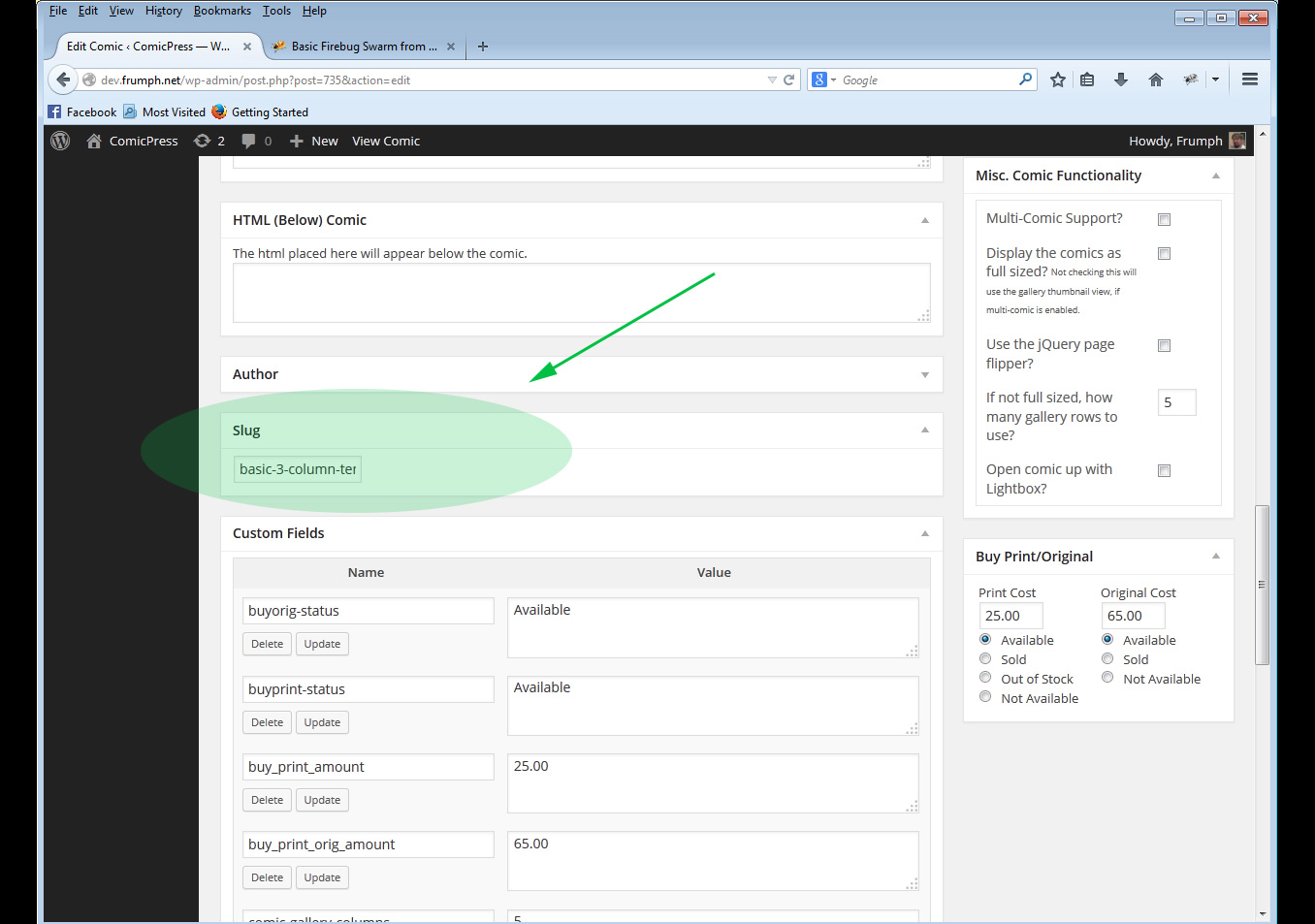
If you have the [x] slug checkbox from the screen options open up, it opens up ANOTHER box lower on the page that looks like this:
http://frumph.net/downloads/slug-screen-option.jpg
two different areas
—–
If you are not seeing the first one. The box itself is set to ‘not display’ .. not be seen at all because of this class=”hide-if-no-js”
If you are using a plugin or bit of code someplace that edits the tinyme editor and it wasn’t updated past 3.9 this would cause an issue.
If you have javascript disabled in your browsers, this would happen.
If another plugin de-enqueue’s jquery and re-enqueue’s their own jquery this could happen.
^ But in all of those cases it would happen to all of the places and not just the comic section.
If you were to use Chrome debug (F10 key pressed) or Firefox with Firebug (F10 again) and enable script debugging and load your editor, you can see if there’s any editor bugs that pop up and find exactly where it’s at.
But at this time, there’s no way for me to duplicate the particular issue where the edit-permalink box isn’t showing; so I am relying on you to go through the steps that I can think of – and the only one I can think of is that there’s something conflicting with the display of the box
Forum: Plugins
In reply to: [Comic Easel] Can't edit permalinkokay “mate”.
This would happen if a 3rd party plugin is running some scripts that is not being inclusive to their pages they’re supposed to be on. (i.e in the head/section of all the admin pages and not just the ones for the plugin it comes from) – – bad programming on their part.
Since I cannot duplicate it on the 7 sites with 5 different browsers that is the only logical conclusion.
So, disable all of your plugins except comic easel – clear your browser cache and give it a go; you’ll notice that you can edit it.
Forum: Themes and Templates
In reply to: [ComicPress] Hyperlinks / image mapsThere’s above html and below html sections inside comic easel, which is used for this.
Forum: Plugins
In reply to: [Comic Easel] Jetpack – Mobile theme for use with Comic EaselThose instructions are outdated, you don’t want to use them; i’ll remove them here soon.
Forum: Plugins
In reply to: [Comic Easel] Can't edit permalinkCan you see the edit of permalinks on regular posts?
Clear your browser cache, you’re retaining the old CSS file in it.
If you’re using firefox or chrome you can hit Control-R to reload your site by avoiding regetting the browser cached files.
Go to appearance -> customize and set the background of your menubar and go to appearance -> menubar to actually SET a menubar.
Forum: Plugins
In reply to: [Comic Easel] Can't edit permalinkhrm, .. did you check the screen options tab in the upper right to see if the option is enabled for you to edit permalinks?