Essekia

Forum Replies Created
-
Hello @kingsdavid, in the table edit page, you can Add Map Field like so
https://freeimage.host/i/HGbHUBeHello @lucas20200 , Will add this to our backlog.
Regards.@jamhamweb Any updates on this?
Hello @oxney,
A1: This is coming in 1.0.2 (based on your request)
A2: Yes. This should already be possible
A3: Coming in v1.0.2 (based on your request) – the ability to completely empty the table of records alone (keep the settings and columns)
A4: Yes.A5: Currently. The user has to click the checkbox (if you have setup that column format) -> click Update. Then, that field would be updated.
Regards.@awstyle We haven’t had a lot of users ask this, so we haven’t prioritised this. Can you share your use-case where this is useful?
@awstyle Have you tried to implement this with the On Table Load -> Filter Table (in trigger and actions)?
@jamhamweb If issue still persists, can you quick send a screenshot of the full triggers and actions config area.
(Would be great to also have debug.log and console.log)
This could be due to a mismatch of the field formats between Tablesome (from onFormSubmit trigger) and Notion Database columns.- This reply was modified 3 years, 5 months ago by Essekia.
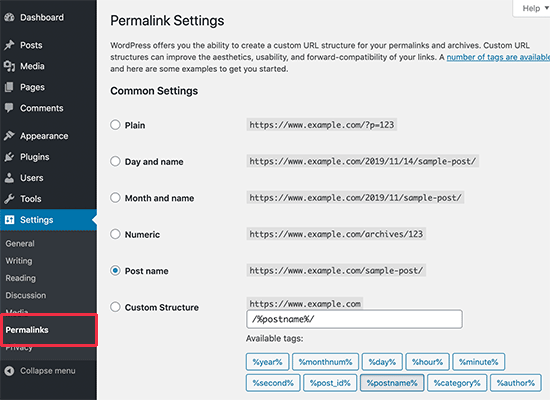
@jamhamweb Can share what you have in your Permalink settings in WordPress (Dashboard -> Settings -> Permalink) ?
Some Rest APIs had problems when they have “Plain” option set in Permalinks which was fixed in v1.0.1.
Can you check with v1.0.1?@bluelee22 Not as of now because there are a lot more features to help users automate most things in WordPress to come and hence we could not add a value to the lifetime plan.
@netton1956 Great Solve. Thanks for using Tablesome and do consider leaving a review.
@pculek Can you check if the latest update v1.0.1 fixes this issue? Also, for any more updates please create a separate support issue.
@netton1956
Should have asked this before. But, could you also share console log and debug logs (after performing both actions which didn’t work 1) Form Submission and 2) Update Row )1. debug.log after loading the page in question ( can be done using this plugin – https://wordpress.org/plugins/debug/ )
2. console.log after loading the page in question ( https://help.mypurecloud.com/articles/gather-chrome-console-log/ )
@pculek Sorry for the confusion, I meant the permalink settings in the dashboard.
You can take a screenshot of the permalink settings page found at:
WP Dashboard -> Settings -> Permalink (would look like this – https://www.wpbeginner.com/wp-content/uploads/2019/11/select-permalinks.png )
Regards.Hello @pculek ,
Can you check your permalink settings at yourdomain.com/wp-admin/options-permalink.php and what option you have there?
I think the issue is related to this and mostly will be fixed by Friday.@kaschwei Bulk Editing is also in our backlog. Please subscribe to our releases to know when it is released.