emdied

Forum Replies Created
-
Forum: Plugins
In reply to: [Auto Post Scheduler] Auto Post Scheduler stopped workingHi @johnh10 thank you for your reply !
I have installed this plugin on all my website (10+) and every website has
5000+ Posts, everything is working great on all sites except this one 🙁 i am so dammn worried because without update my sites are :/Kindly help, what i can do to resolve this issue if it requires premium support i am ready to pay but please help sir 🙁
Thanks and Regards
@emdiedHi Johnh 🙂
Thanks! I tried but was unable to do so :(, can you please guide me how i can do it with the help of “WP Crontrol” Plugin.
or any other method if possible link me any article or video that can help.Thanks & Regards
@emdied- This reply was modified 4 years, 11 months ago by emdied.
Forum: Plugins
In reply to: [WP Job Manager] How to Hide “Load more listings” ButtonHi @bindlegirl
I used that but is’nt working!
i wanna Remove/Hide “Load more listings” Button completely from the page.
Thank You
@emdiedForum: Plugins
In reply to: [WP Job Manager] Wp Job Manager Dashboard Look@braehler Thank You very Much! 🙂 It Worked For Me,
One last thing can i just simply remove <?php the_job_publish_date(); ?> If I don’t Want to show date/time on that page, is doing this can break something into the plugin funcationality? or i need it to hide by using some css. what you suggest.
I dont want to show time/Date from that page.
Thank You
@emdied- This reply was modified 5 years, 2 months ago by emdied.
Forum: Plugins
In reply to: [WP Job Manager] Wp Job Manager Dashboard LookHey @braehler Thank You For the assistance!
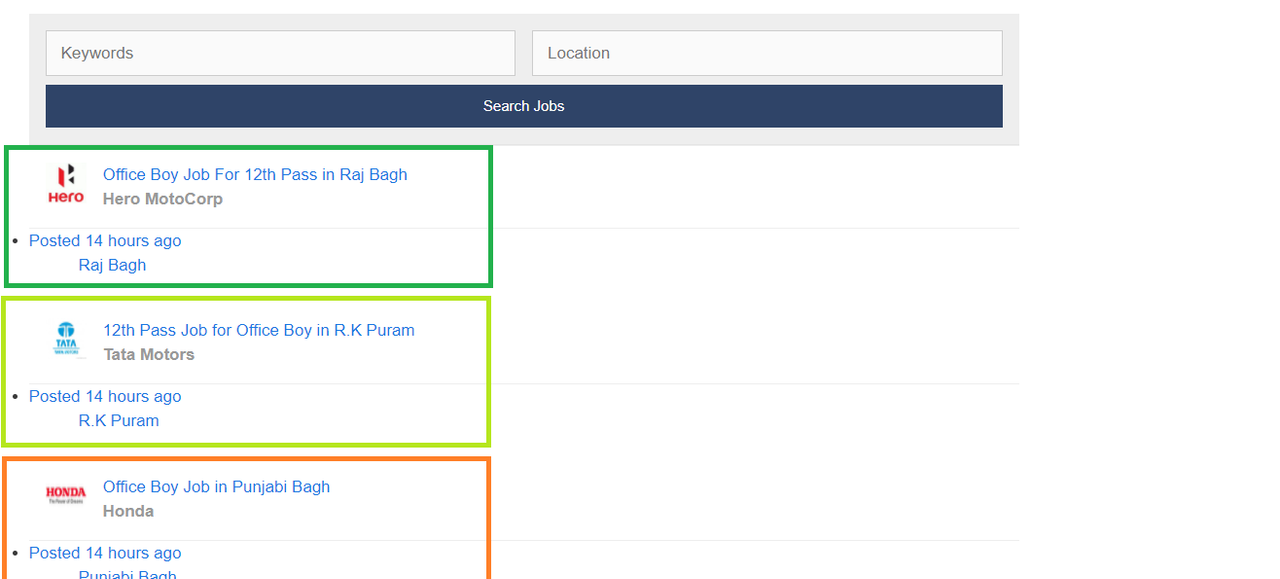
I have tried that as you said by overriding template file but it broke everything :/ kindly look at this screenshot and tell me what to do?
Screenshot Link : https://i.postimg.cc/d3mvDRx1/Broked-Everything.png
==================================================
Summary : What Actually i want to achieve !
=================================================I wanted to Remove “Date/Time” on the page where the “jobs” shortcode is located.
when i am using this line of code by using CSS
time{
display: none;
}It remove the “Time/Date” on every other page but i don’t want that, instead i just wanted to remove it only on the page where the “jobs” shortcode is located.
If you can tell How i can Just Place the “Location” at the place of “Time/date”
I Hope You get the Point what actually i want 🙂 i just wanted to remove time/Date from that page and want to place “location” at the place of “Time/Date”
Kindly Help Its Really very Important For me
Thank You
@emdiedForum: Plugins
In reply to: [WP Job Manager] Wp Job Manager Dashboard LookHey @braehler Thank You For the assistance!
I have tried that as you said by overriding template file but it broke everything :/ kindly look at this screenshot and tell me what to do?
Screenshot Link : https://i.postimg.cc/d3mvDRx1/Broked-Everything.png
Thank You
@emdiedForum: Plugins
In reply to: [WP Job Manager] How i can Hide Locations in FrontendOk! I got it and i have tried it as well its working Great! Thank You:)
I have one more question does doing this will effect my job postings, like locations will be still there or not?, if not kindly tell me some CSS code that i can use just to hide these locations on the frontend only for the viewers,
In-Short i just want to hide locations not complete removals from the post, please help me with this.
Screenshot Link – https://imgur.com/a/GXrRS2Y