dwinden

Forum Replies Created
-
When the Log Type setting is set to “File Only” the Security Log Information metabox on the Logs page will show:
To view logs within the plugin you must enable database logging in the plugin settings. File logging is not available for access within the plugin itself.
So there will not be an additional Security Log Data metabox with log data displayed on the Logs page.
And thus you will also not be able to clear the logs from the plugin.
If the above info answers your questions please mark this topic as ‘resolved’.
dwinden
Log Type : Database Only (you suggest file, is it necessary ?)
I didn’t suggest anything related to this setting … 😉
Ok, let’s go back to the beginning of this topic.
What makes you think the banning of IPs that try to login with “admin” user is not working ?Based on the info provided in your last post banning IPs seems to be working fine.
The error_log clearly shows many IPs trying to access the xmlrpc.php file but being denied access. Probably because these IPs are listed in the Banned Users section of the .htaccess.Do the IPs from .htaccess (Ban Users) and error_log correlate ?
I think you are suffering from an XMLRPC type Brute Force Attack which is distributed over many many many IP addresses.
So the iTSec plugin is doing its work but login attempts as “admin” user keep hitting your site from different IPs …If your site does not need XMLRPC disable it in the WordPress Tweaks section of the iTSec plugin Settings page.
That will take care of the XMLRPC type Brute Force Attack.dwinden
@wp-entwickler.at
I actually tested what I previously posted and it works fine over here …
The iTSec plugin does not set the memory_limit to 256M when it is initialized or activated.
It only does so temporarily when executing a File Change Detection scan or Database Backup, AND ONLY if the current memory_limit < 256M.After execution the value from the WP_MAX_MEMORY_LIMIT is also automatically restored by WordPress.
But who knows I’m missing something … 😉
dwinden
Ok good.
Next we need to make sure you have enabled all the required settings for users to be banned permanently in the .htaccess file. So here we go:
- Global Settings – Write to Files
- Global Settings – Blacklist Repeat Offender
- Banned Users – Ban Users
- Brute Force Protection – Enable local brute force protection
- Brute Force Protection – Automatically ban “admin” user
If any of these settings is not currently enabled, enable them now.
If banning is still not working after enabling all the required settings check your web server error_log for any errors.
Note that when banning an IP the iTSec plugin will normally add the following lines to the .htaccess file:
# Ban Hosts – Security > Settings > Banned Users
SetEnvIF REMOTE_ADDR “^192\.168\.111\.11$” DenyAccess
SetEnvIF X-FORWARDED-FOR “^192\.168\.111\.11$” DenyAccess
SetEnvIF X-CLUSTER-CLIENT-IP “^192\.168\.111\.11$” DenyAccess<IfModule mod_authz_core.c>
<RequireAll>
Require all granted
Require not env DenyAccess
Require not ip 192.168.111.11
</RequireAll>
</IfModule>
<IfModule !mod_authz_core.c>
Order allow,deny
Allow from all
Deny from env=DenyAccess
Deny from 192.168.111.11
</IfModule>By default an IP will be banned after 3 (temporary) lockouts.
So it takes 3 invalid login attempts with the admin username to ban the IP. Any other user 3×5=15 invalid login attempts.dwinden
First thing to check is on which web server (and version) your site is running.
You can find this info in the iTSec plugin Dashboard page.
Scroll down to the System Information metabox, Server Information section, Server Type.The Web Server version is probably not displayed as a good hosting provider will prevent this info from being published.
dwinden
Yes, disabling XMLRPC may (or may not) break some functionality of your site.
It will depend on whether you are using any features that require XMLRPC.dwinden
@wp-entwickler.at
No, there is no bug in the set_minimum_memory_limit() function.
By default WordPress will set the memory_limit to 256M for Admin sessions.
(Verify in wp-includes/default-constants.php and wp-admin/admin.php).To change the default add the following line to your wp-config.php:
define( 'WP_MAX_MEMORY_LIMIT', '512M' );If the above info answers your question please mark this topic as ‘resolved’.
dwinden
Ok, no problem.
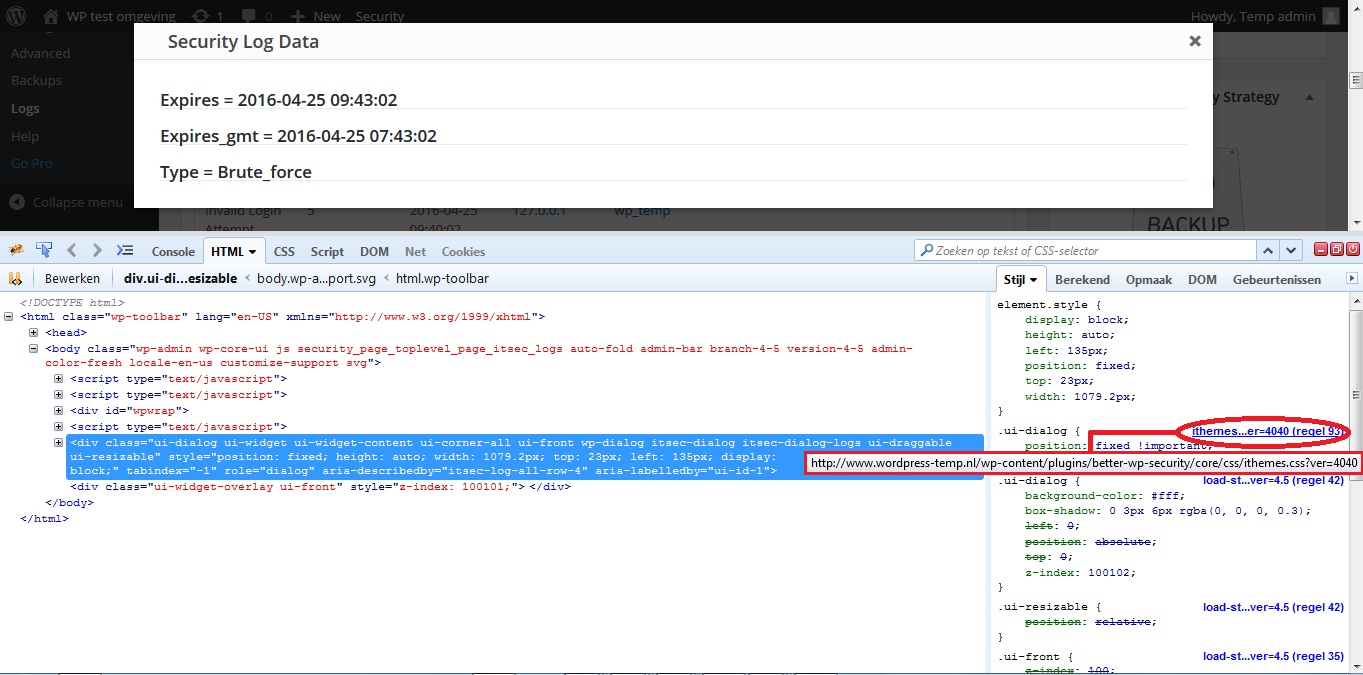
I’ve seen this issue before. Probably a css style conflict from another plugin which is causing this.
I’ve attached an example printscreen from my env displaying some css using Firefox FireBug browser plugin. Compare it with yours.
Example printscreen Host or User Lockout details …
You will probably find that in your env css styles are used from a jquery-ui.css file instead of an ithemes.css file.
Please position the mouse cursor on top of the file name (jquery-ui.css). A tool tip will show you the full path to the jquery-ui.css file. It could be pointing to a plugin or theme folder which includes its own jQuery install or one from Google CDN.
Note the jQuery jquery-ui.css file is normally not included in a WP 4.5 install …
Also notice in my printscreen that (when details are properly displayed) the Logs Details jQuery dialog box only uses styles from the following files:
- ithemes.css
- load-styles.php
You’ll need to identify which plugin enqueues the jquery-ui.css file.
To prevent conflicts it should only be enqueued in that plugin’s admin pages… (and not in ALL admin pages).dwinden
The notice is expected behavior since we are comparing multidimensional arrays. It is triggered since PHP 5.4 or newer.
Weird the notice is triggered only on line 231.
It should be triggered on the previous line (230) as well …dwinden
@julio Potier
According to the 5.3.6 Changelog:
Security Fix: Better caps checks for dismissal of changed file dialog – Thanks to Julio Potier for notifying us of this issue.
For anyone interested read more about this security vulnerability on this page.
Since the security vulnerability was fixed in the 5.3.6 release please mark this topic as ‘resolved’.
dwinden
Seems to me the auth_core error is irrelevant.
I noticed that the memory used for the file change detection scan is pretty high (~160 MB) which probably indicates a lot of files are being scanned. So this could be a sizing issue.
You could try and enable the Split File Scanning setting.
This way File Change Detection scanning is split into 7 chunks.As to the backup please check what files currently exist in the wp-content/uploads/ithemes-security/backups folder (name, size, date).
dwinden
Is any of these 2 plugins installed and activated in your WordPress env:
- wpDataTables
- White Label CMS
dwinden
Forum: Everything else WordPress
In reply to: checksums for formal translations in api.wordpress.orgOk, let me rephrase my question:
How do I submit an enhancement request for the wordpress.org api ?
dwinden