digitalnature

Forum Replies Created
-
Forum: Themes and Templates
In reply to: Help with the Mystique themedo you have the 2 URLs set up correctly in the General Settings page?
paste in your browser
http://rambling-theory.com/?mystique=cssyou should see CSS code.
Forum: Fixing WordPress
In reply to: Changing permalinks for redirect is making load time *super* slowwhat kind of permalinks are you using?
For performance reasons, it is not a good idea to start your permalink structure with the category, tag, author, or postname fields. The reason is that these are text fields, and using them at the beginning of your permalink structure it takes more time for WordPress to distinguish your Post URLs from Page URLs (which always use the text “page slug” as the URL), and to compensate, WordPress stores a lot of extra information in its database (so much that sites with lots of Pages have experienced difficulties). So, it is best to start your permalink structure with a numeric field, such as the year or post ID. See wp-testers discussion of this topic.
don’t do that anymore (changing theme files).
paste the css code I posted above in the theme settings > user css page.I assure you that it does exactly what you want.
where did you test my code above?
can you post a link to your site?Forum: Themes and Templates
In reply to: wtf?– disable cache plugins when updating
– clear your browser cache
– click the reset settings button from the theme settings if your’re upgrading from 1.xForum: Fixing WordPress
In reply to: 4 questions about Comments: quotes, forms, and more1. replace the comments.php file with one from a older version of mystique. try 2.3 from here
2. style the blockquote
3.
li.comment input{ ... }3. set a fixed width for the comment input, or remove the bold/italic properties from .clearFieldBlurred and .clearFieldActive classes
something like this:
ul.navigation ul{
  bottom: -100%;
  top: auto;
  margin-bottom: 60px;
}
you might need to change the margin value…
Forum: Themes and Templates
In reply to: Original Photoshop image files for Mystique themeyes, I’ll put the PSD on my website, after I finish a project I’m working on.
but I don’t know if it will help you very much, because almost all exported slices are individually edited again…
Forum: Fixing WordPress
In reply to: Remove page title from static home ONLY (not other pages)1. where in pages?
2. why would you need that when you can write a post in Visual (WYSIWYG) mode in WordPress?Forum: Plugins
In reply to: How to add extra menu on Top in mystique themesomething like:
register_nav_menus(array('my_menu' => 'Top Header'));
add_action('mystique_header_start', 'my_menu');

function my_menu(){
  wp_nav_menu(array('container_class' => 'navigation', 'theme_location' => 'my_menu'));
}
(paste in advanced – functions, then see the menus page)
Forum: Themes and Templates
In reply to: Fixing page width (and preventing resizing) with Mystique themeset a min-width/ or width property on the .page-content selector, like 980px (keep the fluid option selected)
weird, might be the search highlight js. try this:
open functions.php file and comment out this line:
add_action('mystique_jquery_init', 'mystique_highlight_search_query');then go back and make search in IE8 and see what happens
Forum: Fixing WordPress
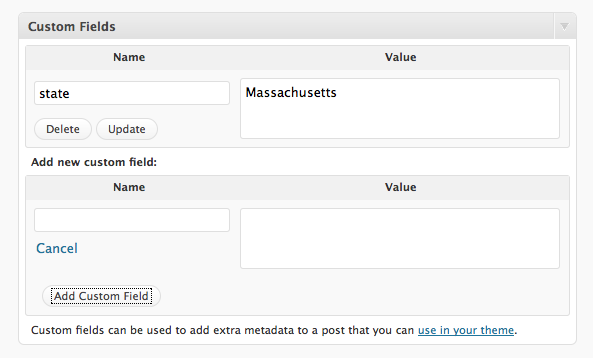
In reply to: Remove page title from static home ONLY (not other pages)here
instead of “state” add “hide_title”
value can be empty.you can force a ampersand by wrapping the entire esc_url_raw(…) function above in htmlentities(), but then the css file won’t be imported anymore 🙂
looks like css import doesn’t accept html encoded characters.
if you only want the html to validate, change the function above to:
function mystique_load_stylesheets(){ ?>
<style type="text/css">
 /* <![CDATA[ */
 @import "<?php bloginfo('stylesheet_url'); ?>";
 @import "<?php echo esc_url_raw(add_query_arg('mystique', 'css', (is_404() ? get_bloginfo('url') : mystique_curPageURL()))); ?>";
 /* ]]> */
</style>
I didn’t test it but it should work…
Forum: Fixing WordPress
In reply to: Remove page title from static home ONLY (not other pages)add a custom field in the page named “hide_title”