dba83

Forum Replies Created
-
Hi Dmytro, thank-you so much ! it is a good idea! and i think it works , i’m going to test this asap, i keep-you informed.
BR
Dominique
Hi Amin, thanks for your reply, but i have tried “after specific days” and for example if i set “20” ,after validation of the rule the indication is “date is 20 or more days from current date” so the rule takes always in account the year , i am stuck..
In any case, thanks for all your explanations
BE
Dominique
Hi Dmytro, thanks for your reply !
So i understand that is not simply to do this…
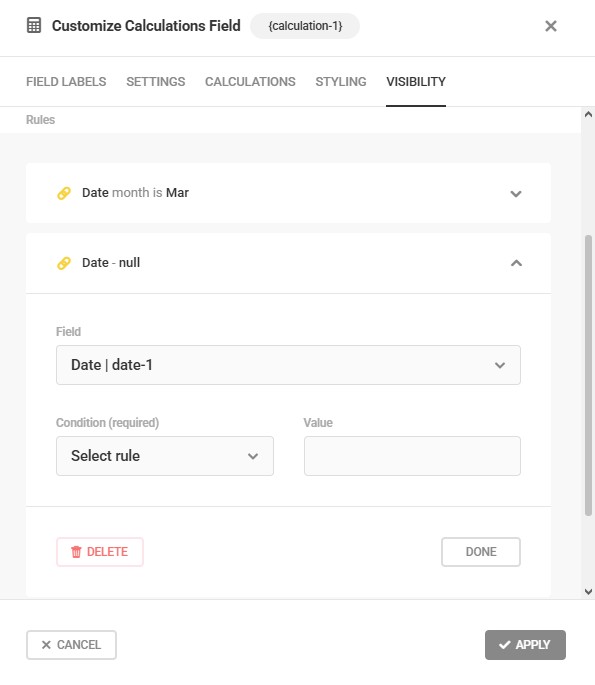
However i have tried to create a calculation of Arie sign on the date range |21 march to 20 april]
on my first calculation i have selected the rule ” date month is mar” but Can-you explain how to setup a value “Select Rule” ? , i need to add a rule saying day is after 20 …
Here is screenshot of my calculation item : https://i.postimg.cc/hPfG6d26/Select-rule.jpg
BR
Dominique
Hi Nirhin,
sorry i was busy .. thanks for your previous message , but when you said “it is possible to pre-populate the Forminator fields using a query parameter” , i cannot do this simply because : yes i can pre-populate a date ( i have done the test and it is ok) , but how to pre-populate only day + month ?
probably impossible ?
BR
Dominique
- This reply was modified 4 days, 23 hours ago by dba83.
Hi Dmytro,
it is working fine ! thanks , but is it possible to prepopulated a form with a date but without the year ?
I mean i succeed to populate a date on another form on a submitted page , but if i want de detect the astrologic sign, i need to populate only the day and month , (or populate the date with masking the year) , but i think it is quite impossible ?
BR
Dominique
- This reply was modified 1 week, 5 days ago by dba83.
Hi Dmytro,
Thank-you so much !!, i think it can work fine !
I will check soon this procedure , i’ll keep-you informed
BR
Dominique
Thank-you so much for your informations !
Best Regards
Dominique
Hi, sorry my question is not clear : i try to use the query parameter on the second page (date of birth) in order to calculate the astrologic sign on the form, and then submit to another page with the sign characteristic . But i think it is not possible.
BR
Dominique
Thanks for your reply, but is-it possible to hide the second pre-populated form( the user is knowing his date of birth), and ask the user to validate the form ?
Best Regards
Dominique
Before mark this thread as resolved I have a last question :
Is it possible to run the pre-populated form ( in my case the “Signes” form) automatically when the new page is submitted , and without the user intervention ?
BR
Dominique
Hi Dmytro, yes it’s working fine!
Thank-you for your great help !
BR
Dominique
Hi Kris, thanks for you email , i have followed the rules to Pre-Populate my Form Field Values, however i don’t know how to use this field value on my second form here is my operations :
On my first form ” date de naissance” , i have updated one URL after submission behavior to pre-populate the “date-1” value ( ie date of birth) like the following ( the sixth URL submission) :
https://astro-dom.ovh/yamato/?page_id=272?datedenaissance={date-1}
So the key here is “datedenaissance”
Then on the submitted page above i have created another form “signes” and updated the setting date field with the query parameter “datedenaissance” , then i copied the shortcode of my form “signes” on the new page above, but when the submitted page appears , the form is displayed without the date and i need also to enter the date of birth !
I think that i’m doing something wrong but i don’t know what is wrong…
Please download the “date de naissance” form here: https://drive.google.com/file/d/1h2K-3NXw8_kWFXXAY_jdPX4G6-Ar5Ukw/view?usp=sharing
and “signes” form here : https://drive.google.com/file/d/1qS8_M-YZvjip_q8w8ASR6GrVxiYLoVi-/view?usp=sharing
Thank-you by advance
BR
Dominique
Hi Dmytro, thanks for your email , yes i have followed your suggestion but i don’t know how to use the date of birth on the new page submitted : the best way for me is to use the date of birth on another form to submit another page without input of the user .. Please let me know if it is possible ?
BE
Dominique
Hi Amin,
very sorry , il think the access are not working correctly on the drive, please download my staging form on the following link : https://www.filemail.com/d/tkxrfslfzdgqpel
BR
Dominique
Hi Nithin,
thanks for your reply , i have put my Form stagin site which use not hidden rules “Date de naissance Staging.txt” , you can download it on this link : https://drive.google.com/drive/folders/1NWukzoSQ4RRFsZd_N8e2IfbHlRE-yBd7?usp=sharing
BR
Dominique