davmerit

Forum Replies Created
-
Forum: Plugins
In reply to: [Contact Form 7] Receive Bounced Mail” Another contact form we’ve used before had a fail-to: header tag”
Is there a link where I can find information on this – fail-to: header tag?
Forum: Plugins
In reply to: [Contact Form 7] Rescue Contact Form 7 data base entriesSeems impossible that CF7 did’t store informations in some place.
Contact From 7 just sends emails it does not store your emails in WP database.
Forum: Plugins
In reply to: [Contact Form 7] Include referrer on mailpage from which the user accessed the contact page
Forum: Plugins
In reply to: [Contact Form 7] Send message to recipient depending on value of a fieldSelectable Recipient with Pipes might offer a solution.
Forum: Plugins
In reply to: [Contact Form 7] Date Placeholder not workingI can see your problem is resolved – You may add a reply on how you resolved it to help others. Also remember to check it as [resolved]
Forum: Plugins
In reply to: [Contact Form 7] Form not sending emailThough the plugin successfully sends millions of emails every day, there are a host of issues that can stop or delay emails on both the sending and receiving ends. It depends entirely on your local Server & WordPress configuration. You will need to investigate this issue for your particular local configuration.
See Contact Form 7 Email Issues. There is a link at the bottom of the page to a comprehensive and detailed article which covers many issues. Most people that work through this information appear to be able to resolve their email sending & receiving issues.
Forum: Plugins
In reply to: [Contact Form 7] Show submit buttom and "no file selected" in different linesI think you supposed to check https://wordpress.org/support/topic/no-file-selected-in-a-new-line?replies=3#post-7577539 as resolved too 🙂
Forum: Plugins
In reply to: [Contact Form 7] Checkmail ErrorPlease include a link to your Contact Form 7 form plus all your input in the Form and Mail sections of the CF7 interface. If others here are able to understand your actual problem, they may be able to offer a possible solution.
Forum: Plugins
In reply to: [Contact Form 7] How to retrieve e-mail ids from the form filled by usersYou can use the submission storage plugin and export your DB to a csv. see https://wordpress.org/plugins/contact-form-7-to-database-extension/
Forum: Plugins
In reply to: [Contact Form 7] Is it possible to create an IF THEN Form?Conditional Logic is is not available directly in the Contact Form 7 plugin.
It can be done via custom programing but you would need to be rather skilled at WordPress development using PHP and/or jQuery.Some of the premium Form plugins do offer some Conditional Logic including Gravity Forms and Ninja Forms.
Forum: Plugins
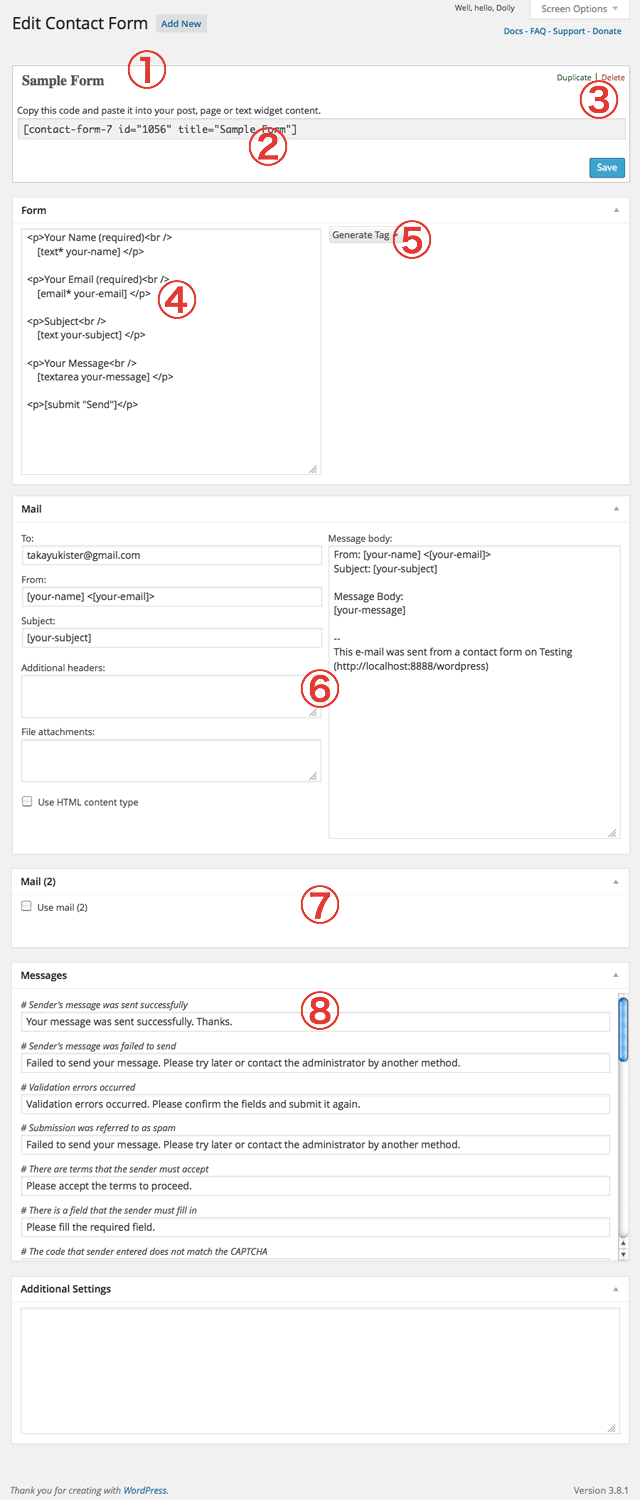
In reply to: [Contact Form 7] Not get email ( office 365 domain email )You are probably using your gmail address in the TO: field of CF7 user interface.
See Contact Form 7 Interface at https://cacoo.com/diagrams/2xhVwuNicE1G20Df-6E3D9.png
In the screenshot point number 6, enter the preferred email address to receive emails from your form.
Forum: Plugins
In reply to: [Contact Form 7] No file selected in a new lineStyling of Upload / Add File is largely contolled by the selected browser unless you use Javascript to override this – see http://stackoverflow.com/questions/4909228/style-input-type-file
see http://contactform7.com/custom-layout-for-checkboxes-and-radio-buttons/
Also see Styling Contact Form for a general explanation of styling CF7 forms using CSS.
If you find you need more detailed advice, after reading and working through the above links, please include a link to your Contact Form 7 form, so others here can examine your form in detail using Firebug or Chrome Dev Tools to understand the CSS used for your CF7 form elements and provide you with a possible solution.
You may target the wrapper around
iframe
see http://stackoverflow.com/questions/27713505/recaptcha-api-v2-styling.For a basic* styling around reCAPTCHA, you may do something like this
.wpcf7-recaptcha{ margin-top: 20px; margin-bottom: 20px; }Use Firebug or Chrome Dev Tools to examine the HTML and CSS of your CF7 form in detail. Once you understand how the HTML and CSS is configured in your CF7 form, you should be able to see the CSS changes you need to change the appearance of the form to suit your requirements.
Also see Styling Contact Form for a general explanation of styling CF7 forms using CSS.
Forum: Plugins
In reply to: [Contact Form 7] Style File Upload ButtonStyling of Upload / Add File is largely contolled by the selected browser unless you use Javascript to override this – see http://stackoverflow.com/questions/4909228/style-input-type-file