codeforweb

Forum Replies Created
-
Forum: Fixing WordPress
In reply to: Secure connection errorBefore reading your post I was browsing through different posts and was trying to resolve the above mentioned error message and I have ended up in a blank page error that says[I had disabled the firewall service]
“This site can’t be reached 10.20.0.16 refused to connect.
Search Google for admin plugins
ERR_CONNECTION_REFUSED”I’m also unable to restart my httpd service, and when I check the status for httpd I get this message
[root@webserver ~]# service httpd status
Redirecting to /bin/systemctl status httpd.service
● httpd.service – The Apache HTTP Server
Loaded: loaded (/usr/lib/systemd/system/httpd.service; enabled; vendor preset: disabled)
Active: failed (Result: exit-code) since Wed 2018-12-26 22:23:37 PST; 30min ago
Docs: man:httpd(8)
man:apachectl(8)
Process: 16967 ExecStop=/bin/kill -WINCH ${MAINPID} (code=exited, status=1/FAILURE)
Process: 1138 ExecReload=/usr/sbin/httpd $OPTIONS -k graceful (code=exited, status=0/SUCCESS)
Process: 16965 ExecStart=/usr/sbin/httpd $OPTIONS -DFOREGROUND (code=exited, status=1/FAILURE)
Main PID: 16965 (code=exited, status=1/FAILURE)Dec 26 22:23:37 webserver.abc.com systemd[1]: Starting The Apache HTTP Server…
Dec 26 22:23:37 webserver.abc.com systemd[1]: httpd.service: main process exited, code=exited, status=1/FAILURE
Dec 26 22:23:37 webserver.abc.com kill[16967]: kill: cannot find process “”
Dec 26 22:23:37 webserver.abc.com systemd[1]: httpd.service: control process exited, code=exited status=1
Dec 26 22:23:37 webserver.abc.com systemd[1]: Failed to start The Apache HTTP Server.
Dec 26 22:23:37 webserver.abc.com systemd[1]: Unit httpd.service entered failed state.
Dec 26 22:23:37 webserver. abc.com systemd[1]: httpd.service failed.Do you have any idea what might have gone wrong?
Forum: Themes and Templates
In reply to: [WP Bootstrap Starter] Fix footer to bottom of the pageThank you @saidalkharusi this worked well for me! :))
After looking through all the folders and files I came across this
Resolution: Go to /inc/customizer.php file in your theme folder and search for #page-sub-header and change the background color from #fff to whatever color you need.
See Screenshot for details https://snag.gy/yWFjim.jpg
Forum: Fixing WordPress
In reply to: Unable to update WordPress (4.9.4) to 4.9.6Attached screenshot links for reference
Thanks!
Forum: Fixing WordPress
In reply to: Unable to update WordPress (4.9.4) to 4.9.6Thank you @sterndata.
SELinux was the issue!! After reading a lot of other posts and blogs came down to this resolution.Resolution: Enter this command
ls -Z /var/www/html/path_to_your_website_folder/
If your output is as shown below (read, write permissions are only enabled for wp-content folder.)
-rw-rw-r–. apache apache unconfined_u:object_r:httpd_sys_content_t:s0 index.php
-rw-rw-r–. apache apache unconfined_u:object_r:httpd_sys_content_t:s0 license.txt
-rw-rw-r–. apache apache unconfined_u:object_r:httpd_sys_content_t:s0 readme.html
drwxrwxr-x. apache apache unconfined_u:object_r:httpd_sys_content_t:s0 wordpress
-rw-rw-r–. apache apache unconfined_u:object_r:httpd_sys_content_t:s0 wp-activate.php
drwxrwxr-x. apache apache unconfined_u:object_r:httpd_sys_content_t:s0 wp-admin
-rw-rw-r–. apache apache unconfined_u:object_r:httpd_sys_content_t:s0 wp-blog-header.php
-rw-rw-r–. apache apache unconfined_u:object_r:httpd_sys_content_t:s0 wp-comments-post.php
-rw-rw-r–. apache apache unconfined_u:object_r:httpd_sys_content_t:s0 wp-config.php
-rw-rw-r–. apache apache unconfined_u:object_r:httpd_sys_content_t:s0 wp-config-sample.php
drwxrwxr-x. apache apache unconfined_u:object_r:httpd_sys_rw_content_t:s0 wp-content
-rw-rw-r–. apache apache unconfined_u:object_r:httpd_sys_content_t:s0 wp-cron.php
drwxrwxr-x. apache apache unconfined_u:object_r:httpd_sys_content_t:s0 wp-includes
-rw-rw-r–. apache apache unconfined_u:object_r:httpd_sys_content_t:s0 wp-links-opml.php
-rw-rw-r–. apache apache unconfined_u:object_r:httpd_sys_content_t:s0 wp-load.php
-rw-rw-r–. apache apache unconfined_u:object_r:httpd_sys_content_t:s0 wp-login.php
-rw-rw-r–. apache apache unconfined_u:object_r:httpd_sys_content_t:s0 wp-mail.php
-rw-rw-r–. apache apache unconfined_u:object_r:httpd_sys_content_t:s0 wp-settings.php
-rw-rw-r–. apache apache unconfined_u:object_r:httpd_sys_content_t:s0 wp-signup.php
-rw-rw-r–. apache apache unconfined_u:object_r:httpd_sys_content_t:s0 wp-trackback.php
-rw-rw-r–. apache apache unconfined_u:object_r:httpd_sys_content_t:s0 xmlrpc.phpAll you need to do is enable read write for all the other files and directories which can be done using the following command
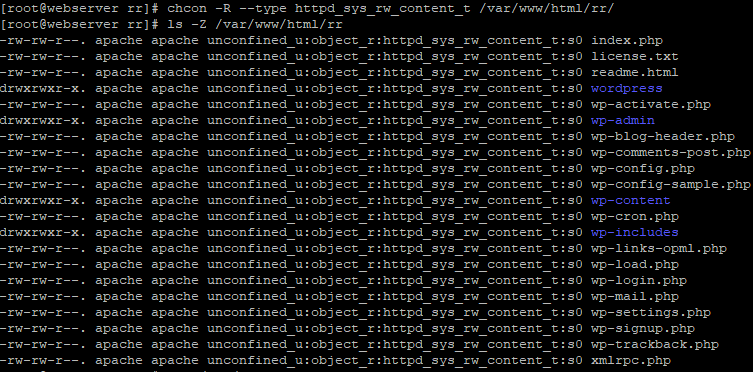
chcon -R –type httpd_sys_rw_content_t /var/www/html/rr/path_to_your_website_folder/
Now the output should look something like this.
-rw-rw-r–. apache apache unconfined_u:object_r:httpd_sys_rw_content_t:s0 index.php
-rw-rw-r–. apache apache unconfined_u:object_r:httpd_sys_rw_content_t:s0 license.txt
-rw-rw-r–. apache apache unconfined_u:object_r:httpd_sys_rw_content_t:s0 readme.html
drwxrwxr-x. apache apache unconfined_u:object_r:httpd_sys_rw_content_t:s0 wordpress
-rw-rw-r–. apache apache unconfined_u:object_r:httpd_sys_rw_content_t:s0 wp-activate.php
drwxrwxr-x. apache apache unconfined_u:object_r:httpd_sys_rw_content_t:s0 wp-admin
-rw-rw-r–. apache apache unconfined_u:object_r:httpd_sys_rw_content_t:s0 wp-blog-header.php
-rw-rw-r–. apache apache unconfined_u:object_r:httpd_sys_rw_content_t:s0 wp-comments-post.php
-rw-rw-r–. apache apache unconfined_u:object_r:httpd_sys_rw_content_t:s0 wp-config.php
-rw-rw-r–. apache apache unconfined_u:object_r:httpd_sys_rw_content_t:s0 wp-config-sample.php
drwxrwxr-x. apache apache unconfined_u:object_r:httpd_sys_rw_content_t:s0 wp-content
-rw-rw-r–. apache apache unconfined_u:object_r:httpd_sys_rw_content_t:s0 wp-cron.php
drwxrwxr-x. apache apache unconfined_u:object_r:httpd_sys_rw_content_t:s0 wp-includes
-rw-rw-r–. apache apache unconfined_u:object_r:httpd_sys_rw_content_t:s0 wp-links-opml.php
-rw-rw-r–. apache apache unconfined_u:object_r:httpd_sys_rw_content_t:s0 wp-load.php
-rw-rw-r–. apache apache unconfined_u:object_r:httpd_sys_rw_content_t:s0 wp-login.php
-rw-rw-r–. apache apache unconfined_u:object_r:httpd_sys_rw_content_t:s0 wp-mail.php
-rw-rw-r–. apache apache unconfined_u:object_r:httpd_sys_rw_content_t:s0 wp-settings.php
-rw-rw-r–. apache apache unconfined_u:object_r:httpd_sys_rw_content_t:s0 wp-signup.php
-rw-rw-r–. apache apache unconfined_u:object_r:httpd_sys_rw_content_t:s0 wp-trackback.php
-rw-rw-r–. apache apache unconfined_u:object_r:httpd_sys_rw_content_t:s0 xmlrpc.phpSolution taken from @toddalancox ‘s post. Thank you @toddalancox. You made my day 🙂
Hope this helps someone else too.Forum: Fixing WordPress
In reply to: Unable to update WordPress (4.9.4) to 4.9.6The permissions for /wp-admin/includes is 775 apache:apache
Forum: Fixing WordPress
In reply to: Unable to update WordPress (4.9.4) to 4.9.6I have updated the ownership to apache:apache, but it still shows the same error 🙁
“Downloading update from https://downloads.wordpress.org/release/wordpress-4.9.6-partial-5.zip…
Unpacking the update…
The update cannot be installed because we will be unable to copy some files. This is usually due to inconsistent file permissions.: wp-admin/includes/update-core.php
Installation Failed”
Forum: Themes and Templates
In reply to: [WP Bootstrap Starter] Fix HeaderHello @moelle
You can try adding “fixed-top” to the “site-header” class in the header.php file.
For details check this image https://snag.gy/i3Nk6e.jpg.Hope this helps you. Have a great day!
Forum: Themes and Templates
In reply to: [WP Bootstrap Starter] Transparent Background ImageThank you for the help @afterimagedesigns
I did it by reducing the opacity of my background image in Adobe Photoshop.
Forum: Fixing WordPress
In reply to: Access Permissions WordPressThanks for the help Steve. I am able to upload the images to my WordPress without any issues! :))
Forum: Fixing WordPress
In reply to: Access Permissions WordPressThe directory in which I have my WordPress theme is rr.
My permissions are/var/www – rwxr-xr-x (owner-root)
/var/www/html – rwxr-xr-x (owner-root)
/var/www/html/rr – rwxr-xr-x (owner-nobody)
/var/www/html/rr/wp-content – rwxr-xr-x (owner-nobody)Forum: Fixing WordPress
In reply to: Access Permissions WordPressI executed this command
find . type f -exec chmod 644 {} \;
and the 500 error page is not being displayed now. I am able to view my web page.But I am still unable to upload a background image. (same error appears “Unable to create directory wp-content/uploads/2018/05. Is its parent directory writable by the server?”)
Forum: Fixing WordPress
In reply to: Access Permissions WordPressWhen I run this command ps -ef |grep php, its says PHP is running under root user. Also I checked(cat /etc/sysconfig/selinux) SE Linux is in enforcing state, but how do I change them to 755/644??
Forum: Fixing WordPress
In reply to: Access Permissions WordPressForum: Fixing WordPress
In reply to: Access Permissions WordPressHi Steve,
I hosting my site on a Red Hat Linux on which I have set up a LAMP stack server. I read in a blog that changing access permission would fix the file upload error and followed the steps provided in links 1 and 2(mentioned in my question).
I feel the 500 error that I am getting now, is due to the permissions I have set up. I have taken screenshots to show. But can I upload images in this forum or is there another way to show them?