Chris Jean

Forum Replies Created
-
Forum: Plugins
In reply to: [Easy Theme and Plugin Upgrades] Updating ThemePeople previously said that all that needed to be updated was
trunk/readme.txt. I tested that, and it did not work. I tried again after seeing your message, and it still didn’t work.Then I thought about updating the
tags/1.0.4/readme.txtfile. I did the update, and that worked. Thanks.Forum: Plugins
In reply to: [Easy Theme and Plugin Upgrades] Updating ThemeGlad to hear that. Have a good day.
Forum: Plugins
In reply to: [Easy Theme and Plugin Upgrades] Updating ThemeIt works well with the current version of WordPress. The only way to update the version compatibility reported on and by .org is to release a new version. It hasn’t required an update in a bit, so that number gets out-of-date.
Forum: Plugins
In reply to: [Easy Theme and Plugin Upgrades] Updating ThemeThe Easy Theme and Plugin Upgrades plugin doesn’t have a settings page or any options. It also doesn’t have any text saying “Force Updates”. So I’m confused when you refer to enabling all of the plugin’s options and using the “Force Updates” option. Any of those settings that you see would be from something else and not this plugin.
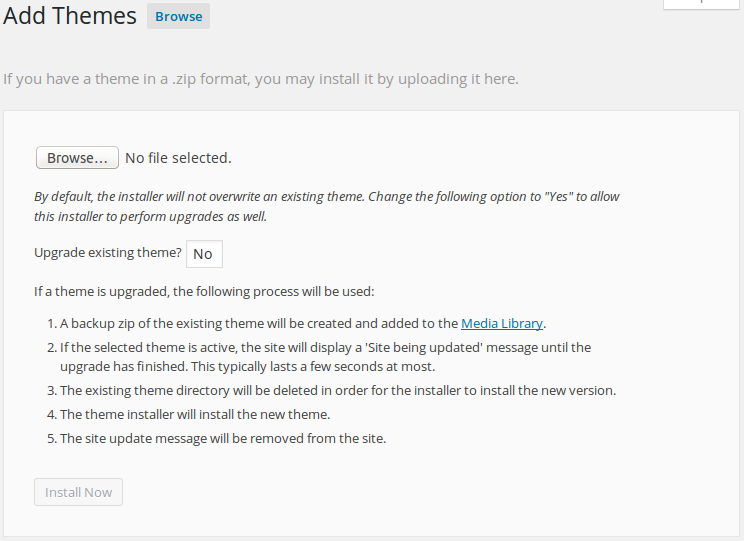
The primary thing that this plugin does is modify the page used to upload a theme or plugin file. You can see the modification in this screenshot (that page can be reached by going to Appearance > Themes, clicking the “Add New” button at the top of the page, and then clicking the “Upload Theme” button at the top of the page). To enable this plugin’s ability to replace an existing theme with a zip file containing a theme with the same name, use the “Browse…” button (or however that appears on your specific browser), select “Yes” from the “Upgrade existing theme” drop down, and click the “Install Now” button.
If this plugin is able to work with your site, you’ll see a confirmation page showing that the theme was installed and details about where you can download a backup of the old theme files.
Forum: Plugins
In reply to: [Easy Theme and Plugin Upgrades] Can't deactivate, can't deleteI’m not sure what could cause that. The plugin doesn’t run any code on deactivate, so everything in the deactivate process would be from WordPress and any plugin that latched into that process. It’s possible that some plugin or other customization was creating the issue.
All of this is purely academic however as the problem is now resolved. 🙂
Forum: Plugins
In reply to: [Easy Theme and Plugin Upgrades] Can't deactivate, can't deleteWhen you say that the plugin won’t deactivate, does that mean that you do not have a link to deactivate the plugin or that you click the link to deactivate, but it does not deactivate?
If you are able to click the link, do you see an error message that indicates what prevented the plugin from deactivating?
One option is to manually remove the plugin by using FTP or some other file manager for the site to manually delete the plugin’s directory. This can typically be found at:
wp-content/plugins/easy-theme-and-plugin-upgradesOnce the directory is deleted, reload the plugins page, and it should tell you that the plugin was deactivated since it could not be found.
I can’t give any advice beyond what I’ve given above. I’m not adept at Varnish configs, but I know enough about them to know that the Varnish config is causing this specific incompatibility.
Varnish is very, very tough to configure properly. I have seen big hosting companies get it wrong. I would assume that you probably followed a guide on setting up your server which included Varnish as part of a high-availability WordPress setup. While this can work for simple WordPress setups, such configurations often start having problems when changing things away from a standard WordPress setup.
My recommendation would be to either not use the hide backend feature or remove Varnish from your hosting setup until you learn enough about it to handle such issues.
The issue is likely caused by your Varnish config. The config is likely set to allow and recognize cookies when the URL matches wp-login or wp-admin while dropping cookies elsewhere. The result of this is that changing the login URL causes all cookies for the custom URL to be dropped. Your options are to modify the Varnish config to allow cookies for your custom login page name (in addition to the wp-login and wp-admin URL patterns) or to not use the hide login page feature.
Forum: Plugins
In reply to: [Global Content Blocks] EndSession ErrorWith regards to the simplest things creating problems, I fully agree. I’ve been there many times before.
Thanks for the quick update.
Happy Thanksgiving everyone.
Forum: Plugins
In reply to: [Global Content Blocks] EndSession ErrorHi Dave. I’m one of the developers for iThemes Security.
You are correct that the problem was related to the gcbEndSession() function, but the modification has a bug in it, preventing it from working as expected.
The function currently looks as follows:
function gcbEndSession() {
    if(!session_id()) {
        session_destroy ();
    }
}
However, it should be:
function gcbEndSession() {
    if(session_id()) {
        session_destroy ();
    }
}
In gcbStartSession(), using !session_id() is correct as you only want to run session_start() if there is not a current session. However, in gcbEndSession(), you want to check session_id() (without !) in order to ensure that you are only calling session_destroy() when there is a current session. With the current logic, it only attempts to destroy the current session when there is not a current session. This is the reason for the warning being triggered which in turn is preventing the redirect from working as expected.
Please let me know if you have any questions.
Forum: Plugins
In reply to: [Easy Theme and Plugin Upgrades] error in "already subscribed" e-mail messageNo problem. Good luck with your issue.
Forum: Plugins
In reply to: [Easy Theme and Plugin Upgrades] error in "already subscribed" e-mail messageI believe that you posted this on the incorrect plugin. This support is for the Easy Theme and Plugin Upgrades plugin.
While I can’t know the exact situation, my best guess is that upgrading the theme also upgraded the data stored by the theme, which cannot be reverted to the old version. The only way to fix the issue may be to manually apply your changes to the new version of the theme.
It is for this reason that I don’t recommend people modify the theme directly, as those modifications can be accidentally destroyed when updating the theme. This is why I ensured that this plugin creates a backup before it upgrades the theme/plugin.
I would suggest that you also ask the theme vendor how they recommend that you make your modifications so that they are not destroyed with future updates.
Best of luck to you. I hope that you are able to resolve the issue quickly.
I’m unfamiliar with that error message. I cannot find it inside WordPress’ code. That indicates that the error message is coming from the theme itself or perhaps a plugin that the theme relies upon. I believe that only the theme vendor can help you properly fix this issue as they will know what triggers this error and how it can be resolved.
Forum: Plugins
In reply to: [Easy Theme and Plugin Upgrades] missing stylesheetWould you be able to share the zip file that is failing with me?
You can send it to wordpress.cb18@spamgourmet.com. Please include a link to this support request so that I can reference where it came from. Thanks.