batdoi

Forum Replies Created
-
Forum: Fixing WordPress
In reply to: trouble switching from code to visual while postingClear your browser cache (if using IE or Firefox, hit ctrl-F5 when on the Write Posts page).
I already did what you told me but it still didn’t work.
Forum: Fixing WordPress
In reply to: trouble switching from code to visual while postinganyone plz?
Forum: Fixing WordPress
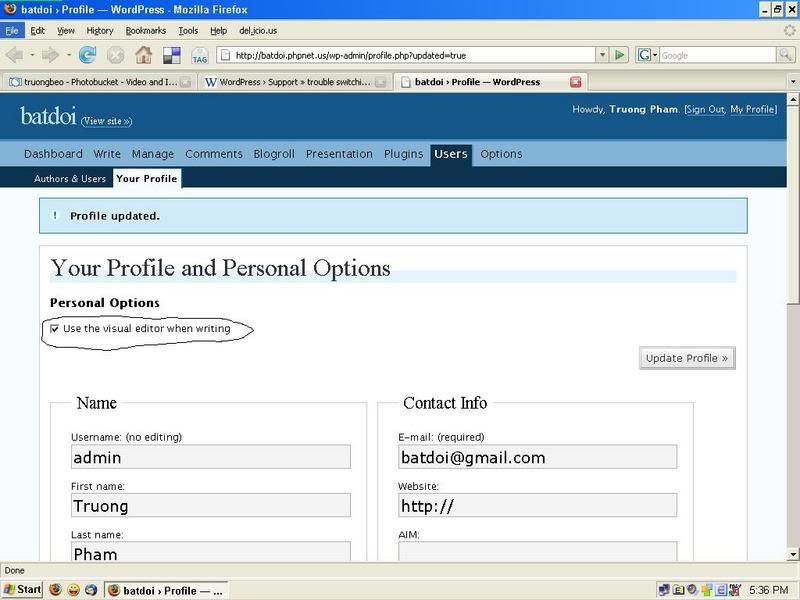
In reply to: trouble switching from code to visual while postinghave to say sorry again. Yesterday I thought the problem was solved but today I realize it wasn’t. Even though I’d checked
“Use visual rich editor”, I couldn’t switch to visual.
http://i27.photobucket.com/albums/c198/truongbeo/profile.jpg
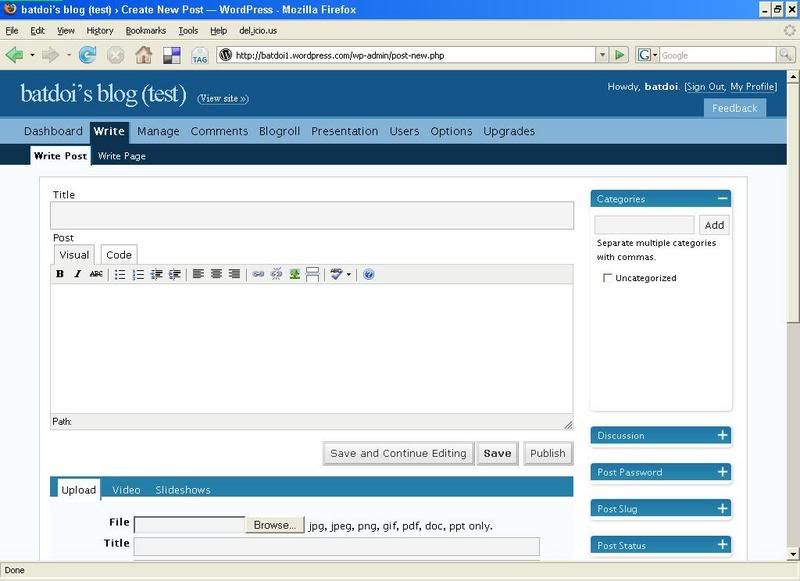
plz check this for me:
http://i27.photobucket.com/albums/c198/truongbeo/wpproblem.jpg
I don’t know why the format toolbar in my blog dashboard disappeared, although I still can see one in another WP blog
http://i27.photobucket.com/albums/c198/truongbeo/wp.jpgPlease help me.
Thanks a lotForum: Fixing WordPress
In reply to: trouble switching from code to visual while postingoh, my bad for not reading HandySolo’s first post carefully.
Again, thank you very much!PS: I’m really impressed by your responsive support!
Forum: Fixing WordPress
In reply to: trouble switching from code to visual while postingthe problem is now solved.
Thank you very much, HandySolo!Forum: Fixing WordPress
In reply to: trouble switching from code to visual while posting{deleted} sorry, please delete this for me
It looks like your blog location in options is set incorrectly. Seeing as how you can get to your admin, you’ll have to manually change it in the database. Do you know how to do that?
so what to do now? can you show me how to change it in the DB plz?