Gary H

Forum Replies Created
-
Forum: Fixing WordPress
In reply to: How do I make sidebar widerThank you Aleix, You gave me enough to go on to find where I can find the size. I am almost done, testing it now.
Forum: Fixing WordPress
In reply to: How do I make sidebar widerAlan,
Thanks for your input, but it’s not really the kind of helpful advice I was looking for. I just can’t find the exact lines to edit in the eyesite theme.I figured it out, it is caused by the theme I’m using. So far I haven’t found a theme that works with all my other content and teh contact form, so I will keep trying different themes till I hit the jackpot. Thanks.
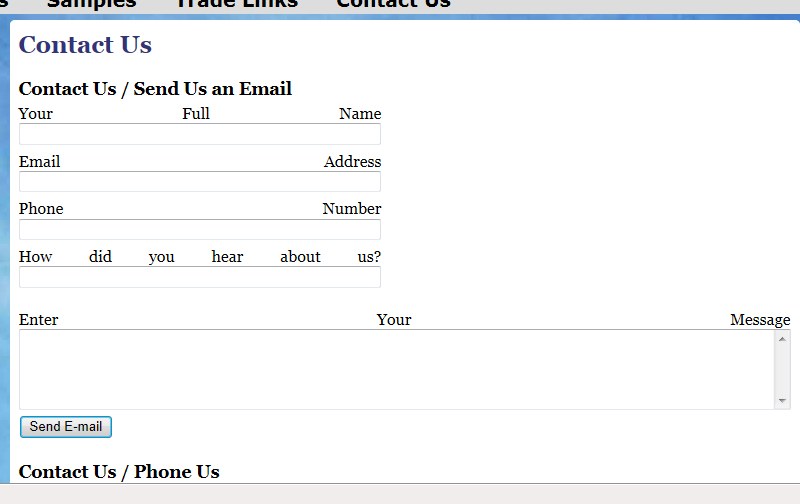
OK, I went back to it today and the form is different. I did not do anything since I last checked it, but it is still too much space between words on the top of each input area. It was originally all inputs across the entire screen, but now only the comment portion is full screen. That part is perfect, but how do I pull the words together? I have attached a picture so maybe you guys can understand what I am talking about. Hopefully, someone has seen this before.
Thanks for taking the time to look at this.
<img src=”http://www.norinedecorators.com/images/contact1.jpg”>
OK so I tried to attach a picture. lol. Follow the link above for the picture, not exactly attached but you can get to it by the link.Hey guys, I figured it out. To clarify, I was clicking on the + sign to try to change the phone numbers. That’s when I got the error above. I tried it with google chrome, but when I hovered over the phone number in google chrome, it popped up saying click to edit, so I did. And that worked fine after I hit enter. I should know better than to use IE for this. Doh!! I figured I would post it here in case any one else can benefit from my stupidity.
Axe