Andrei

Forum Replies Created
-
Hey there,
Thanks for reaching out to us!
Please install this small addon as a normal plugin. It disables automatic “product”, “product-category” and “product-tag” slug translation.
You can still add a custom slug from String Translation, if automatic slug translation is active, it will still add translations to it.
https://translatepress.com/download/1236529/
Hey there,
Thanks for reaching out to us!
Please try clearing your cache and resaving permalinks.
If this method does not present any improvement please try running a conflict test(ideally in a staging environment):
Briefly disable all other plugins and enable the default Twenty Twenty theme. Please also disable all add-ons. If this fixes the problem, as it probably will, enable everything one by one, checking each time to see when the problem returns.
Please let us know when you find the conflict so that we can take a look and see what we can do about it.
Hello there,
Thanks for reaching out to us!
If TranslatePress is not able to detect the strings in this widgets I am afraid there isn’t much we can do.
You can make a widget for each language and use our Conditional Shortcode Based On Language to display them accordingly.
Best Regards,
Hello,
I appreciate you reaching out to us!
Unfortunately the trp_translate function returns the translated strings but it does not save them.
For saving and using the manual translations, I would suggest making use of the gettext function along with WordPress hooks. They will allow you to translate strings programmatically in an efficient way.
Please refer to this link for more information and usage of gettext: https://developer.wordpress.org/reference/hooks/gettext/
I hope this helps in achieving the functionality you need for your custom theme. If you have any more questions or need further clarification, please, do not hesitate to let us know.
Best regards,Hello there,
Apologies for not getting back to you any sooner, our team was out of office due to seasonal holidays.
One approach would be to wrap this text with a translation block:
https://translatepress.com/docs/translation-editor/#translation-blocksYou have to keep in mind that the entire content will merged into one string, so any changes made to the original text will invalidate your translation.
Another approach would be to use our Conditional Shortcode:
https://translatepress.com/docs/translation-shortcode/Let me know if this works for you!
Hello there,
Thanks for reaching out to us!
Unfortunately at the moment we do not have any fast method for doing this. You will have to manually delete these translation from the Translation Interface.
Thank you for understanding.
Best Regards,
Hello there,
Thanks for reaching out to us!
At the moment I am not familiar with the Bedrock Environment so I can’t say for sure what is the issue on our end.
In this case, install this plugin to switch to a WordPress native approach. The only drawback is that on some large websites it can be a bit slower to translate front-end dynamic texts. https://translatepress.com/download/1151690/
Let me know about this.
Hello there,
Thank you for reaching out to us!
The way TP works right now, we save all of the strings that we can detect in your database without any reference to page/post/product or anything like that.
The strings of the original meta are used for adding support for the WP_Query search.
While this might not be the best idea, you can always try duplicating each TP related table in your database and export them. This should not negatively impact your functionalities only the storage.
Thank you for understanding!
Best Regards,
Hello there,
Thanks for contacting us regarding your question.
Those apartment links are threated as one big section from js and TranslatePress is unable to detect the link.
<section data-wts-url="https://sofrenchrealestate.com/pantheon114" data-wts-link="yes" data-wts-new-window="" class="has_eae_slider elementor-section elementor-top-section elementor-element elementor-element-51cdf7f ae-link-yes elementor-section-boxed elementor-section-height-default elementor-section-height-default" data-id="51cdf7f" data-element_type="section" id="pantheon114">Unfortunately because we are unable to detect these you will need to restructure this page and how the links work.
Alternatively you can use our Conditional Shortcode Based on Language to display the correct links depending on the user’s language.
Best Regards,
Hello there,
Thank you for reaching out to us about this!
I will be replicating this issue on one of our instances and forward it to our team so we can get it solved as soon as possible.
Once again we are grateful for describing this in such details to us, I might get back to you if I have any further questions.
Best Regards,
Hello there,
Thank you for writing to us!
The way TP works right now you translate the strings from your default language into secondary ones. You can do so by accessing the Translation Interface.
That being said I am not sure what you are asking, can you offer a bit more details?
Best Regards,
Hey there,
Thanks for reaching out to us!
The way TranslatePress works right now there is not relationship between the content of a post and it’s database entry.
Chunks of text text from your posts are saved separately in trp_original_string without having any kind of reference to their post ID.
Thank you for understanding.
Best Regards,
Hey there,
Thanks for reaching out to us!
This is an odd issue. We save translations in your database and it would be odd if they disappeared. I will be sending you below a tutorial on how to translate string directly from your database. Please let me know if the translation are still disappearing afterwards.
You can also translate your strings directly from the backend using the WP Data Access plugin https://wordpress.org/plugins/wp-data-access/
Let’s say for example that your default site’s language is English (United States) and that you want to translate a string to Spanish.
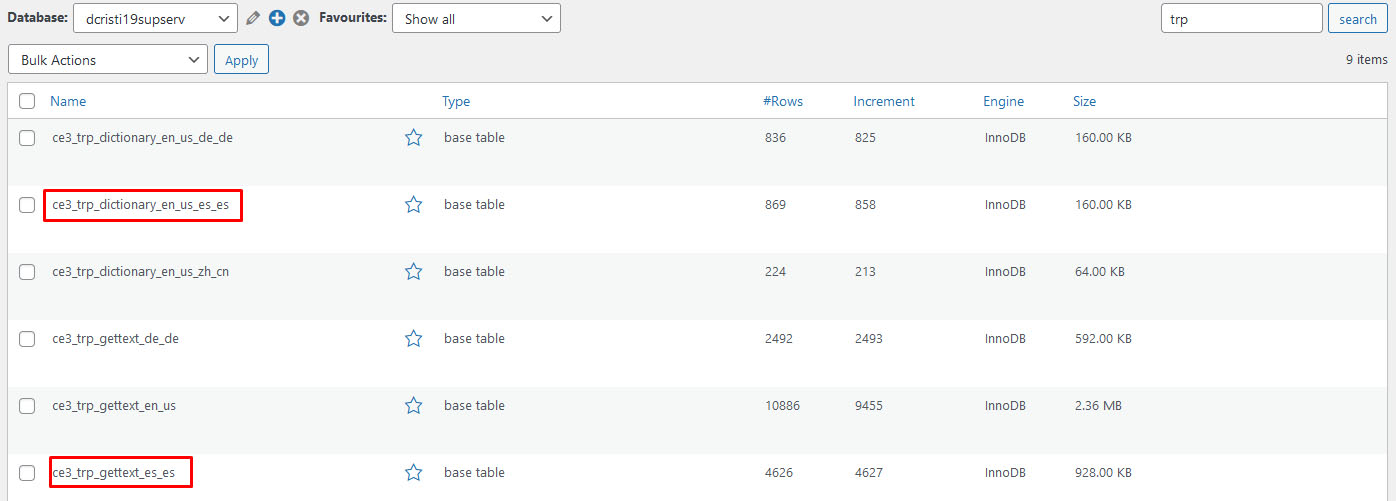
Using WP Data Access, you will have to search for that string either in the wp_trp_dictionary_en_us_es_es table or in the wp_trp_gettext_es_es table.
The gettext table contains all the strings related to plugins or themes, while the dictionary table contains the strings related to your site’s content.Here is an image of how WP Data Access looks when you search for the trp tables: https://www.cozmoslabs.com/wp-content/uploads/2021/05/wp_data_access_search_for_table.jpg
You can never be too sure in which table a string will be, so the best practice is to search for it in both tables. Start with one table and if you are not able to find it there, search for it in the other table.
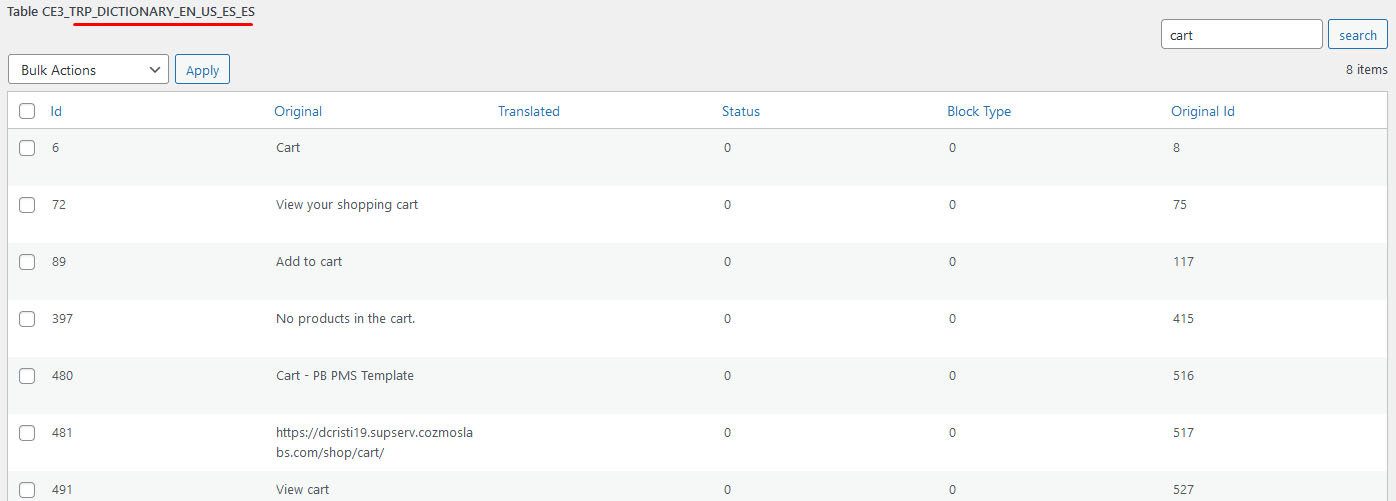
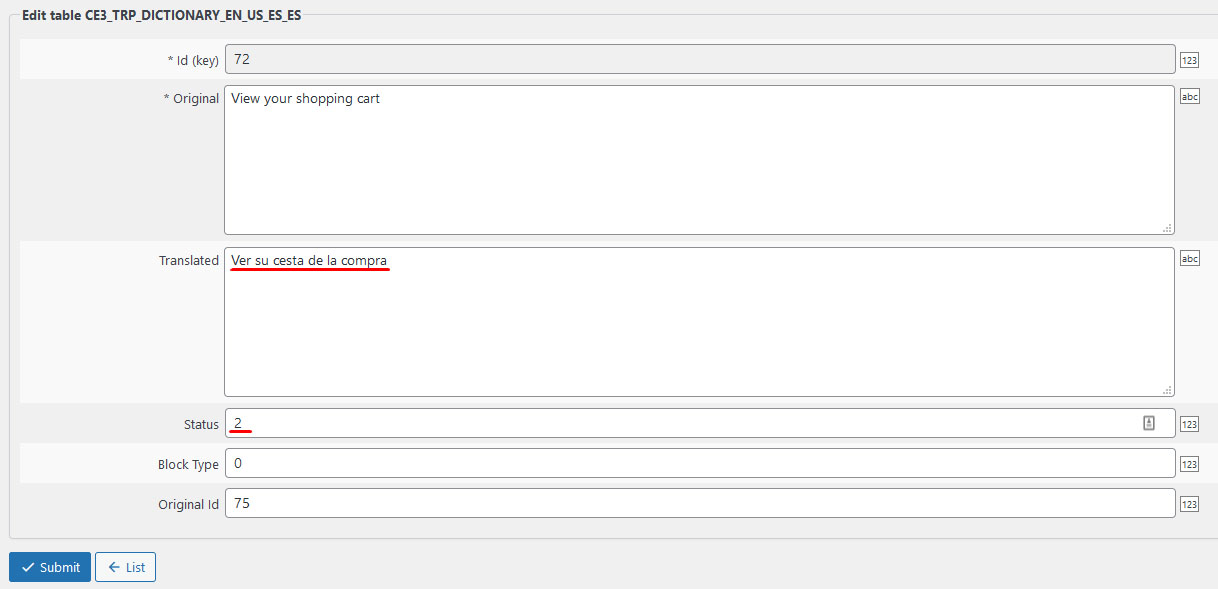
Here is an image of how I was able to search for all strings that contain “cart” in the wp_trp_dictionary_en_us_es_es table: https://www.cozmoslabs.com/wp-content/uploads/2021/05/wp_data_access_search_for_string.jpgAfter you find the string that you want to edit, all you have to do is to edit the row and to add the translation in the Translated column. It is also important to add 2 in the Status column (0 – not translated; 1 – automatic translated; 2 – manually translated).
Here is an image of how to do the translation: https://www.cozmoslabs.com/wp-content/uploads/2021/05/wp_data_access_translate_string.jpg
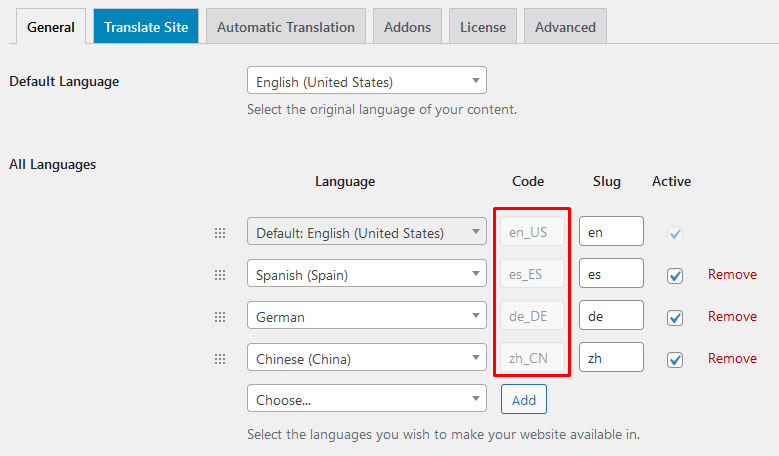
After you have filled the Translation and Status columns, press the Submit button and the translation is going to be saved.In the example I gave above, I used English and Spanish, you can do the same for all languages, just make sure to replace the en_us and es_es language codes with the ones that you are using. You can find the codes for your languages by going to: Settings –> TranslatePress –> General tab https://www.cozmoslabs.com/wp-content/uploads/2021/05/general_langauge_code.jpg
Best Regards,
Hello there,
Thanks for reaching out to us!
Would you mind sharing a link to your website so we can check this issue?Maybe some screenshots would also be helpful.
Looking forward to your reply.
Hey there,
Thanks for reaching out to us!
After having a quick look it seems that the language parameter in the link you sent over does not come from TranslatePress (wp_lang=hu_HU). After a quick search it seems to be coming from WP Hide & Security Enhancer.
Please have a look and let me know if this is the case.
Best Regards,