Hello @fabbstar,
Please, look the attribute in the following screenshot:
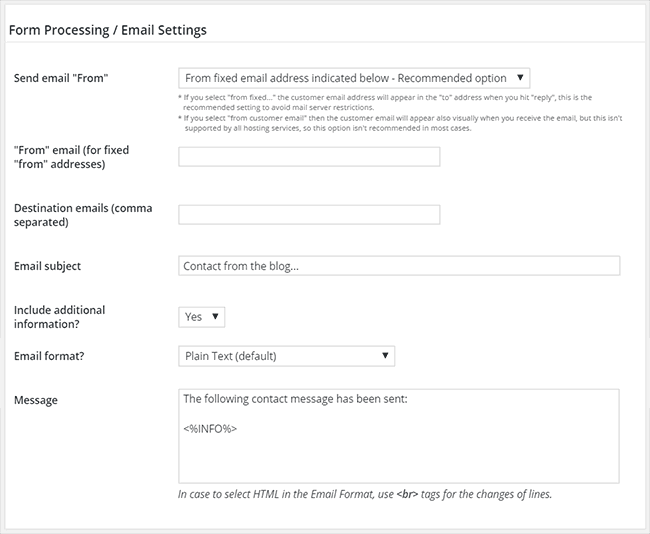
The notification emails is a feature only available with the Professional, Developer and Platinum versions of the plugin.
Best regards.
Ah! Sorry, I am familiar with that field.
I was rather hoping something similar could be used for an email address form field which the customer fills out on the front end, as opposed to the admin area.
I have a customer who wants a confirmation email to be sent to two different email addresses when he completes the form, I was wondering if this could be done without having to add another email field on the front end. I’ve tested comma separating the email addresses on the front end in the email field, but it throws a validation error when trying to submit.
Thanks,
F
Hello @fabbstar,
Yes that’s possible, in this case you should insert multiple email fields in the form and select them through the multi-select list: “Email field on the form”

Remember, you should select the fields explicitly from the list (they must be highlighted)
Best regards.
Hi,
Thanks for that. I was rather more hoping that the email form field on the front end could accept multiple email addresses, comma separated, so the website user can add more than one email address for the confirmation email to go to, without have to complete two email fields. If that makes sense.
Would there be a function for this? I’ve tested adding more than one email address into an email field, comma separated, but it doesn’t allow the form to send due to validation errors.
Many thanks,
F
Hello @fabbstar,
There is another alternative:
– Insert a “Single Line Text” field in your form.
– Enter a regular expression into the attribute: “Validate against a regular expression” in the field’s settings, to ensure the user has entered a valid email address or multiple email addresses separated by comma.
– And finally, enter this field’s tag into the attribute: “Destination Emails” in the form’s settings.
For example, if the field’s name is the fieldname1, its corresponding tag would be: <%fieldname1%>
If this solution, or the other solutions described in the previous tickets, do not satisfy your project’s requirements, I can offer you a custom coding service from my private website:
https://cff.dwbooster.com/customization
Best regards.


