Remove Archive Sidebar
-
Hello,
I will admit I’m a novice when it comes to this.
I am trying to remove the archive sidebar from my site and make every page full page afterwards. I looked through all the forums for the Enigma theme but cannot figure this out for the life of me!
Just an FYI, the sidebar is on all the subpages, not on the homepage
If it was broken down into two parts 1) How to remove the archive and then 2) how to make the page the entire width, I’d really appreciate it!
Thank you in advance!
-
This topic was modified 7 years, 7 months ago by
dpb2007.
The page I need help with: [log in to see the link]
-
This topic was modified 7 years, 7 months ago by
-
Hii dpb2007,
Go to Dashborad -> Pages -> Edit page -> select Full-Width Page template and save.
You select full-width template sidebar also remove.Thanks.
Is there a way to do this to all the pages at once, or do I have to do this to each individual page?
Hii dpb2007,
You have to do this for each individual page.
Thanks.
I want to remove the sidebar in the blog.
Unfortunately I can not select Full-Width Page Template because it is not there
How to choose the Full-Width Page Template for a blog?Hii,
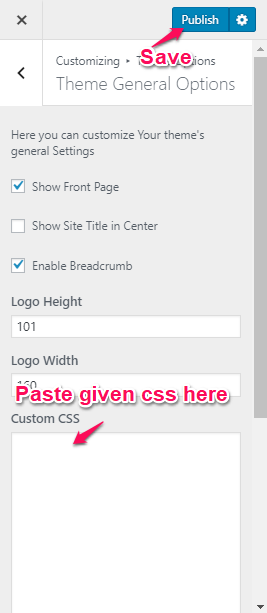
Go to Dashboard -> Appearance -> Customize -> Theme Options -> Theme General Options -> paste the give CSS in Custom CSS box and save –
.blog .col-md-4.enigma-sidebar {
display: none;
}
.blog .col-md-8 {
width: 100%;
}Thanks.
Hii,
Please paste the given css in custom css box and save
follow the given screenshot –
https://i.postimg.cc/CxSRjYWW/custom_css.pngThanks.
How do I remove the sidebar completely on shop page and product pages? (Theme: Enigma Pro)
The topic ‘Remove Archive Sidebar’ is closed to new replies.