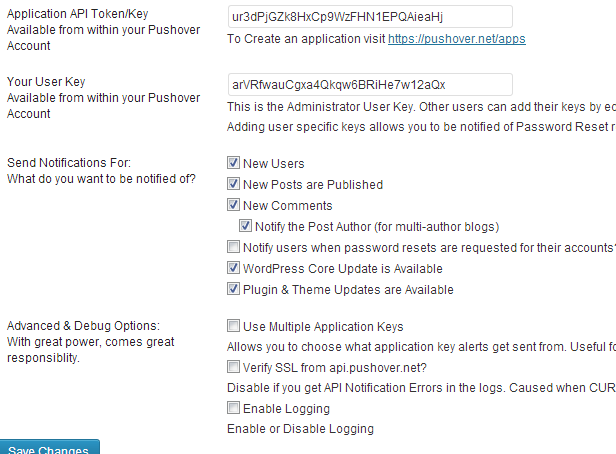
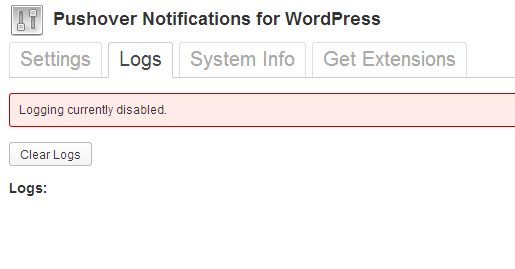
@jaroslav
Thanks for the report. I haven’t been able to replicate this yet, however, it seems the System Info supplied in your 2nd screenshot was cut off. Could you provide me with the remaining info as it contains info about the server configuration.
Thanks,
Chris
As a side note, It’s important to know that I don’t work for Superblock (The company who runs Pushover). I’m just a Pushover user who built a plugin for WordPress.
Thank you very much for your effort:
SITE_URL: http://knowledgebase.data3s.com
HOME_URL: http://knowledgebase.data3s.com
CKPN Version: 1.8
WordPress Version: 3.5.1
PUSHOVER NOTIFICATIONS SETTINGS:
application_key: [removed for display]
api_key: [removed for display]
new_user: true
new_comment: true
notify_authors: true
password_reset: true
plugin_updates: false
sslverify: false
multiple_keys: false
logging: true
ACTIVE PLUGINS:
Calendar: 1.3.2
Pushover Notifications for WordPress: 1.8.0.1
CURRENT THEME:
KB: 1.2
Multi-site: Yes
ADVANCED INFO:
PHP Version: 5.3.3
MySQL Version: 5.5.8-log
Web Server Info: Apache/2.2.17 (Win32) PHP/5.3.3
PHP Memory Limit: 256M
PHP Post Max Size: 64M
PHP Time Limit: 30
WP_DEBUG: Disabled
WP Table Prefix: Length: 11 Status: Acceptable
Show On Front: posts
Page On Front: #0
Page For Posts: #0
Session: Disabled
Session Name: PHPSESSID
Cookie Path: /
Save Path: c:/wamp/tmp
Use Cookies: On
Use Only Cookies: On
UPLOAD_MAX_FILESIZE: 64M
POST_MAX_SIZE: 64M
WordPress Memory Limit: 64M
DISPLAY ERRORS: N/A
FSOCKOPEN: Your server supports fsockopen.
Thanks for the information.
The call to the Pushover servers is made via https, do you have the ‘php_openssl’ extension enabled?
It appears you have WAMP installed to manage your server, you can do this by clicking on the WAMP menu, choosing PHP, PHP Extensions, and then checking ‘php_openssl’.
Let me know if this fixes the issue for you.
Thanks,
Chris
You are welcome,
Thanks for your cooperation in getting the issue fixed.
I got the same result. Totally same as Jaroslav that send notifications from the pushover.net is working great, but not working from my WP.
This is my system info:
SITE_URL:                 http://www.bardpresent.com/test
HOME_URL:                 http://www.bardpresent.com/test

CKPN Version:             1.9.1.1
WordPress Version:        3.7.1

PUSHOVER NOTIFICATIONS SETTINGS:
application_key: [removed for display]
api_key: [removed for display]
new_user: true
new_post: true
post_notification_role: administrator
new_comment: true
notify_authors: true
password_reset: false
plugin_updates: true
core_update: true
sslverify: false
multiple_keys: false
logging: false

ACTIVE PLUGINS:
Aqua Verifier: 1.1.1
bbPress: 2.4.1
Crayon Syntax Highlighter: 2.4.2
GetShopped Support Forum Plugin: 3.0
Pushover Notifications for WordPress: 1.9.1.1
Search Everything: 7.0.1
WP-Mail-SMTP: 0.9.3

CURRENT THEME:
Supportte: 1.1.0

Multi-site:               No

ADVANCED INFO:
PHP Version:              5.2.17
MySQL Version:            5.5.34-log
Web Server Info:          Apache

PHP Memory Limit:         256M
PHP Post Max Size:        10M
PHP Time Limit:           30

WP_DEBUG:                 Disabled

WP Table Prefix:          Length: 7 Status: Acceptable

Show On Front:            posts
Page On Front:             #0
Page For Posts:            #0

Session:                  Disabled
Session Name:             PHPSESSID
Cookie Path:              /
Save Path:                /tmp
Use Cookies:              On
Use Only Cookies:         Off

UPLOAD_MAX_FILESIZE:      10M
POST_MAX_SIZE:            10M
WordPress Memory Limit:   40M
DISPLAY ERRORS:           N/A
FSOCKOPEN:                Your server supports fsockopen.
Is it the same issue?
My hosting is bluehost.com
@dreamwork
Logging disabled wouldn’t cause your site to not send push notifications, it would simply not run the logging process. Have you verified that you have the php_openssl extension enabled in your PHP.ini? This solved the problem for the previous user.
Hi,
My hosting is bluehost.net
Where do I check for it? Please point me a clue, it’s a c_panel base administration.
I can’t say 100% as I do not work for BlueHost. A simple Google search produced this help article
https://my.bluehost.com/cgi/help/128
If you need any other assistance getting this enabled you’ll have to contact your hosting provider.
If after you’ve verified the php_openssl module is running and notifications still aren’t sent,please let me know.