Plugin CSS not showing up on sidebar
-
I recently purchased a new theme for my site and have been talking to the support there, but they don’t seem to know how to fix the problem I’m having with the ULTIMATE BOOK BLOGGER PLUGIN. I have also emailed the plugin developer, but I thought maybe someone here would know how to fix the problem.
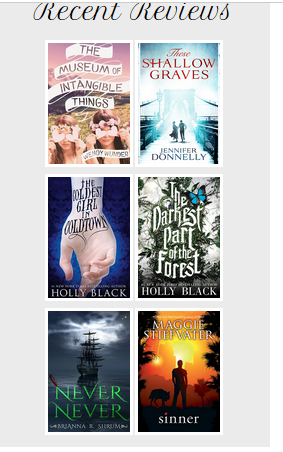
With this new theme I’m using, the css for the plugin isn’t showing up on the sidebar widgets. So any formatting I have on my css in the plugin folder isn’t applying itself to the widgets. It works with all other responsive themes.
It works on normal posts on the site, just not the sidebar. At the moment on the new theme, the images are showing as full size images with no padding or borders/background. It’s also not displaying my CURRENTLY READING books how I have styled them. The only reason they are small is because the image size for these ones is controlled in the admin/settings panel directly.
My site is here: http://www.nicegirlsreadbooks.com
And this is how the recent reviews is supposed to look: https://shop.nosegraze.com/wp-content/uploads/2015/09/sidebarresponsive.png
-
Nevermind, let’s just create our own CSS.
Can you add a class to your “Recent reviews” widget?
To this bit:<article class="side-widget">So that you have this:
<article class="side-widget recent-reviews">Hi Andrew,
Thank you for your response!
I am unable to make just the widget I want have that class, as it’s a drag and drop widget that I can’t change styling options for. If I were to edit the css or the html for the widgets, wouldn’t all widgets then have this class?
It’s okay, for now we’ll just target your third widget. It isn’t robust because as soon as you re-order your widgets your 3rd widget may not be the “Recent reviews” widget.
If you’re not using a Child Theme, and if the theme doesn’t have a designated section of the dashboard for CSS modifications then do the following:
- Install this Custom CSS Manager plugin http://wordpress.org/plugins/custom-css-manager-plugin
- use its “CSS Code” section of the dashboard to hold your CSS modifications:
-
(put this code in)
.aside .side-widget:nth-child(3) { background-color: #ebebeb; } .aside .side-widget:nth-child(3) a { display: block; float: left; width: 50%; } .aside .side-widget:nth-child(3) img { border: 5px solid white; margin: 0px 0 10px 0; display: block; width: 100%; } - Save
Alternatively use your Child Theme style.css file to hold your CSS modifications
Hi Andrew,
Thank you – that worked, but I have also now received information about the theme itself from the plugin developer.
“The register_sidebar function in the theme needs to look like this for the before_widget parameter:
'before_widget' => '<article id="%1$s" class="side-widget %2$s">'From what I can tell, your theme’s only looks like this:
'before_widget' => '<article class="side-widget">'See how it’s missing pieces? That missing %2$s in the class is a placeholder for “the class name for the widget”. That’s how widgets are styled according to their type (search widget, archive widget, or in this case “UBB recent reviews widget”).
Your theme creator needs to add those extra parameters in. The ID one is optional but the class one is not.
The topic ‘Plugin CSS not showing up on sidebar’ is closed to new replies.