Nextgen Widget random thumbnails hidden
-
I have updated to latest version but it says it is 2.0.66.16 and I see it goes to past version 3, so if mine is not updating for some reason let me know.
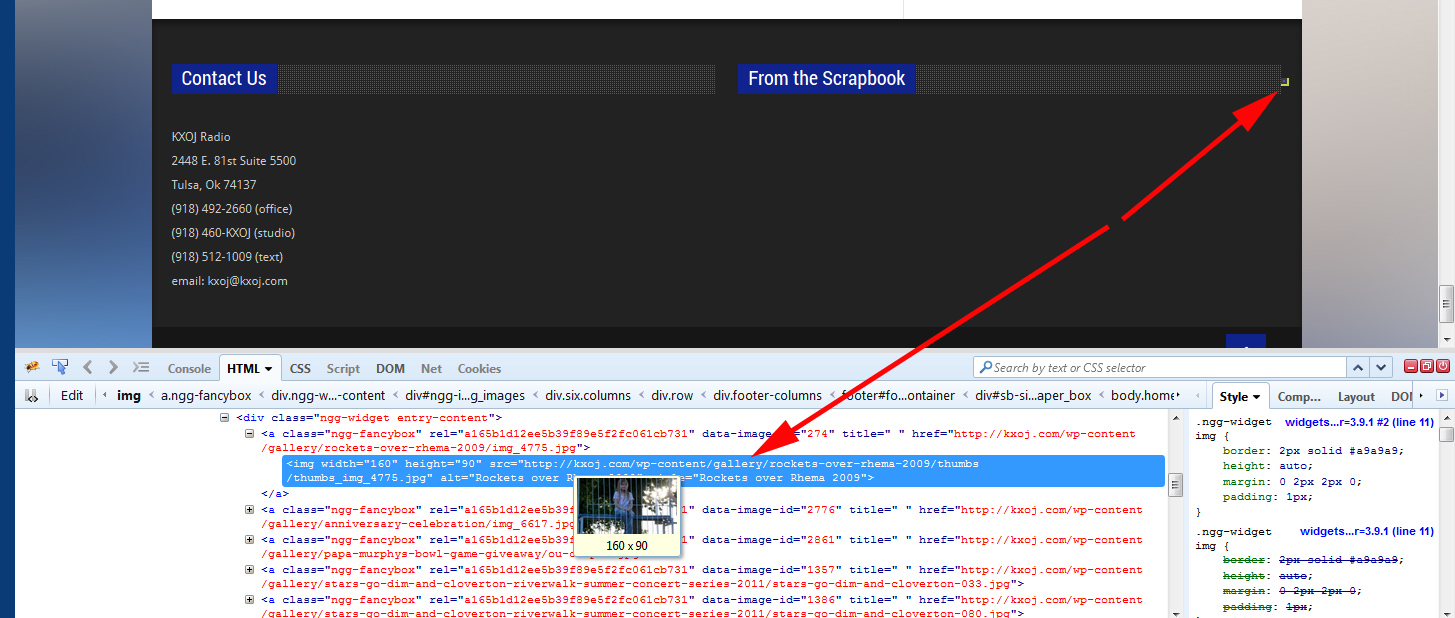
Anyway, seemingly out of the blue (no server changes, no new plugins or plugin updates, no wordpress version updates) my widget that displayed wonderful random thumbnails for months just went blank. When I look at the source code the html for the images is there, but all that displays is a blank 1×1 pixel square. I have included a screen capture showing this. If anyone can help me figure this out I would appreciate it.
Thank you!
Bob
http://kxoj.com/wp-content/uploads/2014/08/nggproblem.jpg
-
@tulsabobt – I had a look at your site (found via the screenshot) and I can see what you are showing in your screenshot. Have you tried placing that widget into a different area to see if something odd is happening in that specific location?
– Cais.
Yes, I have tried sidebar and even other nextgen widgets like slideshow. All come up blank in all locations. I have disabled all plugins and all the usual troubleshooting. Anything else I can try? Permissions issue? Are thumbnails created on the fly?
Thanks,
Bobalso just downgraded to 2.0.61 and no change. Again thanks for any help you can give.
@tulsabobt – When did this issue start?
– Cais.
I was on vacation week before last and when I got back I noticed it. I own the server and no OS or PHP updates have occurred lately, and it worked fine for months. Again no plugin additions or theme changes. What’s weird is being able to see the HTML in the source but it not showing up…
Also the other Nextgen widgets also show up as blank
I also noticed when I save the widget options, such as putting a “1” in and setting it to “only galleries not listed” it will not save. It just reloads defaults. it WILL save my size though.
Well I found a workaround! In the default css it looks like this:
.ngg-widget, .ngg-widget-slideshow {
margin: 0;
overflow: hidden;
padding: 5px 0 0 0;
text-align: left;
}I created custom css and changed overflow to “visible” and made it !important, and now my thumbs are showing again.
Hope this helps
Bob@tulsabobt – Thanks for the update, Bob. I’m glad you found a work-around for this.
– Cais.
The topic ‘Nextgen Widget random thumbnails hidden’ is closed to new replies.