Plugin Contributor
 webnus
(@webnus)
Hello @komar45,
For troubleshooting, deactivate all your plugins and let the MEC remain active only, set your theme on default, then reload the page, if the issue was solved, then activate your plugins one by one and your theme, refresh your page and check to see which plugin is causing the issue.
Best Regards
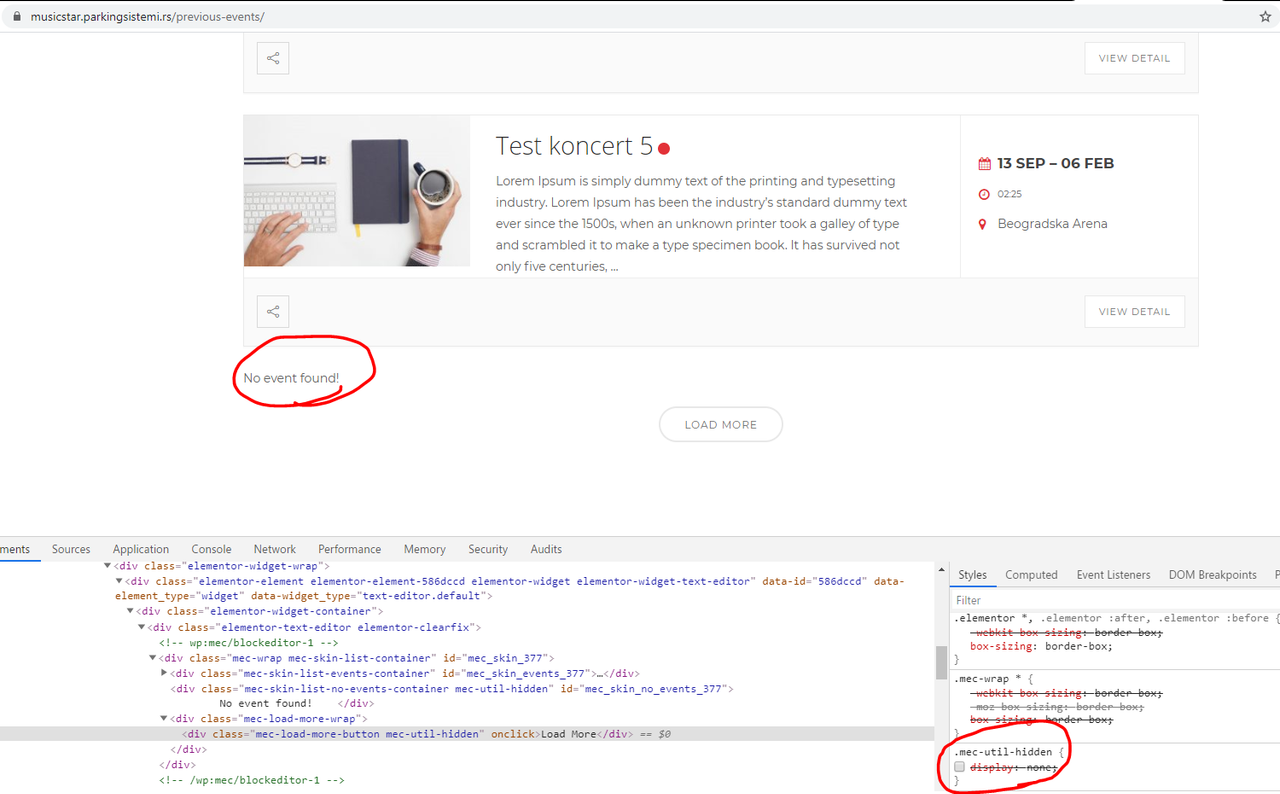
Thanks for the answer. I did what you said, but unfortunately I still have same problem. You can check my problem on this link: https://musicstar.parkingsistemi.rs/previous-events/ I have 7 previous events, and set limit 5, and turn on load button, but when click on load button, only showing loading wheel for less than second and that’s it, the rest of previous events are not showing.
I will be very thankful if I resolve this problem,
Thanks.
Plugin Contributor
webnus
(@webnus)
Hello @komar45,
This page doesn’t seem to exist!
https://postimg.cc/MXvLS00D
If you send a live URL, so we can check the console on your website.
Best Regards
Sorry, can you check link now: https://musicstar.parkingsistemi.rs/previous-events/
So,when you open the link, you will see 5 events and load more button on the bottom of the page. When you click on the button, other events are not display.
Plugin Contributor
webnus
(@webnus)
Hello @komar45,
Please use the latest version MEC.
We have not received such an issue report before and it should be checked on your site exclusively.
However, I think your issue is related to the shortcode configurations, please follow the steps explained in this article: https://webnus.net/dox/modern-events-calendar/setup-date-option-on-shortcodes/ so after reading this article, you can configure shortcode to showing all expire events and upcoming events
I open inspect elements and I see you didn’t have events anymore:
https://i.postimg.cc/brcKnGrh/image.png
Best Regards