• Resolved macstainless

    (@macstainless)


    Hello. Lately I keep getting these “pull process failures” any time I add a new image to my WP instance. It’s usually coupled with a “Pull Cron is running” message.

    Report number is TLWUXLQB.

    Thank you.

Viewing 15 replies - 1 through 15 (of 19 total)
  • Plugin Support qtwrk

    (@qtwrk)

    please try add this at top of your wp-config.php , next line after <?php :

    define('LITESPEED_FORCE_WP_REMOTE_GET', true);

    then click “clean up unfinished data” and send again , see if you still get this fail message

    Thread Starter macstainless

    (@macstainless)

    Thank you. I’ll give this a try and see if it happens again. Will update this thread in a few days with the status. Appreciate the support.

    Plugin Support qtwrk

    (@qtwrk)

    thanks, please let me know how it goes

    Thread Starter macstainless

    (@macstainless)

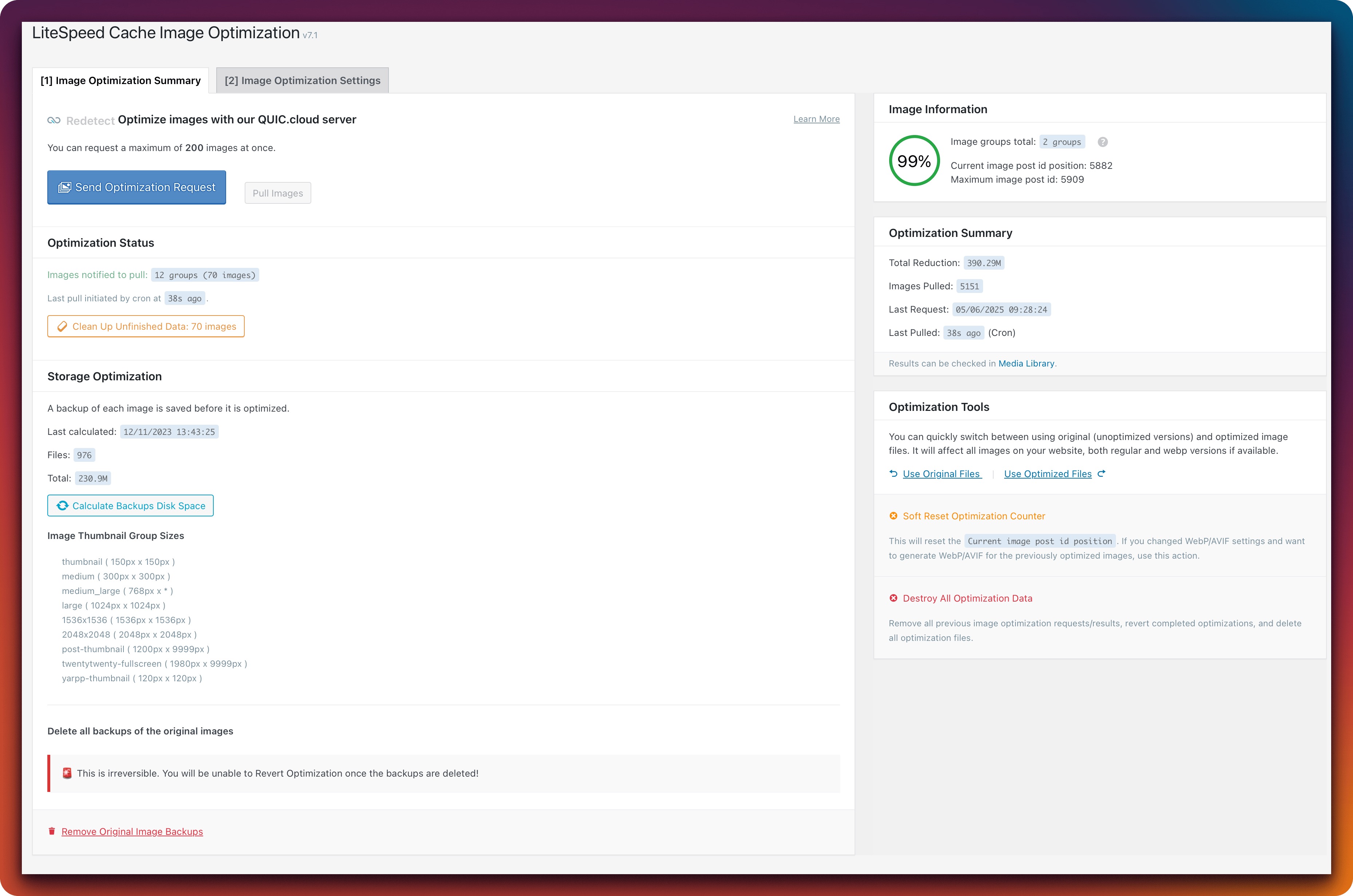
    Okay, so the error is now no longer showing, which is good. However, in my Image Optimization setting in the plugin, it never processes these 70 images. I’ve tried clicking the Clean Up Unfinished Images button, but it never actually processes this queue.

    Images notified to pull: 12 groups (70 images)

    Last pull initiated by cron at 22s ago.

     Clean Up Unfinished Data: 70 images

    Plugin Support qtwrk

    (@qtwrk)

    please do me a full screenshot on your image optimization summary page

    and please confirm if 199.xxx.xxx.199 is your server IP ?

    Thread Starter macstainless

    (@macstainless)

    An IP lookup of my server for Timemachiner.io is 172.67.149.70 & 104.21.87.253

    Here’s a screen shot of the page:

    Plugin Support qtwrk

    (@qtwrk)

    no , these 2 IPs are cloudflare IP as CDN, I meant the origin/backend server IP

    Thread Starter macstainless

    (@macstainless)

    oh, sorry! Yes yes I just looked and the 199 IP you listed (masked) is it. Do you need the full IP or do you have what you need?

    Plugin Support litetim

    (@litetim)

    @macstainless do not share private info.
    My colleague asked to compare your IP with what he provided and give him an short answer

    Thread Starter macstainless

    (@macstainless)

    Got it, sorry about that. I didn’t even realize you can’t edit responses on here after an hour of posting. I won’t post any other information that could be private.

    Yes, the IP listed by support is the correct IP. Thank you.

    Plugin Support qtwrk

    (@qtwrk)

    please try this , go to toolbox -> debug setting, debug log to ON , debug level to advance , debug include URI , add litespeed_type=imgoptm and notify_img into it

    then go to toolbox -> log view -> clean up any eixsting log

    now go to image optm summary , clean up unfinished data , send again

    if nothing happens after 1 hour , then go to log view tab again , copy paste and share the log via https://pastebin.ubuntu.com/

    Thread Starter macstainless

    (@macstainless)

    Got it. Just did the steps and I’ll check it in one hour. Thank you.

    Thread Starter macstainless

    (@macstainless)

    Okay, it’s still doing it. Here is the paste of the log: https://pastebin.ubuntu.com/p/kM9FgYSkTk/

    Thank you.

    Plugin Support qtwrk

    (@qtwrk)

    https://sin97-hyb-worker.quic.cloud/dl/d_1166229/68224b9321c327.46812241.jpg.webp

    does it open on your browser ?

     ❌ failed to pull image: cURL error 28: Connection timed out after 10003 milliseconds

    plugin says it can not connect to sin97-hyb-worker node in 10 seconds , looks like it was blocked by your security measure or something

    and also please try, create a php file , name it like test.php with code

    <?php
    require( './wp-load.php' );

    $response = wp_remote_get( 'https://sin97-hyb-worker.quic.cloud/dl/d_1166229/68224b9321c327.46812241.jpg.webp' );
    echo '<pre>';
    var_dump($response);
    echo '</pre>';

    put it at same dir as your wp-config.php , open it in browser as https://your_domain.com/test.php, see what it returns.

    Thread Starter macstainless

    (@macstainless)

    1. Yes that URL opens for me when I click on it.
    2. “plugin says it can not connect to sin97-hyb-worker node in 10 seconds” I’m not sure what this means or how I can address that.
    3. Test.php outputs the following:

      object(WP_Error)#13178 (3) { [“errors”]=> array(1) { [“http_request_failed”]=> array(1) { [0]=> string(59) “cURL error 28: Connection timed out after 5002 milliseconds” } } [“error_data”]=> array(0) { } [“additional_data”:protected]=> array(0) { } }
Viewing 15 replies - 1 through 15 (of 19 total)

The topic ‘Image pull process failure: Failed to pull image [url] https://saw35-hyb-worker.’ is closed to new replies.