Hi hurra03
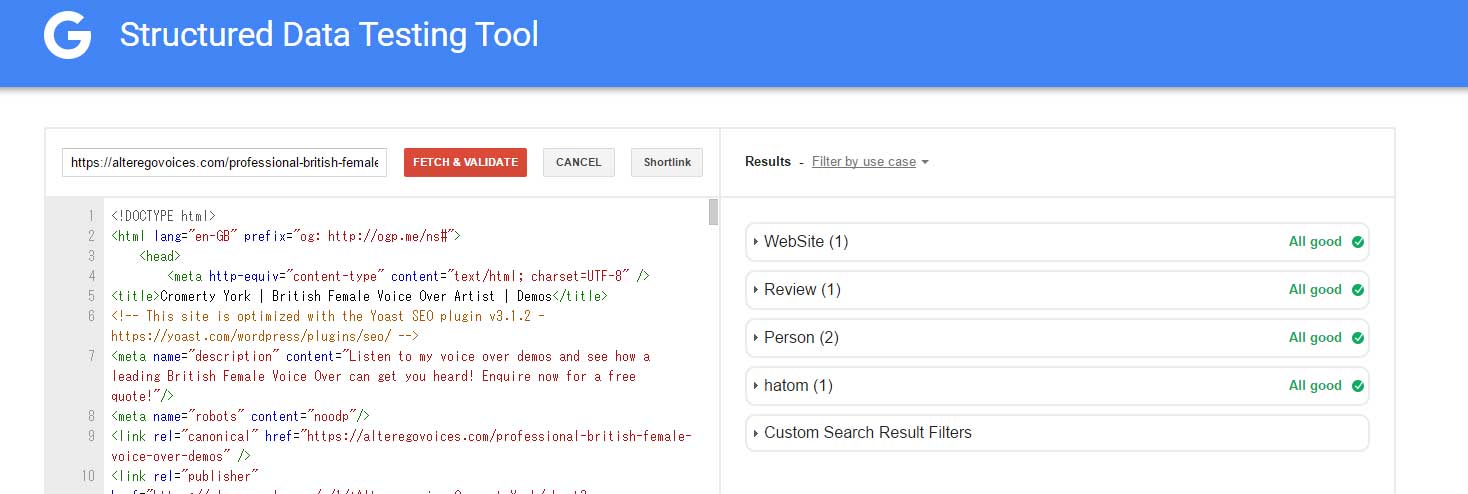
Testing tools is below ?
https://developers.google.com/structured-data/testing-tool/
I’m tested your site width above service.
Result All good.
In the case of other services, please tell me the URL
Thank you.
For Example (although it doesn’t come up with an error here, the entries are missing, which are displayed as an error under webmaster)
https://alteregovoices.com/rostartist
https://alteregovoices.com/professional-british-female-voice-over-demos
Thank you!!!
Hi Nobita – Yes I see that too, but when you click on hatom, in comes up with only entry-title and entry-content as values, not with author or “updated”. It is these two missing values which being reported on the https://www.google.com/webmasters/tools/structured-data page :
https://alteregovoices.com/wp-content/uploads/2016/04/nobita.jpg
Thank you
hurra03
Diffarance of anothor thmee about microformat
nickname ( default theme use n )
I think n needs first name and Llast name,
I’m using nickname.
When I was misunderstood, pointed out to please 🙂
Raindrops
<span class="author vcard"><a class="url fn nickname" href="http://www.exampl.com/wp/archives/author/tenman"><img alt="" src="http://0.gravatar.com/avatar/...?s=24&r=g" srcset="http://0.gravatar.com/avatar/...?s=48&r=g 2x" class="avatar avatar-24 photo" height="24" width="24"><span class="screen-reader-text">tenman</span></a></span>
Twenty sixteen
<a class="url fn n" href="http://www.example.com/wp/archives/author/tenman">tenman</a>
Diffarance of anothor thmee about microformat
nickname ( default theme use n )
I think n needs first name and Llast name,
I’m using nickname.
When I was misunderstood, pointed out to please 🙂
Raindrops
<span class="author vcard"><a class="url fn nickname" href="http://www.exampl.com/wp/archives/author/tenman"><img alt="" src="http://0.gravatar.com/avatar/...?s=24&r=g" srcset="http://0.gravatar.com/avatar/...?s=48&r=g 2x" class="avatar avatar-24 photo" height="24" width="24"><span class="screen-reader-text">tenman</span></a></span>
Twenty sixteen
<a class="url fn n" href="http://www.example.com/wp/archives/author/tenman">tenman</a>
is resolved OK ?
Yes – I think you are right. You are using nickname. Could I make a change to include “author first and last name”, as well as “updated” fields?
Thank you!!
I beleive I need a function similar to this:
//mod content - use this function only if you DON'T USE Suffusion theme
function hatom_mod_post_content ($content) {
  if ( in_the_loop() && !is_page() ) {
    $content = '<span class="entry-content">'.$content.'</span>';
  }
  return $content;
}
add_filter( 'the_content', 'hatom_mod_post_content');

//add hatom data
function add_suf_hatom_data($content) {
    $t = get_the_modified_time('F jS, Y');
    $author = get_the_author();
    $title = get_the_title();
if (is_home() || is_singular() || is_archive() ) {
        $content .= '<div class="hatom-extra" style="display:none;visibility:hidden;"><span class="entry-title">'.$title.'</span> was last modified: <span class="updated"> '.$t.'</span> by <span class="author vcard"><span class="fn">'.$author.'</span></span></div>';
    }
    return $content;
    }
add_filter('the_content', 'add_suf_hatom_data');