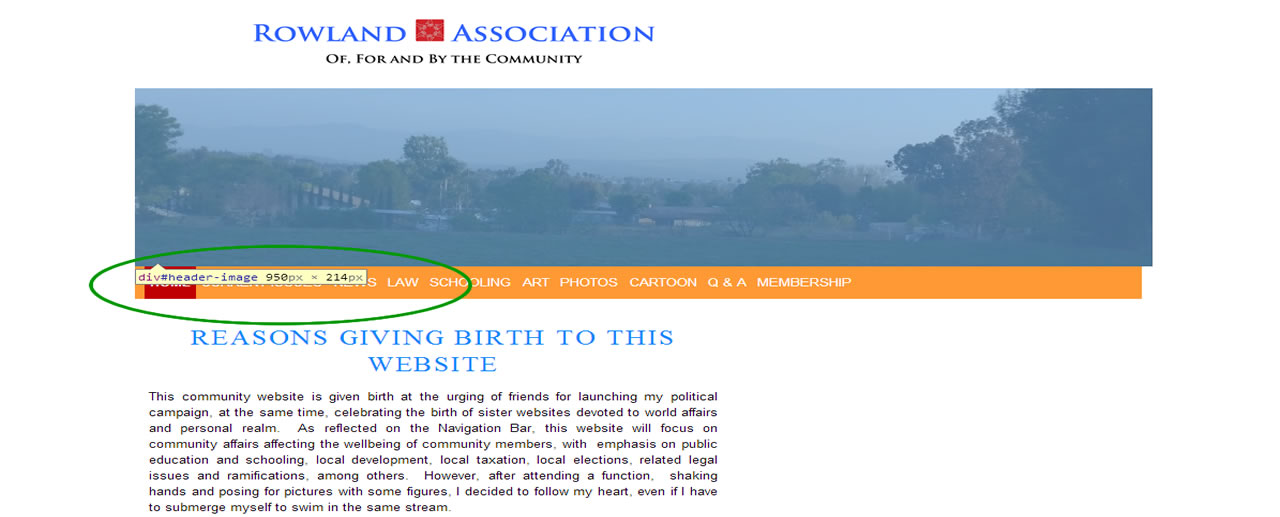
Full Width Reduced to 60% After Update
-
Hi, Nobita,
How have you been?
After the most recent update this afternoon, the full width page is reduced to abpout 60%. How can I restore to the real Full Width? I am using a Child Theme, but still affected by this update. Why?Please advise. Many thanks,

-
Hi wccesq
Raindrops 1.221 ?
page is reduced to abpout 60%.
Sorry I can not detect it.
Please tell me your WEBSite URL.
Thank you.
Are you using a cache plugin?
Hi, Nobita,
I have been using 950px fix. But adter updating 2 day ago the most recent version (must be 1.221), all my full-width pages are shrunk to about 60%. Here is my website. Many thanks, in advance, KenYes. It is W3 Total Cache. I can removeit, if necessary.
I checked your site.
http://www.tenman.info/wp3/manualraindrops/files/rowland.jpg
Page width, was displayed in 950px
Possible causes, cache plug-in, for example at the timing of access in the old browser in IE8 or less, if you have generated a cache file, it may width is displayed in about half.
I’m using Quick Cache plug-in
I’m not familiar with the use of W3 Total cacheSince there may be somewhere settings that do not generate cash in the case of the browser in IE8 or less, Please check.
Thank you.
I deactivated W3 Total cache and installed Quick Cache. But the result is still the same–only a half width.
I dont understand IE8.
Any further suggestions?
Did you look at the screen shot of me?
Your site, it is displayed correctlyIf, and if it is displayed with a width of 60% still, please delete the browser cache
Thank you.
I cleaned the Bowser Cache from the beginning of time, but still getting half width of the page. What should I dod? Thanks.
You can give me your screenshot?
Below is my screenshot:
http://www.rowlandassociation.com/wp-content/uploads/2014/06/RA-Screenshot-2014-0617.jpg
Nobita, I think the Full-Width Template is not functioning properly. The Default Template is fine; I set Current Issues, Law, Q&A and Membership in Default Templalate for your reference. Thanks,
Ken
Rather than the page width 950px, do you want to change the setting to something broader?
Full-Width Template means 1 column template.
It is not the thing does not limit the page widthIf it is intended that if a fixed page width, you want to set your own page width,
add child themes functions.php
(if page width 1280px)
$raindrops_page_width = '1280';I added to the last line, but it did not work, excepting making the Navication Bar extremely big.
Question: I had no problems getting the full width using 950px fix. But, after the most recent update, (i) The full width is not working properly, and (ii) the mobile screens are off and different, forcing me to usde Twenty-Fouyrteen for my mobile purposes.
Please check and help. Thanks,
I detect Bug
Thank you for patiently pointed out,
I will fixed this bug next version Raindrops.
Hotfix
child themes/style.css
.page-template-page-templatesfull-width-php #container{
    width:100%;
}
status bar hide
add child themes/functions.php
$raindrops_status_bar = false;Sorry !!
Thank you.
Hi, Nobita,
Thank you for being so thorough and helpful. The Hot fix does not work for me, because I encountered the following problems after adding`.page-template-page-templatesfull-width-php #container{
width:100%;
}`
Warning: Cannot modify header information – headers already sent by (output started at /home3/wccesq/public_html/wp-content/themes/raindrops-child/functions.php:2) in /home3/wccesq/public_html/wp-includes/pluggable.php on line 1121Therefore, I did not try the Code for php.
Should I do anything now? Or should I just wait for the next update?
I just found out that for the time being, I can use “fluid” mode. I prefer the “950 pix fix” mode, because the “fluid” mode results in uneven photo layouts, and the “950px fix” mode automatically reduces all photos bigger than 950 pix to 950 pix, making those photos look more uniformed.
Many thanks, Nabita,
Ken

The topic ‘Full Width Reduced to 60% After Update’ is closed to new replies.