Forminator date parameter
-
Hi,
I’m facing a problem with my form “Signe” which has only a date field : i need to select only month range and no matter of the year in order to submit on an astrology sign page , is it possible to do this ?
For example for the Aries page, i want to submit this page only when the date is between 21 march and 20 april..
Thanks by advance
Dominique

-
Hello Dominique,
I hope you’re doing great today!
The Date field doesn’t have simple options, which would allow such calculations based on the day and month.
However, it should be possible using Select fields. I’ve created a simple form to illustrate the idea with the Aries sign: https://prnt.sc/-e57ktBG5x4Y
You can download the exported form here: https://pastebin.com/raw/p6YZQk81
– import it for testing on your site, by copying and pasting the code: https://prnt.sc/iWK2tK5uEsMK
I had to duplicate the HTML field, in order to split visibility conditions in 2 parts:
- month is March
- date is greater than 20
and:
- month is April
- date is less than 21
– that’s because there’s no option for combining these 2 groups of conditions for one field. So in this example, two identical HTML fields will be displayed separately for March and April.
In order to make it work with other signs and date ranges, you’ll just have to duplicate these HTML fields, and modify them (change Aries text, and edit visibility conditions): https://prnt.sc/1xIehgGQWSgA
I hope this helps. Please let us know if you have any questions.
Best Regards,
DmytroHi Dmytro,
Thank-you so much !!, i think it can work fine !
I will check soon this procedure , i’ll keep-you informed
BR
Dominique
You’re welcome, Dominique!
I’ve just noticed that a semicolon was missing for March option in the month field: https://prnt.sc/IYsthxSsFdRA
I’ve corrected that, and re-selected it in visibility conditions for the “Sign” HTML field.
Here’s the updated form in case you need it for testing.
Best Regards,
DmytroHi Dmytro,
it is working fine ! thanks , but is it possible to prepopulated a form with a date but without the year ?
I mean i succeed to populate a date on another form on a submitted page , but if i want de detect the astrologic sign, i need to populate only the day and month , (or populate the date with masking the year) , but i think it is quite impossible ?
BR
Dominique
-
This reply was modified 1 week, 5 days ago by
dba83.
Hi @dba83,
I am afraid Formiantor does not have any such options with the Date Field to mask the year out of the box. However, it is possible to pre-populate the Forminator fields using a query parameter.
https://wpmudev.com/docs/wpmu-dev-plugins/forminator/#pre-populate-form-field-values
Can you please see if the workaround suggested in our earlier response helps you further?
Best Regards,
Nebu JohnHi @dba83,
Since we haven’t heard from you for a while. I’ll mark this thread as resolved for now. Please feel free to re-open this thread if you need any further assistance.
Kind Regards,
NithinHi Nirhin,
sorry i was busy .. thanks for your previous message , but when you said “it is possible to pre-populate the Forminator fields using a query parameter” , i cannot do this simply because : yes i can pre-populate a date ( i have done the test and it is ok) , but how to pre-populate only day + month ?
probably impossible ?
BR
Dominique
-
This reply was modified 4 days, 20 hours ago by
Hello Dominique,
I hope you’re doing great today!
yes i can pre-populate a date ( i have done the test and it is ok) , but how to pre-populate only day + month ?
probably impossible ?
You’re correct, a year is required for the date field, so it will not allow a date without a year. Bypassing the date validation to allow that might be possible with additional programming though, which is beyond our support scope. If you want, you can try to look for a WordPress developer.
For example, WordPress has a jobs directory: https://jobs.wordpress.net/
I hope this helps. If you need any further advice, please feel free to email us at wpsupport@incsub.com with the following subject:
ATTN: WPMU DEV support – wp.orgBest Regards,
DmytroHi Dmytro, thanks for your reply !
So i understand that is not simply to do this…
However i have tried to create a calculation of Arie sign on the date range |21 march to 20 april]
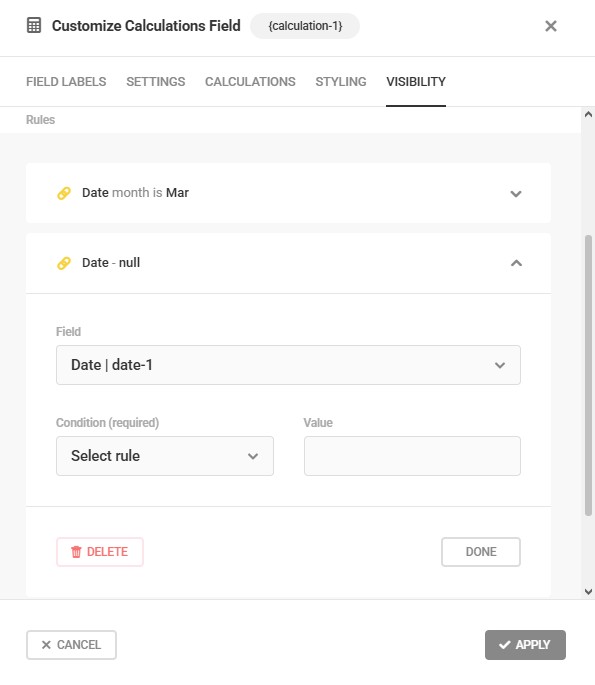
on my first calculation i have selected the rule ” date month is mar” but Can-you explain how to setup a value “Select Rule” ? , i need to add a rule saying day is after 20 …
Here is screenshot of my calculation item : https://i.postimg.cc/hPfG6d26/Select-rule.jpg
BR
Dominique
Hello @dba83
If you want to create a rule like “after specific days” you can select it from the available conditions.
Please note that the conditions are limited for the date field, please run some tests to find the best for you need.
Best Regards
AminHi Amin, thanks for your reply, but i have tried “after specific days” and for example if i set “20” ,after validation of the rule the indication is “date is 20 or more days from current date” so the rule takes always in account the year , i am stuck..
In any case, thanks for all your explanations
BE
Dominique
Hello Dominique,
There’s no option to skip year with those visibility conditions, but you can also test using “Starts with” condition as a workaround.
For example, if the date format of the field is D/m/y, you can check if the date starts with 21/04, 22/04, 23/04, etc., and set it to “Any” instead of “All” at the top: https://prnt.sc/RNncUlUvEacP
The drawback of using “Starts with” is that it will require lots of such conditions – for each day of the month/year.
Another potential downside is that the form with lots of conditions may take longer to load.
Best Regards,
DmytroHi Dmytro, thank-you so much ! it is a good idea! and i think it works , i’m going to test this asap, i keep-you informed.
BR
Dominique
-
This reply was modified 1 week, 5 days ago by


You must be logged in to reply to this topic.