• Resolved piolo1985

    (@piolo1985)


    Hi, congratulations on the plugin which I really like. I want to know if it is possible to set different times for the same service.
    In practice, I have a single time round on Tuesdays, Thursdays and Fridays from 08.00 to 14.00 and on Mondays and Wednesdays a single time round from 08.00 to 16.00. Is it possible to make (without creating further services) that a user selecting on Monday sees in the slot “8.00-16.00” while when selecting Tuesday he sees “8.00-14.00”?
    If this is not possible, is there a way to show a message (for example “booking shift”) in the slots instead of the start time or start-end time?
    Thanks a lot

Viewing 5 replies - 1 through 5 (of 5 total)
  • Plugin Author codepeople

    (@codepeople)

    Hi,

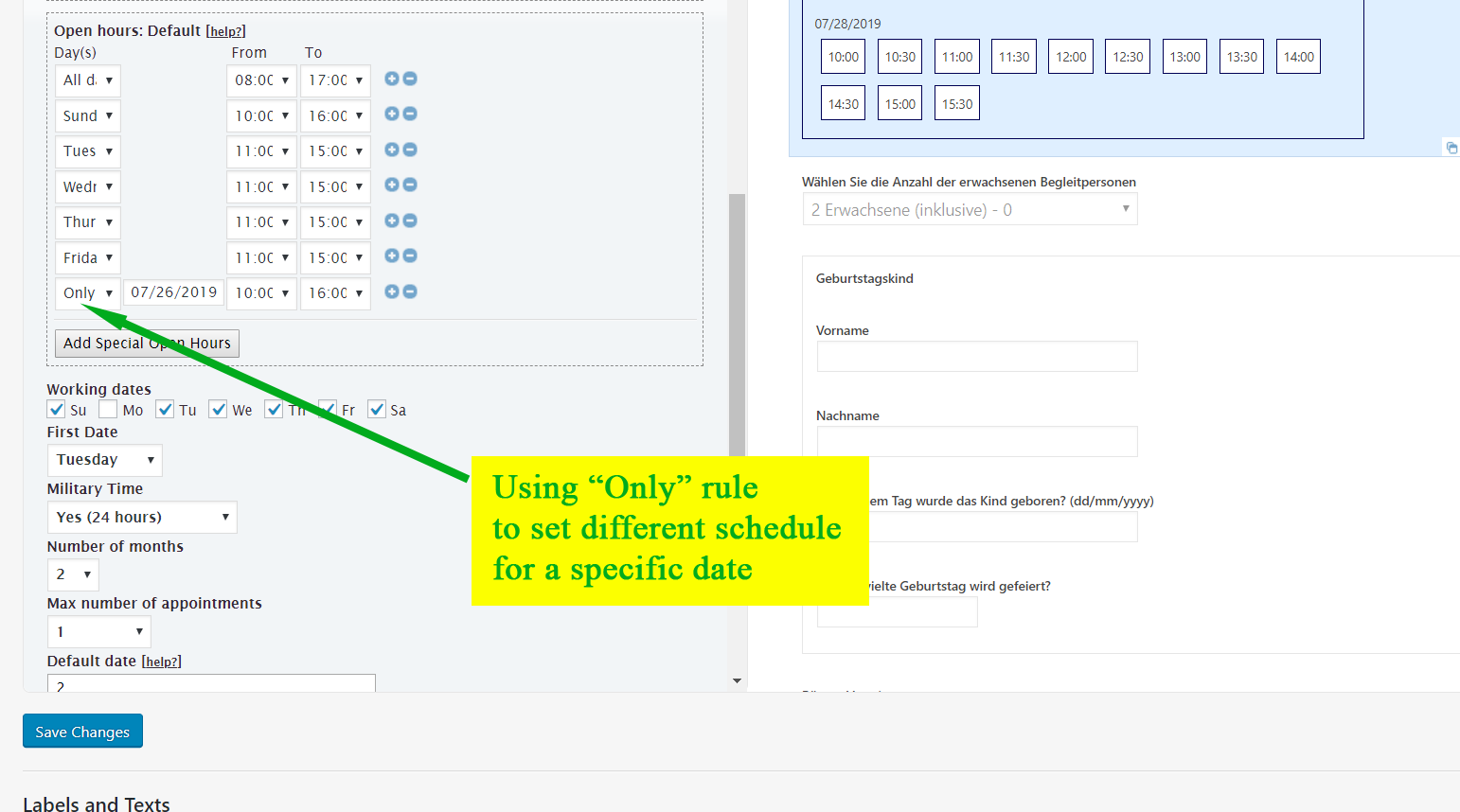
    You can setup different open hours for different weedays and also different open hours for specific dates:

    https://apphourbooking.dwbooster.com/customdownloads/only-date-rule.png

    Thank you for using the plugin!

    Thread Starter piolo1985

    (@piolo1985)

    Sorry but it doesn’t work.
    If I set a service that runs from 9.00 to 14.00 for every day even if I set 9.00-17.00 for a specific day in the open hour, I still see the slot 9.00-14.00. 🙁
    Is there a way to put words in the slots instead of showing the time slots?
    Thanks again

    Plugin Author codepeople

    (@codepeople)

    Hi,

    The “only date” rule should overwrite the general weekday rule. If possible please provide a screenshot of the settings applied in the “open hours” area to check why it doesn’t result in the expected open hours.

    Please be sure to remove any sensitive info (URLs, emails, …) form the screenshot before sending it.

    If you don’t want to share the screenshot in this public forum you can send it using the following contact form (in any case remove sensitive info from it):

    https://apphourbooking.dwbooster.com/contact-us

    Thank you!

    Thread Starter piolo1985

    (@piolo1985)

    Of course,
    I gladly share a screenshot. Thanks for your help.
    As you can see I set the time 8: 00-14:00 except for Monday 28 March which I set 8: 00-17: 00 with the mode you told me. The result, however, is that in the timeslot I always see 8: 00-14:00 🙁

    Booking-Problems-only-date

    • This reply was modified 4 years ago by piolo1985.
    • This reply was modified 4 years ago by piolo1985.
    • This reply was modified 4 years ago by piolo1985.
    • This reply was modified 4 years ago by piolo1985.
    Plugin Author codepeople

    (@codepeople)

    Hi,

    Please note that you have the service duration defined as “360” minutes, that means 6 hours.

    With the open hours set from 08:00..14:00 you can fit one 6 hours time-slot there.

    With the open hours set from 08:00..17:00 you can fit also only one 6 hours time-slot there, since from 14:00..17:00 there are only three hours available. For having space for other 6 hours time-slot you have to increase the interval like 08:00..20:00 hours or to modify the service duration.

    Please check that and let me know if you need further information.

    Thanks.

Viewing 5 replies - 1 through 5 (of 5 total)

The topic ‘Different times for the same service’ is closed to new replies.