• Resolved thehun80

    (@thehun80)


    Hello,

    I successfully imported a dataset via CSV to a recordset and now I want to search some values according to a town name that is in the first column.

    I have tried to use a hidden DS control to filter the data using the condition

    record[‘Municipio’]==fieldname53

    but nothing was returned in the field (and it also messed up my dropdown structure showing all of them regardless of the fact that I had set their visibility in dependency of another dropdown).

    Is there a way to search/reference these values using javascript in a calculated field? or do I have to do an intermediate step adding another DS field and then using its output as variable?

    Thanks!

Viewing 6 replies - 1 through 6 (of 6 total)
  • Plugin Author codepeople

    (@codepeople)

    Hello @thehun80

    The correct structure for the condition would be:

    
    record['Municipio']=='<%fieldname53%>'
    

    Please, for additional questions about features in the commercial version of the plugin, create a ticket in my private website: Contact Us

    Best regards.

    Thread Starter thehun80

    (@thehun80)

    Thanks,

    which field should I use? As I said the Hidden DS messes up the structure of the form and I don’t know how to reference it directly from a javascript code.

    Plugin Author codepeople

    (@codepeople)

    Hello @thehun80

    I’m not sure how do you want filtering the records, but yes, you can walk through all records of RecordSet DS field from the equation associated to a calculated field. Please, visit the following link:

    https://cff.dwbooster.com/blog/2019/02/14/ds/#recordset-equations

    Best regards.

    Thread Starter thehun80

    (@thehun80)

    Thanks and sorry to bother you again,

    I followed the instructions in the link but I still seem to be doing something wrong because I don’t get any results in the calculated field with this code (remains empty):

    (function(){
    
    var records=fieldname55;
    
    for(var i in records)
            {
            if(records[i]['Municipio'] == fieldname53)
                return records[i]['porc5'];
            }
            return '';
    
    })();

    I have double-checked that the columns have been imported correctly and that the data I’m looking for contained in fieldname53 is indeed in the CSV

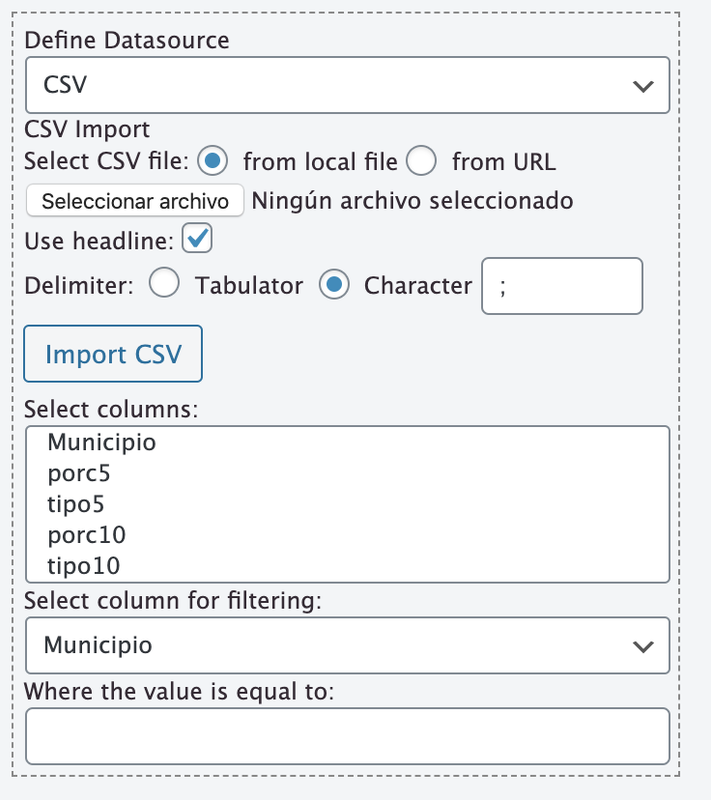
    https://i.postimg.cc/q7Sz6FtB/Captura-de-pantalla-2020-02-17-a-las-21-45-37.png

    Plugin Author codepeople

    (@codepeople)

    Hello @thehun80

    You must select all options through the “Select Columns” attribute. It is a multi-select list, so, the columns must be selected explicitly.

    Best regards.

    Thread Starter thehun80

    (@thehun80)

    Cheers, you’re the best!

Viewing 6 replies - 1 through 6 (of 6 total)

The topic ‘Access Recordset data in javascript code’ is closed to new replies.