Hi there… hope you don’t mind me asking but did you ever resolve this issue? We’re experiencing the same problem and I’ve yet to find a solution so would be very grateful if you could let me know if you did… and if not, I promise I’ll report back if I ever do 😉
Warm regards
Nik
Hi Nik,
We did not find real solutions to either ticket issue, which is too bad.
Our compromise solution for the email: we to added a link to our order confirmation email template to point customers to their order portal area with verbiage saying they can view or download their orders. Ideally we need two different email templates. One for tickets orders and one for regular products in our store. Setting up custom email templates by product type turned into its own project. The plugins we tried to solve this with didn’t play nice with this event plugin.
The number #1 on the ticket page when there aren’t multiple ticket options is confusing for customers. We’ve had feedback that they think #1 is the ticket number, like they are buying the very first ticket. :/
Once ticket sales wrap up on this event we are going to uninstall and look for other options.
Hi there
Thank you so much for taking the trouble to get back to me. I did actually manage to have a brief live chat with someone at Yith who assured me that the post sale email (including the view pdf option etc) should work (even on the free version) but wasn’t able to suggest why it wasn’t happening for us and clearly we’re not the only ones! Your compromise sounds like a pretty good one, although as you say, probably even better with custom email templates… I could probably do that if I had the time/inclination but like you, not entirely sure it’s worth the effort 😉
As for the numbering on the ticket page, since we didn’t need to gather additional information for each ticket holder, we just hid that part altogether with a quick snippet of css ie.
.fields_panel {display:none;}
Not sure I’d want to be using the free version of this plug-in for larger and/or regular events either, although I’ve certainly come across a lot worse!
Thanks Nik!
I agree, we tried other event plugins and this was the best free option we tired. Shame the emails aren’t working as they should, but overall it is getting the job done.
Appreciate you sharing. Hopefully this helps others as well.
Hi there,
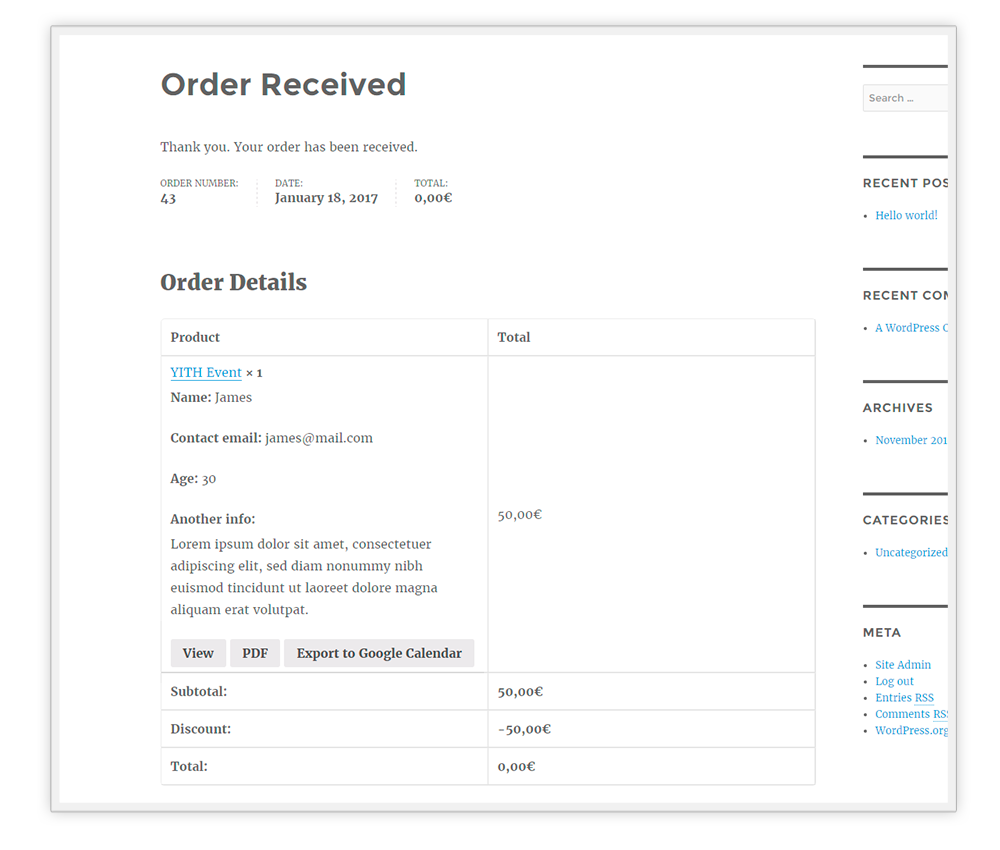
By default, Event Tickets avoid the links on emails to avoid mail spam. If you want to change this, Event Tickets have a filter that allows you print the PDF button and Preview view on mails. Just add the following code in your customization plugin:
add_filter('yith_wcevti_print_pdf_and_gcalendar_button', '__return_true');
Now regarding title form, you can customize using the next code in your customization plugin:
if ( ! function_exists( 'set_wcevti_event_title_form' ) ) {

		function set_wcevti_event_title_form( $title, $product_id ) {
			if ( 56 == $product_id ) {
				$title = 'Another title form';
			}

			return $title;
		}

	}

	add_filter( 'yith_wcevti_event_title_form', 'set_wcevti_event_title_form', 10, 2 );
As you see in the code, you can define the title by event product id ($product_id).
I hope this can help you.
Regards.
-
This reply was modified 8 years, 8 months ago by
 YITHEMES.