So that I can help you, please could you reply with:
+ The URL of your website > the page where you have the KB shortcode
+ Screenshot of your KB Settings page
+ Screenshot of the Page Editor for the page where you have the KB shortcode.
With these three things hopefully I can identify where the configuration error might be.
Thanks,
Maeve
The page is not hosted only running locally on my computer running WAMP server. Does that matter?
Please try resaving permalink structure. Then if still not working, send the screenshots as requested.
Not sure I know how to do that.. Still kinda learning WordPress. Could you explain the process?
Here’s what my permalinks look like and my page.


-
This reply was modified 8 years, 11 months ago by
 sdeyoung.
Something to do with the free hosting site I’m using. They work after visiting the site for some reason.
Try this
http://www.sdeyoung.byethost14.com/images/image2.jpg
http://www.sdeyoung.byethost14.com/images/image1.jpg
Ok please try “Post Name” as the permalink structure type
Do I make these changes in the settings – permalinks? Choose custom structure?
http://localhost/Wordpress/Post name
?
-
This reply was modified 8 years, 10 months ago by sdeyoung.
Maybe I didn’t explain properly the first time. What I want is for the knowledge base page to load as the first page on the site. It really will only be 1 page. It’s for a work knowledge base.
Permalinks…
Go to Settings > Permalinks > and check the radio button that says “Post name” > Save settings
To get your KB as front page:
1.) First get the KB working on the page you want. Once it’s working…
2.) Go to Settings > Reading > and assign the front page:
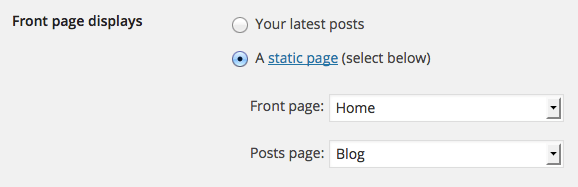
Tried that.. Here’s what I have for settings. No matter what I do I can’t seem to ditch that main theme. Is there a way to uninstall it? Also, could this be because I’m running WordPress locally that it’s not working?
http://www.sdeyoung.byethost14.com/images/image1.jpg
http://www.sdeyoung.byethost14.com/images/image2.jpg
http://www.sdeyoung.byethost14.com/images/image3.jpg


