Currently I have these two plugins installed:
Contact Form DB
Contact Form DB Editor
Am I missing one more plugin?
I think editing will not work when using “*” for the form name. You must indicate the actual form name.
I have now tried with the actual form name instead of * but it doesn’t work.
I tried the most simple shortcode like this:
<?php echo do_shortcode('[cfdb-datatable form="Form Name" edit="cells"]'); ?>
and that gives me the whole datatable with around 300 submissions but none of the cells are editable.
I haven’t used this inside a “do_shortcode” call. The shortcode queues up some javascript files for WP to be added to the page on which it appears. I wonder if those hooks are already called by the time your code is called, and therefore it is too late for WP to add the Javascript to the page.
Hmm okay. Is there another way to call a shortcode instead of using do_shortcode?
Marcus
Just putting the shortcode in the post.
Sorry, but I don’t really understand. If I just put
[cfdb-datatable form="Form Name" edit="cells" filter="email=$user_email"]
in the HTML code, the exact same will be shown on the web…
What about something like this, is this a good start? Can you help me finish it if I’m on the right track?
add_shortcode('editregistration', 'editregistration_callback');
function editregistration_callback ('Form Name', array('edit' => 'cells', "filter" => "email=$user_email")) {

}
-
This reply was modified 9 years, 2 months ago by
 mackans.
-
This reply was modified 9 years, 2 months ago by
 bdbrown.
I’m confused. The shortcode is to show it on a webpage so that people can see data and edit them. I don’t understand what you are trying to accomplish that is different.
I’m more confused than you are for sure. When I’m just putting the shortcode directly in the HTML code this is what I get on my webpage:

I have many other shortcodes on the webpage and they work great, and I have put all of them in a “do_shortcode” call.
I’m using a custom theme and custom templates. Is that the reason why it’s not working to just put the shortcode directly into the HTML code?
/Marcus
Try switching the post editor to Text mode instead of Visual, then paste in the shortcode.
I’m using Advanced Custom Fields for most of my texts on the web. Didn’t know that I could put the shortcode inside a wysiwyg field. I just did that and the datatable shows up just fine. BUT, it’s still not editable!!
What am I doing wrong? As i said before I have everything installed and activated. The editor extension is working fine in the admin panel.
Marcus
I’m not familiar with Advanced Custom Fields. Can you walk me through exactly what you are doing?
Sure, I’ll try to explain!
Step 1.

In the Advanced Custom Fields panel, I create a new field group with one field. I name the field, assign it a unique field name registration-shortcode, and choose the field type. In this case I choose a WYSIWYG-field. I also choose on which page/pages I wan’t this field group to show up so that I can edit the content in the WYSIWYG-field later.
Step 2.
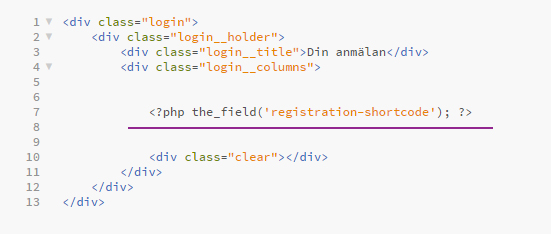
In order to make the content I put in the WYSIWYG-field to display on front-end, I add this code to my HTML code <?php the_field('registration-shortcode'); ?>. Note the identical unique field names.
Step 3.

Next I go to the page that I choose the field group to show up on. And here’s my recently created WYSIWYG-field ready to be edited. I add the shortcode [cfdb-datatable form="Anmälan Långa" edit="cells" filter="email=$user_email"]
Step 4.

The content in the WYSIWYG-field will show up on front-end perfectly!
But the datatable is not editable.
-
This reply was modified 9 years, 1 month ago by mackans.
Hi again Michael
Any ideas on this? Is there something wrong with my version of the plugin? If you try the same shortcode does it work for you? Are the cells editable? Do you think it has something to do with my custom theme? Is there something missing in my custom theme? Anyone else had this problem before?
/Marcus
It looks like none of the Javascript is being loaded on the page. The shortcode tells WP that it needs some scripts loaded. But I think in this case, since the shortcode is being loaded in a round-about way, that by the time the shortcode is called, it is too late to add the scripts. So you don’t get any of the datatable decoration (like search field) or editability.
I think that if you look at the HTML for that page, you will NOT see “cfdb.edit.js” in it. But if you just put that shortcode directly in a post, then you do. Would you verify that hypothesis?
I’d have to work through this example and see if there is a way to make my plugin inject the scripts in that scenario.


