Hey @andrlan76,
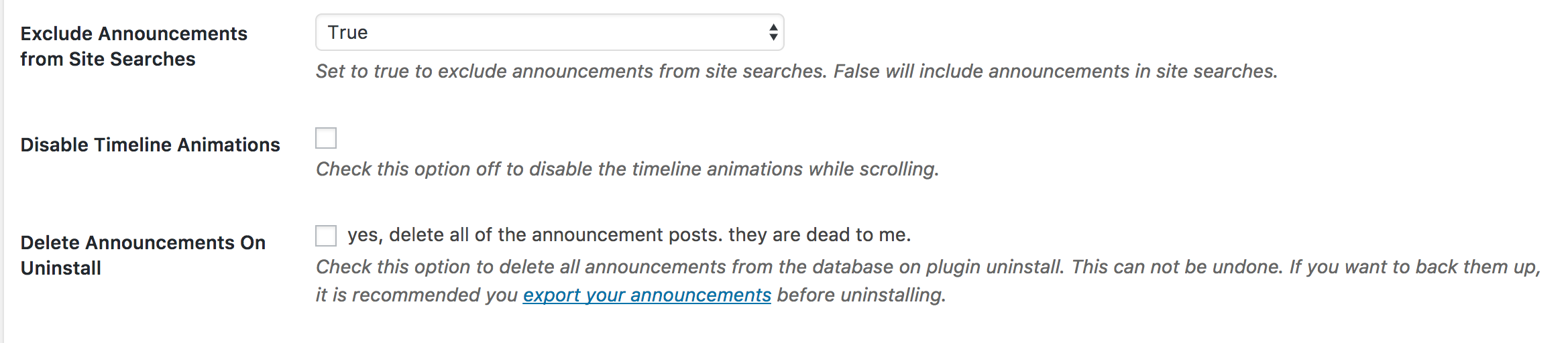
On the settings page there is an option to toggle on/off the animations. Can you double check that the animation option is unchecked.
Take a look at the following screenshot for an example of what I am referring to:
https://cldup.com/LT2chJevGx.png
You can find the setting on the Timeline Express settings page from the dashboard ‘Timeline Express > Settings’ and it will be the second to last option on the settings page.
Let us know if that helps to resolve the issue on your end.
-
This reply was modified 9 years, 3 months ago by
 Code Parrots.
Ok, now it is unchecked. Same result, no animation..
You have a javascript error on your website which is most likely causing the issue. My suggestion is to clear up that issue and re-check.
jQuery('.facebook_like').exists(function() {
	  load('//connect.facebook.net/en_US/all.js#xfbml=1&version=v2.3', 'fbjssdk');
});
I removed the javascript and now its working! Thank you for a quick and very helpful reply!
Great, glad that we were able to help out.
If you continue to use the plugin, we would love it if you would take the time to leave us a nice review:
https://wordpress.org/support/plugin/timeline-express/reviews/
Thanks again and have a great rest of your day!