I have no issue opening the pdf files with adobe or any other pdf viewer. What OS are you using?
To change the language you have to go here and make a request to me a translator:
https://translate.wordpress.org/projects/wp-plugins/memphis-documents-library
OS windows7
Today I re-uploaded files, which can not be opened using Adobe Reader. Prior to this, I checked the originals – they open correctly. Once downloaded, these files can not be opened in Adobe Reader.
Hmm I’ve tested with windows 10 and adobe and once again no issue with downloading and opening the files.
What version of Adobe reader are you using, googling the issue has people reporting the same issue with older version of reader.
Adobe Acrobat Reader DC 2015Release version 2015.023.20053
The fact that the original file is opened in the version of adobe, but after sharing and downloading the file via a plugin – file becomes damaged. So plugin makes any changes to a file. But why?
I will keep looking into the problem see what i can find .
Have you every thought of changing to another pdf viewer?
Hello! I do not understand what happened. Previously I am using the plugin you uploaded the files to the server my site. Now, the server only uploads images from PDF files, and the file is stored, as I understand it, on the Google server. I am absolutely not satisfied with this option. I place the files that are checked in the Ministry and other public services. Please return the load on the site server. Or make a choice.
And also, going back to the previous problem … Maybe an upload any file optimization? Is it possible to disable this feature?
mDocs absolutely does not upload documents to google, all doc are uploaded to your own site and has been this way forever and has not changed.
If you are concerted about file security I would disable preview all together Configuration Settings>Document Post Page Settings>Show Preview Tab
Back to the original problem, I can look into that as an option but don’t know if it will work or not.
I do not see the last uploaded files in PDF format on your hosting (they are converted to JPG-images), before it was possible to get a direct link to a file in PDF format. Now everything is different.
Hide documents just not necessary – they are all publicly.
Direct link is still avaialbe. Click on the file name a dropdown menu will appear. Click on the Share link and a modal will display with 2 links. The second one is direct download.
I’m not sure why you think that pdfs are being convert to images mdocs does not do that in any why. All mdocs does is upload the pdf file into your server in the uploads/mdocs folder. If you ftp into that directory you will see all the files there.
You are right that now, files are uploaded in the same way everywhere. I checked my server, and I can say that the standard WordPress-uploader works on the same principle, with at least December 2016. However, before it was a bit different. Look at the picture – I did a comparison of screenshots.
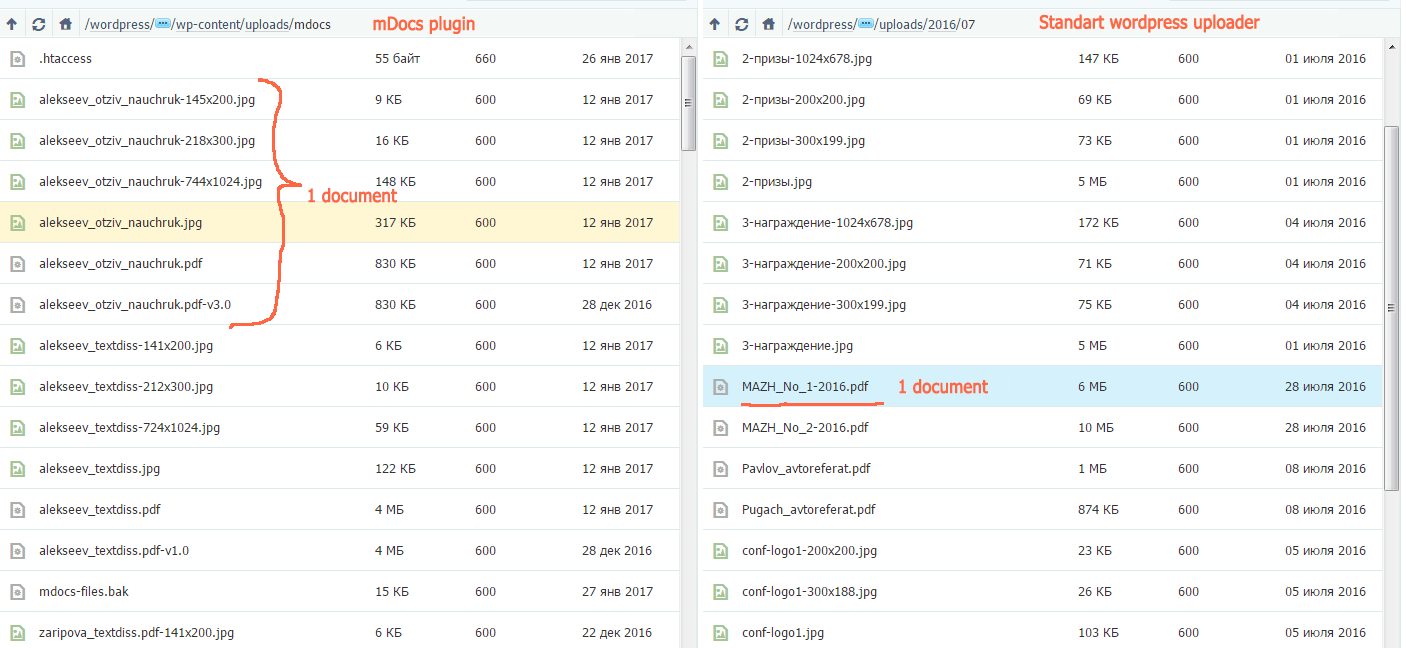
By the way, a pop-up list of my works only in the admin panel. I thought that it should be. After clicking on the address bar is added to the # symbol, but nothing happens.
Take a look at the mdocs settings page. And try checking “Bootstrap Dropdown Fix” then try again. If that doesn’t work try Bootstrap – Frontend and or jQuery.


