• Resolved tarrinr

    (@tarrinr)


    Random White Box
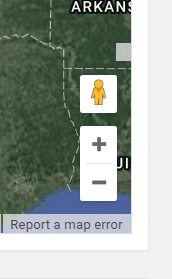
    I just installed the maps builder plugin, and it’s awesome! I do have one annoying thing I can’t figure out… There is a useless white box on the right side of the map just above the little yellow man. I’ve tried to figure out what it’s doing there, but I don’t have a clue. Is there a use for this, and if not is there a way to get rid of it?

    Thanks for your help!

Viewing 4 replies - 1 through 4 (of 4 total)
  • Plugin Author Matt Cromwell

    (@webdevmattcrom)

    Can you provide a link to the live example so I can take a look? That’s the only way I’d be able to make a guess as to what’s going on.

    Thanks!

    Thread Starter tarrinr

    (@tarrinr)

    Plugin Author Matt Cromwell

    (@webdevmattcrom)

    Thanks for the link. For some strange reason that is related to the setting “Draggable Map = None” in your “Map Controls” section. You can either set that to “Standard”, or you can use this CSS to hide it:

    div.gm-style-cc[draggable="false"] {
        height: 0px !important;
    }

    Let me know how that goes. First time I’ve seen that one.

    Thread Starter tarrinr

    (@tarrinr)

    Draggle is already set to standard. I just changed it to none to see if it changed, but nothing happened. I’ll try the CSS.
    Thanks.

Viewing 4 replies - 1 through 4 (of 4 total)

The topic ‘Random White Box’ is closed to new replies.