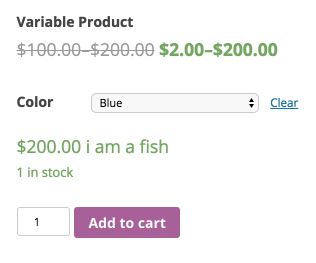
Should I just hook into the woocommerce_variation_price_html? I am looking for a way to add a suffix after the prices. I thought I could use the following approach, but it doesn’t seem to work.
add_filter( 'woocommerce_variation_price_html', 'my_html', 10, 2);

function my_html( $price, $variation ) {
return $price . ' suffix';
}
That looks fine. Can you screenshot which price you’re trying to change? Different hooks are used in different locations..
Thanks for your fast reply Mike. This is the price in question: http://imgur.com/a/9LA4W
Use woocommerce_get_variation_price_html to apply to any variation price (sale, regular, whatever).
Hey Mike.
Im not sure I understand your last reply. Can you please elaborate?
How would I change my function to target the place in my screenshot?
You’re using the filter woocommerce_variation_price_html right now.
Use woocommerce_get_variation_price_html instead.
Thanks for your reply. Unfortunately, that doesn’t do any difference. Below is my exact code:
add_filter( 'woocommerce_get_variation_price_html', 'variation_price_b2b', 10, 2);

function variation_price_b2b( $price, $variation ) {
	if (current_user_can('B2B-kaffe')) {
		return $price . ' ekskl. moms';
	}
}
Both of the hooks you’ve tested DO change that price display, so perhaps you’re just putting your code in the wrong place. Something should change. In fact, based on the above code, you wouldn’t get any price displayed if user didn’t have B2B-kaffe cap.
Well, I’m adding it i my functions.php where I’ve succesfully hooked into my woocommerce_get_price_html. I am testing it with a B2B-kaffe user exactly the same way I do with my working woocommerce_get_price_html example. Im starting to get confused now 🙂
For me your code works fine.
Can you instruct me if I can somehow hook that price and replace the product price with this price?