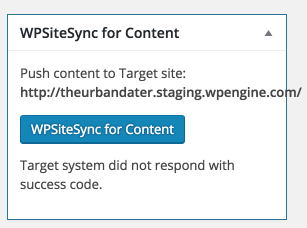
Hello Alex,
In order to diagnose this issue, we will need to get the debug log from the system. On the Target site, enable debug logging by editing wp-config.php and ensuring that these two lines are present:
define(‘WP_DEBUG’, true);
define(‘WP_DEBUG_LOG’, true);
On WPEngine, use the “Reset file permissions” button in the Dashboard.
Then, perform the same operation, recreating the issue. After that, forward the log files located at wp-content/debug.log and wp-content/plugins/wpsitesynccontent/~log.txt
I’m seeing the same message as Alex shared in his initial screenshot.
I can enable the debug logging on my target system. Where would I forward the log files?
Would greatly appreciate getting this working.
It turns out that the reason that WPSiteSync could not successfully sync content is because it was triggering a rule in mod-security on the target site:
mod_security rule [Id '340162'] triggered!
I was able to test that this is the case by disabling mod_security for the domain through .htaccess
<IfModule mod_security.c>
SecFilterEngine Off
SecFilterScanPOST Off
</IfModule>
That’s very interesting. Thanks for noting this. We will relay this to our tech department for further review.
Hello Alex, klassenjm,
We’ve recently released WPSiteSync 1.2.2. Besides several enhancements, we’ve also addressed some issues from the previous version. We’d like to invite you to update your copy and let us know if it has fixed the issues you are having by marking this thread as “Resolved”.
By the way we just released Bulk Actions! You can check it out at http://wpsitesync.com