I tried a test order – did it come in?
The checkout process has been heavily customised, so I’m wondering if one of those changes has broken the redirect. You should do a test with a default theme to confirm.
You should also check the server error logs because an error may have been logged preventing order creation.
Hello,
First of all, thanks for your answer. No order came in. Did you see any confirmation message?
I just saw that the minimum recommended PHP version is 5.4 and mine is 5.3.10. Could this be the cause?
Doubtful – we support 5.2+ 5.4 is a recommendation.
No confirmation – it just refreshed. Thats why Is suspect its due to modification. Looks like at some point you had a ‘step based’ checkout rather than our one page.
The progress bar is just a another plugin. I didn’t create a step based checkout, my modifications were only in CSS.
Just reading the description, I’m going to put my money on “Booster for WooCommerce” being the culprit. Can you check?
I deactivated the plugin, but I still get the same problem.
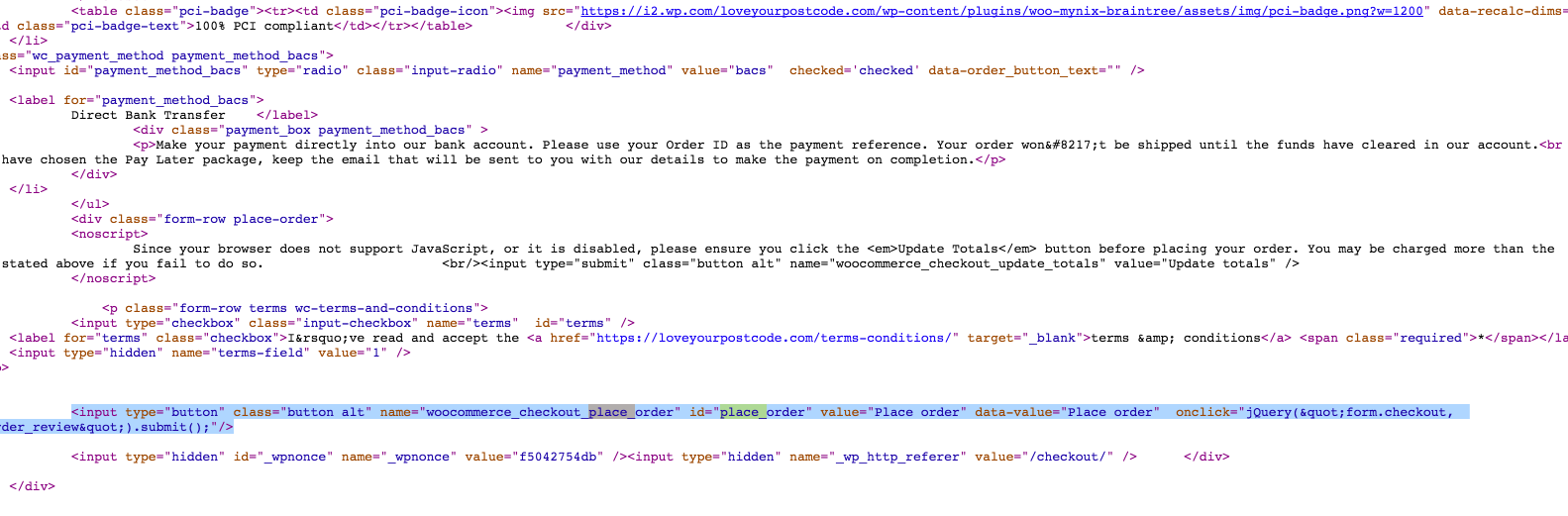
Hold on. You said you had made no customisations.
https://dl.dropboxusercontent.com/s/q3xilhwyxdzs46a/2016-02-04%20at%2017.01.png?dl=0
We definitely do not use onclick.
I haven’t changed this. Maybe a plugin? Where is this located and how can I modify this to make this work?
I am not sure how its been modified. Thats why you need to turn things off to see if they are affecting it, or check if someone has modified the woocommerce plugin itself.
https://github.com/woothemes/woocommerce/blob/89ede21ff2937aabf5b2fcce3255a0536fc4a3b6/templates/checkout/payment.php#L49
I found the solution. The problem was the plugin Woo Braintree Payment. Thanks Mike for your help.
I am having a slightly different issue. The “Place Order” button disappears when the user checks the “Ship to a different address” checkbox. If the button is unchecked and the address selected is the billing address, the ‘place order’ button re appears.
You can view it on : http://www.thtonline.co.in (use pin code 400006) on the product page to add it to your cart.
Thank you