Hi gmkimhong. Can you provide more details so I can help? I have nothing to go on here. 🙂
i want you help me to solve this problem. i have installed and activated your plugin already. i use your plugin with multisite wordpress (English-Khmer). when i post in English site and then i want to duplicate to Khmer site. But when i duplicate, it unknown images in khmer site.
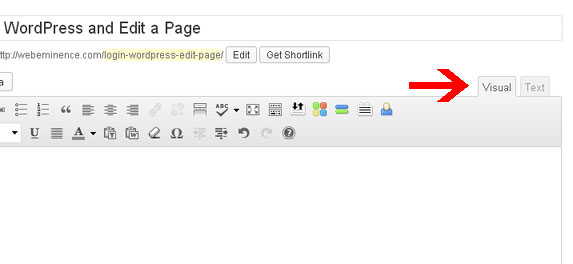
Can you send me the post content html on the source post AND the new post that was created. You can get this by clicking on the ‘text’ tab in the post editor. See here for what I mean: http://webeminence.com/wp-content/uploads/2013/05/wordpress-add-html-code.jpg
I would like to thanks so much for you reply.
now i would like to send you about the post that i want to add.
http://lyhourleasing.com/wp-content/uploads/2016/01/image-sc.png
Looks like the image is down now, but I got a glimpse of it last night. Seems the theme you are using has some kind of custom uploader for images. If the plugin isn’t copying the images over then the this custom uploader my be using fields/database tables outwith the normal wordpress core (which is what my plugin covers). If you want to send me a dump of your sql database I can have a look and see if I can help. Unfortunately there is nothing more I can do based on a picture.
thanks so much for take time to reply with me.
How can i customize the folder of upload?
Thats interesting actually. Why is there a ?tmp=XXXX parameter at the end of the URL? That is not usual wordpress behaviour. Try changing the URL to just in the source page. http://lyhourleasing.com/lyhourleasing/wp-content/uploads/thememakers/cardealer/1/1036/thumb/567e54022d90d.jpg
Hi gmkimhong. Can you try updating to the new version (0.7.2) and see if this makes any difference?
thanks for telling me. I have updated already. but nothing change. it’s still have problem. i cannot duplicate image to other site.
Make sure you have your permissions set properly (read and write) and check if the web server user (apache is www-data) is the owner of upload folders (recursively).
Yes, I have changed permission to 777 already. But it’s still doesn’t work.